









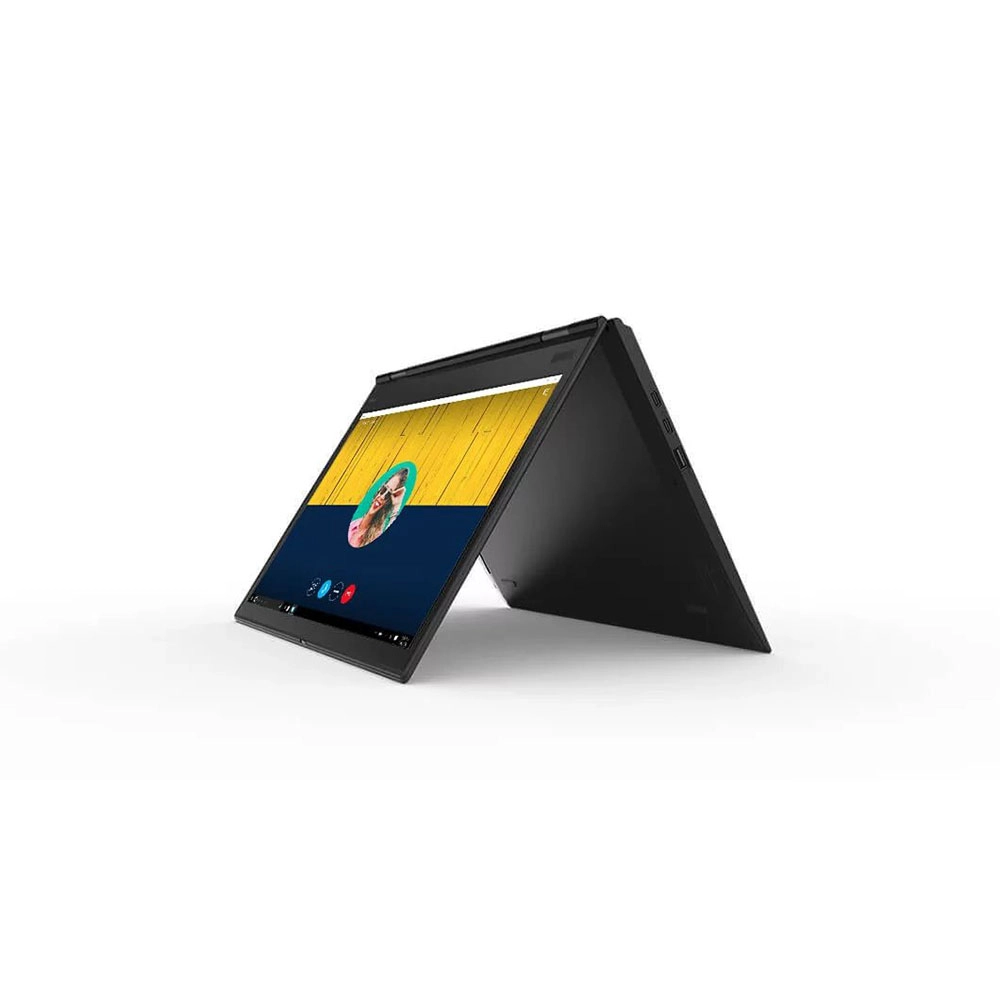

Lenovo Thinkpad X1 Yoga Gen 3 Laptop – Ci5-8th, 16GB RAM, 256 SSD Storage

| Brand and Model | Lenovo ThinkPad X1 Yoga Gen 3 |
|---|---|
| CPU model | Intel Core i5 8th Gen |
| Installed RAM memory size | 16GB LPDDR3-2133 |
| Graphics card description | Intel UHD Graphics 620 |
| Hard disk size | 256GB SSD NVMe |
| Screen size | 14 Inches |
| Colour | Grey |
700 AED 800 AED
Lenovo ThinkPad X1 Yoga Gen 3 Laptop – Core i5 8th Gen, 16GB RAM, 256GB SSD
The Lenovo ThinkPad X1 Yoga Gen 3 laptop is a 14-inch convertible business notebook built around an 8th Generation Intel Core i5 processor, 16GB of LPDDR3 memory and a 256GB SSD. Instead of following the layout of a traditional office laptop, it uses a flexible hinge that lets the display rotate through a full 360 degrees. This design gives the system several operating positions, while its touchscreen and integrated pen support provide additional ways to work with documents, presentations and handwritten notes. The result is a compact productivity device that combines familiar ThinkPad input features with a tablet-style interface.
Technical Specifications
| Component | Specification |
|---|---|
| Brand | Lenovo |
| Model | ThinkPad X1 Yoga Gen 3 |
| Processor | Intel Core i5 8th Generation |
| Processor Options | Core i5-8250U / Core i5-8350U |
| Cores / Threads | 4 cores / 8 threads |
| Maximum Turbo Frequency | Up to 3.6GHz, depending on CPU |
| Cache | 6MB |
| Memory | 16GB LPDDR3-2133 |
| Memory Upgrade | Soldered, not upgradeable |
| Storage | 256GB SSD |
| Graphics | Integrated Intel UHD Graphics 620 |
| Display Size | 14 inches |
| Display Options | FHD, WQHD or HDR WQHD, depending on configuration |
| Touchscreen | 10-point multi-touch |
| Hinge | 360-degree Yoga hinge |
| Pen | ThinkPad Pen Pro, integrated rechargeable pen on supported configurations |
| Battery | Integrated 54Wh |
| Wireless | Wi-Fi 802.11ac |
| Bluetooth | Bluetooth 4.1 or 5.0, depending on wireless module |
| Camera | HD 720p; optional IR camera |
| Audio | Stereo speakers with Dolby Audio Premium |
| Ports | 2× USB 3.1 Gen 1, 2× Thunderbolt 3 / USB-C, HDMI 1.4, microSD, audio combo |
| Security | TPM 2.0, fingerprint reader |
| Starting Weight | Approximately 1.4kg, depending on configuration |
A 2-in-1 Format Built Around the Hinge
The X1 Yoga Gen 3 approaches everyday computing through its convertible construction. Its 360-degree hinge allows the screen to fold behind the keyboard, changing the device from a conventional notebook into a tablet or presentation-oriented system.
In laptop mode, the keyboard and TrackPoint provide the traditional ThinkPad working experience. Tablet mode makes the touchscreen more accessible for reading, browsing and annotating documents. Tent mode positions the display for shared viewing, while stand mode offers a convenient angle for presentations and video playback.
This flexibility changes how the computer can fit into different work settings. For instance, someone reviewing a document at a desk can use the keyboard, then rotate the display and continue reading or marking up the same file with touch or pen input.
Eighth-Generation Core i5 Processing
Lenovo offered the X1 Yoga Gen 3 with two relevant eighth-generation Core i5 processors: the Intel Core i5-8250U and Core i5-8350U. Both use a four-core, eight-thread design and include 6MB of cache. The i5-8250U reaches a maximum turbo frequency of 3.4GHz, while the i5-8350U can reach 3.6GHz.
These low-power U-series processors were designed for thin notebooks and mobile productivity systems. They can handle common office workloads such as word processing, spreadsheets, web applications, email and video meetings. Their four-core architecture also provides more parallel processing capacity than the dual-core processors found in many earlier business notebooks.
The exact processor matters when identifying the individual machine. Although both options belong to the same generation and share the same core and thread count, their operating frequencies differ slightly.
16GB LPDDR3 Memory
This configuration includes 16GB of LPDDR3-2133 memory. The capacity supports everyday multitasking, allowing users to keep office applications, browser tabs, communication software and documents open at the same time.
The memory is soldered directly to the system board. Lenovo does not provide conventional RAM sockets on this platform, so users cannot increase the installed capacity through a later memory upgrade. The 16GB configuration therefore represents the maximum memory option for this generation.
Although LPDDR3 is an older memory standard than the LPDDR4x and LPDDR5 technologies found in newer notebooks, its capacity remains useful for routine productivity tasks. The system is best understood as a business-oriented computer for established office workloads rather than a platform designed for demanding modern computing tasks.
256GB SSD and File Access
A 256GB solid-state drive provides local storage for the operating system, applications and personal or professional files. Compared with a mechanical hard drive, SSD storage offers faster access to data and contributes to shorter startup and application-loading times.
The available capacity is suitable for a focused collection of productivity software, documents and frequently used files. Users who maintain large photo collections, video projects or extensive archives may need external storage or cloud-based file services.
The X1 Yoga Gen 3 platform supports M.2 solid-state storage, including PCIe NVMe options. The exact drive interface should be confirmed against the machine’s configuration rather than assumed from capacity alone.
Intel UHD Graphics 620
The eighth-generation Core i5 processors in this configuration use integrated Intel UHD Graphics 620. This graphics solution shares system memory with the processor and handles the display output, video playback and everyday visual tasks.
For office work, presentations, web browsing and standard multimedia playback, the integrated GPU provides the graphics functionality expected from a business notebook of this generation. It can also drive compatible external displays through the laptop’s video-capable connections.
However, the UHD Graphics 620 is not a dedicated graphics processor. It has limited resources for demanding 3D applications, modern high-end games and intensive graphics production. The system is therefore more appropriate for general productivity than GPU-heavy workloads.
14-Inch Touch Display
The 14-inch display combines a conventional notebook viewing area with multi-touch input. Lenovo offered several panel choices for the X1 Yoga Gen 3, including Full HD at 1920 × 1080, WQHD at 2560 × 1440 and an HDR WQHD option with Dolby Vision.
The Full HD panel provides a practical resolution for documents, spreadsheets and everyday applications. WQHD increases the available screen detail, while the HDR version adds higher brightness and broader colour coverage for supported visual content.
All of these display options belong to the convertible touchscreen design, with support for up to ten-finger gestures. The anti-reflection and anti-smudge treatments also help make direct screen interaction more practical.
Because Lenovo offered multiple panels, brightness, contrast and colour characteristics depend on the specific configuration. The 14-inch size and convertible touchscreen design are the common features across the platform.
ThinkPad Pen Pro and Touch Interaction
The touchscreen is complemented by Lenovo’s ThinkPad Pen Pro. On supported configurations, the rechargeable active pen sits inside the laptop chassis, making it available without requiring a separate accessory to be carried.
Pen input can support handwritten notes, document annotations, sketches and navigation in applications designed for stylus interaction. It is particularly useful when the system is folded into tablet mode, where writing directly on the display can feel more natural than using the keyboard.
The pen adds another input method to the standard ThinkPad keyboard and pointing system. However, the exact pen arrangement and included accessories should be checked against the individual machine configuration.
Battery and Mobile Use
Lenovo equips the X1 Yoga Gen 3 with an integrated 54Wh lithium-ion battery. The platform supports Rapid Charge, with Lenovo specifying charging to approximately 80% in one hour when using a compatible 65W USB-C adapter.
Actual runtime depends on the display panel, brightness, wireless activity, power settings and the applications in use. The higher-resolution and HDR display options may also affect power consumption compared with other configurations.
The convertible design gives the device flexibility in mobile environments, while its starting weight of approximately 1.4kg keeps it within the category of portable 14-inch business notebooks. Its compact format is suited to moving between workspaces, meetings and classrooms.
Ports and Wireless Connectivity
The physical connections provide support for external displays, storage devices and office accessories. Two USB 3.1 Gen 1 ports handle standard USB peripherals, while two USB-C ports with Thunderbolt 3 support high-speed data transfer, Power Delivery and DisplayPort output.
An HDMI 1.4 connection provides a direct way to connect compatible monitors and projectors. The laptop also includes a microSD card reader and a combined headphone and microphone jack. Selected configurations provide a Nano-SIM slot for mobile broadband.
For wireless connections, Lenovo lists 802.11ac Wi-Fi options and Bluetooth modules that vary by configuration. These connections support wireless networking, keyboards, mice, headsets and other compatible accessories.
Keyboard, TrackPoint and Business Security
The keyboard follows the familiar ThinkPad layout, with a six-row design, spill-resistant construction and backlighting on supported versions. Its TrackPoint pointing device offers an alternative to the touchpad, allowing cursor control without moving the hands away from the main typing area.
The convertible format does not remove the importance of these traditional input features. In laptop mode, the keyboard and TrackPoint remain central to document creation, spreadsheet work and longer typing sessions.
For security, the platform includes a discrete TPM 2.0 security chip and a fingerprint reader. Selected configurations also offer an infrared camera for facial recognition. These features provide additional authentication options for users working with business accounts and protected information.
Advantages and Limitations
The ThinkPad X1 Yoga Gen 3 combines a flexible physical design with the core features of a business notebook.
Key advantages
- A 360-degree hinge supports laptop, tablet, tent and stand modes.
- The 14-inch touchscreen supports multi-touch gestures and pen interaction.
- The eighth-generation Core i5 processor provides four cores and eight threads.
- 16GB of memory supports everyday multitasking.
- Thunderbolt 3 provides high-speed connectivity and external display support.
- The integrated fingerprint reader and TPM 2.0 add business-oriented security features.
Important limitations
- The 16GB RAM is soldered and cannot be upgraded.
- Intel UHD Graphics 620 is intended for everyday graphics rather than demanding 3D workloads.
- The 256GB SSD offers limited space for large local media collections.
- Display resolution, wireless modules and camera features vary by configuration.
- The platform uses an older processor and connectivity generation compared with current business notebooks.
Final Overview
The Lenovo ThinkPad X1 Yoga Gen 3 combines an eighth-generation Intel Core i5 processor, 16GB of memory and a 256GB SSD in a flexible 14-inch convertible design. Its touchscreen, 360-degree hinge and integrated pen support give users several ways to interact with documents and applications. Alongside the familiar ThinkPad keyboard, TrackPoint, Thunderbolt 3 connectivity and business security features, it provides a practical environment for everyday office work, communication and mobile productivity.
| Brand | |
|---|---|
| Model | Lenovo ThinkPad X1 Yoga Gen 3 |
| Processor | |
| RAM | |
| Storage | |
| Graphics | |
| Screen Size | |
| Camera | Integrated Camera |
| Color | |
| Keyboard | Backlit Keyboard, US-English |
| Operating System | Window 10 Pro |
| Condition | Used-Excellent (Fully Tested) |
| Battery | |
| Weight | 1.4 kg |
| Warranty | 3 Months |
Based on 0 reviews
Only logged in customers who have purchased this product may leave a review.
Related products
-
Surface Pro, Tablet and Detachable
Microsoft Surface Pro-7 2-in-1 Intel Core i5-1035G4 | 8GB RAM | 256GB SSD
-13% Surface Pro, Tablet and Detachable
Microsoft Surface Pro-7 2-in-1 Intel Core i5-1035G4 | 8GB RAM | 256GB SSD
Surface Pro, Tablet and DetachableMicrosoft Surface Pro-7 2-in-1 Intel Core i5-1035G4 | 8GB RAM | 256GB SSD
>
<tr class=”a-spacing-small po-brand” role=”listitem”>&amp;amp;amp;amp;amp;amp;amp;amp;amp;amp;amp;lt;span class=”a-size-base a-text-bold”>Brand and Model ass=”a-span9″ role=”presentation”>Microsoft Surface Pro 7</span>ass=”a-spacing-small po-model_name” role=”listitem”><strong>lass=””>=”a-size-base a-text-bold”>CPU model</span></span></strong><strong><span class=”a-size-base po-break-word”>Intel Core i5-1othe=”listitem”>
</table>
Platinum
o-break-word”>12.3 Inches Full HD</span></strong></td></td>
;span class=”a-size-base a-text-bold”>Screen size</td></td>
<td class=”a-span9″ role=””>=”presentation”>8GB DDR4</span></td>
>Colour</span>
“presentation”>Installed RAM memory size</span></strong> e=”presentation”><strong>class=”a-size-base a-text-bold”>Graphics card description &lt;strong>Intel UHD</strong> ass=”a-span3″ role=”presentation”><strong>Hard disk size</strong> “”a-span9</yoastmark”>” role=”presentation”>256GB SSD Nvme</strong></strong></td></td> e=””>=”presentation”><strong>< e=”presentation”>lass=”a-size-base p ass=”a-span3″>e=”presentation”&gt;<strong class=”a-span9″ role=”presentation”> SKU: Su70175 -
Surface Book, Tablet and Detachable
Surface Book-3 Core i7-10th Gen, 32GB RAM, 512GB SSD, 1660Ti 6GB
-19% Surface Book, Tablet and Detachable
Surface Book-3 Core i7-10th Gen, 32GB RAM, 512GB SSD, 1660Ti 6GB
Surface Book, Tablet and DetachableSurface Book-3 Core i7-10th Gen, 32GB RAM, 512GB SSD, 1660Ti 6GB
Brand and Model Microsoft Surface Book 3 CPU model Intel Core i7-1065G7 Installed RAM memory size 32GB DDR4 Graphics card description 6GB Nvidia GTX 1660Ti Hard disk size 512GB SSD Nvme Screen size 15.6 Inches Full HD Color Silver 
What is Tested Working?
This Renewed product is tested and certified to … more
How to deliver ?All delivery and payment options… more 
Warranty , Term and Condition?
In case you got problem and want to return … more
Order it easy ? Oder this item from whats-app Now.. more SKU: n/a -
Microsoft Surface Studio, Tablet and Detachable, Workstation Laptops
Surface Laptop Studio 1 2-in-1 Core i7-11th 32GB 1TB 4GB Nvidia RTX A2000
-13% Microsoft Surface Studio, Tablet and Detachable, Workstation Laptops
Surface Laptop Studio 1 2-in-1 Core i7-11th 32GB 1TB 4GB Nvidia RTX A2000
Microsoft Surface Studio, Tablet and Detachable, Workstation LaptopsSurface Laptop Studio 1 2-in-1 Core i7-11th 32GB 1TB 4GB Nvidia RTX A2000
=”a-spacing-small po-color” role=”listitem”>=”a-spacing-small po-hard_disk.size” role=”listitem”>Hard disk sizeole=”presentation”>512GB SSD Nvme
<tr class=”a-spacing-small po-cpu_model.family” role=”listitem”>Screen size<strong>14.4 Inches Full HD</td>
CPU modelIntel Core <span class=”a-size-base po-break-word”>i7-11370H</td>”>Installed RAM memory size<strong>32GB DDR4
ass=”a-spacing-small po-brand” role=”listitem”>Brand and Model Microsoft Surface Laptop Studio 1</tbody>
Graphics card description ole=”presentation”>4GB Nvidia RTX 3050 s=”a-spacing-small po-brand” role=”listitem”>f=”https://idita.com/what-is-tested-working”><img class=”aligncenter size-medium wp-image-9154″ src=”https://idita.com/wp-content/uploads/2026/04/test-2-300×300.jpg” alt=”Tested by idita” width=”120″ height=”120″ />What is Tested Working?
</strong>This Renewed product is tested and certified to … moreHow to deliver ?All delivery and payment options… more<td>ass=”a-span9″ role=”presentation”>
Warranty , Term and Condition?
In case you got problem and want to return … morec=”https://idita.com/wp-content/uploads/2026/04/whatapp-300×300.jpg” alt=”Order in whatsapp” width=”120″ height=”120″ />Order it easy ? Oder this item from whats-app Now.. more
</p>
SKU: n/a -
Surface Pro, Tablet and Detachable
Microsoft Surface Pro 8 with Core i7-11th | 16GB 256GB
Surface Pro, Tablet and DetachableMicrosoft Surface Pro 8 with Core i7-11th | 16GB 256GB
ass=”a-spacing-small po-hard_disk.size” role=”listitem”>
><strong>=””>=”a-size-base a-text-bold”>Graphics card description</td>
=”presentation”>Brand and Model Microsoft Surface Pro 8 role=”presentation”>CPU model Intel Core i7 (11th Gen) Processor Installed RAM memory size <strong>16GB DDR4 >Intel UHD</strong></strong> Hard disk size s=”a-span9″ role=”presentation”>>>>>256GB SSD Nvme</strong> le=”presentation”>Screen size <span class=”a-size-base po-break-word”>12.3 Inches Full HD</td></td></td> lass=”a-span3″ role=””>=”</yoastmark”>”presentation”>Colour Silver SKU: Su70169
There are no reviews yet.