







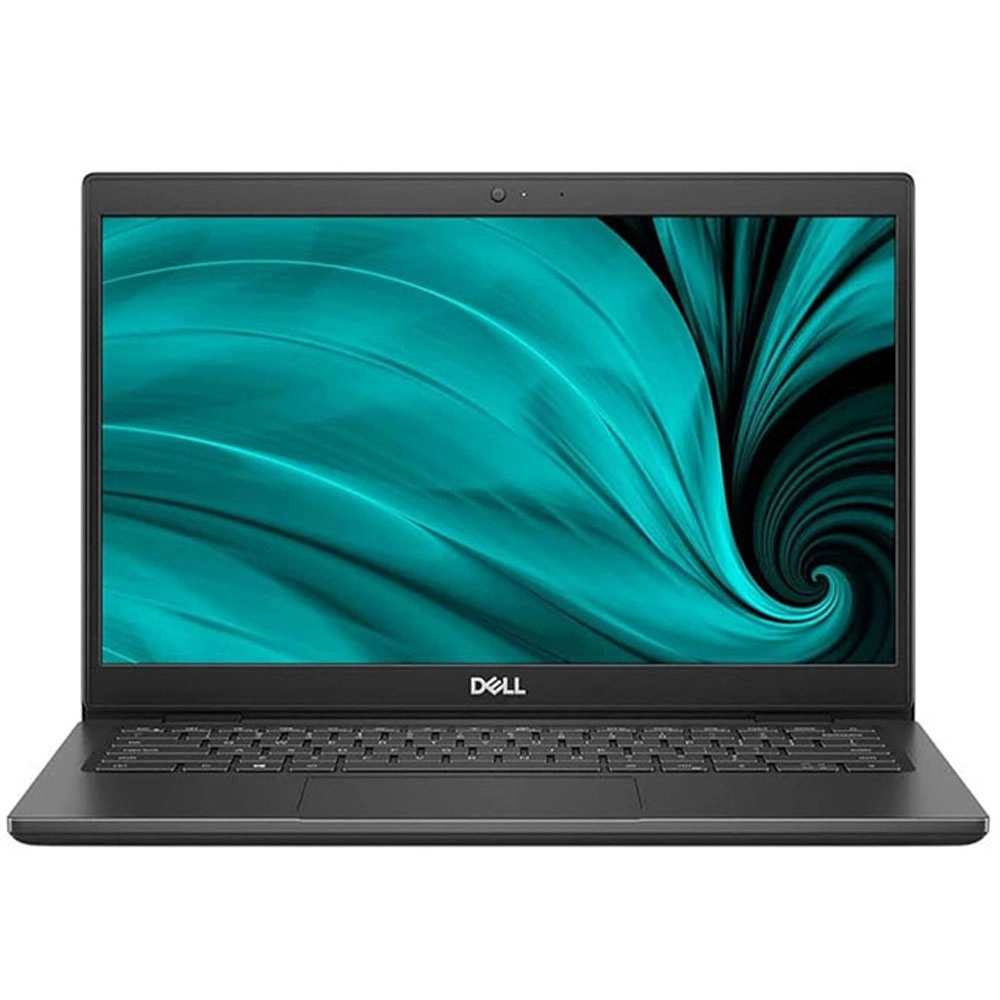

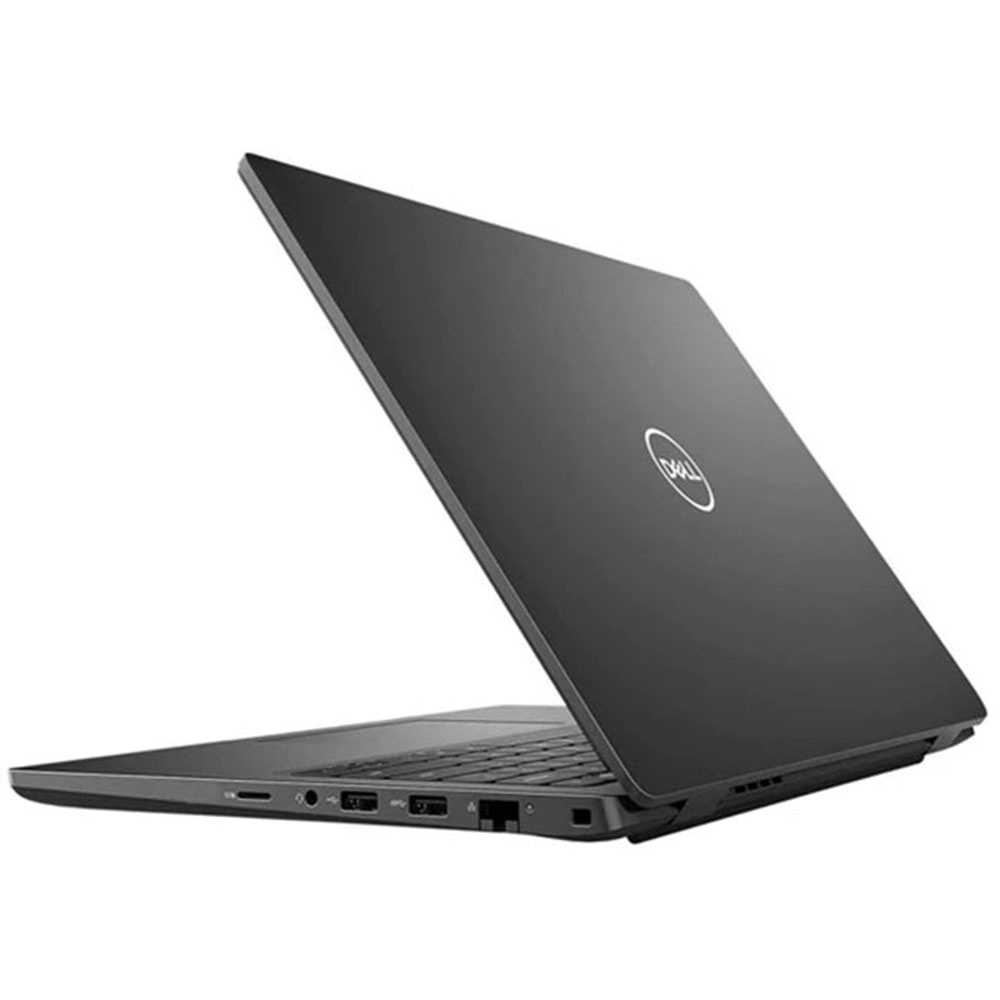
Dell Latitude 3420 | Intel Core i7 11th Gen | 16GB RAM | 256 SSD | 14″ | Renewed

| Brand and Model | Dell Latitude 3420 |
|---|---|
| CPU model | Intel Core i7 11th Gen |
| Installed RAM memory size | 16GB |
| Graphics card description | Intel Iris Xe Graphics |
| Hard disk size | 256GB SSD |
| Screen size | 14 Inches |
| Colour | Grey |
| Condition | Renewed |
900 AED 1,100 AED
Dell Latitude 3420 Laptop
The Dell Latitude 3420 is a practical business laptop designed for everyday professional computing, study and general productivity. This configuration features an 11th Generation Intel Core i7 processor, 16GB DDR4 RAM and a 256GB PCIe NVMe SSD, giving it a stronger multitasking foundation than lower-memory versions of the same model.
Rather than focusing on premium materials or workstation-class hardware, the Latitude 3420 prioritises useful connectivity, upgrade flexibility and a familiar 14-inch format. As a result, it can fit naturally into office environments, administrative work, remote study and other routine computing situations.
Dell Latitude 3420 Specifications
| Specification | Details |
|---|---|
| Brand | Dell |
| Model | Latitude 3420 |
| Product Series | Dell Latitude 3000 Series |
| Processor | Intel Core i7 11th Gen |
| RAM | 16GB DDR4 3200MHz |
| Storage | 256GB M.2 PCIe NVMe SSD |
| Graphics | Intel integrated graphics; exact configuration should be verified |
| Display Size | 14 inch |
| Display Resolution | HD or Full HD, depending on configuration |
| Operating System | Windows or Ubuntu, depending on configuration |
| Form Factor | Standard Laptop |
| Connectivity | USB-C, USB-A, HDMI, Ethernet, Wi-Fi and Bluetooth |
11th Gen Core i7 for Professional Productivity
At the centre of this configuration sits an 11th Generation Intel Core i7 processor. Dell offered several processor options for the Latitude 3420, so the exact CPU should be checked against the individual unit. One documented option is the Intel Core i7-1165G7, which features four cores, eight threads and a maximum turbo frequency of up to 4.7GHz.
For normal business workloads, this class of processor provides enough headroom for applications such as Microsoft Office, browser-based platforms, spreadsheets, presentations and video conferencing. It can also handle routine multitasking without the need for workstation-level hardware.
However, the supplied Ci7-11XXX designation does not identify a complete processor model. Therefore, the exact CPU should be confirmed through the laptop’s system information or service tag before publishing a specific processor name.
16GB DDR4 Gives Multitasking More Room
The supplied configuration includes 16GB of DDR4 memory at up to 3200MHz. This capacity is well suited to users who regularly move between several applications rather than working with only one program at a time.
For example, a user could keep multiple browser tabs open while working on a spreadsheet, joining an online meeting and accessing a cloud-based business platform. The additional memory also gives the system more flexibility when compared with an 8GB configuration.
Another useful aspect is the Latitude 3420’s upgradeable memory design. The laptop provides two SODIMM slots and supports configurations of up to 32GB RAM. The exact upgrade path depends on how the existing 16GB is installed, so the current module arrangement should be checked before purchasing additional memory.
256GB NVMe Storage for Everyday Files
A 256GB M.2 PCIe NVMe SSD handles the operating system, applications and everyday documents. Because it uses solid-state storage, it provides faster data access than a traditional mechanical hard drive and supports responsive application loading.
The capacity works well for users who rely heavily on cloud storage and mainly keep documents, spreadsheets, PDFs and business applications on the laptop. On the other hand, 256GB can become restrictive when a user stores large media collections, extensive project files or numerous large applications locally.
For those workloads, external storage or cloud-based file management can extend the available space without changing the laptop’s core configuration.
14-Inch Screen for Office and Mobile Use
The 14-inch display gives the Latitude 3420 a useful middle ground between screen space and portability. It provides a practical working area for documents, spreadsheets and web applications while remaining suitable for users who move between different locations.
Dell offered the Latitude 3420 with different display configurations. Depending on the unit, the panel may provide:
- 1366 × 768 HD resolution
- 1920 × 1080 Full HD resolution
- Anti-glare treatment
- Touch capability on selected configurations
These differences matter when comparing individual units. A Full HD panel offers greater detail and more usable workspace than the HD version, especially for text-heavy tasks and spreadsheets.
For that reason, the exact display resolution and touch capability should be verified before these features are listed as standard specifications.
Integrated Graphics for General Visual Work
Graphics performance on the Latitude 3420 depends on the installed configuration. The documented Core i7-1165G7 option uses integrated Intel Iris Xe Graphics, while Dell also offered configurations with discrete NVIDIA graphics.
With integrated Iris Xe graphics, the laptop can handle everyday visual workloads such as video playback, presentations, web content, office applications and compatible external displays. Light photo editing can also fall within its practical range.
Nevertheless, the Latitude 3420 should not be positioned as a dedicated graphics workstation. Users working with professional 3D rendering, demanding visualisation software or modern graphics-intensive games should consider a laptop with a stronger dedicated GPU.
Connectivity Designed Around Traditional Workplaces
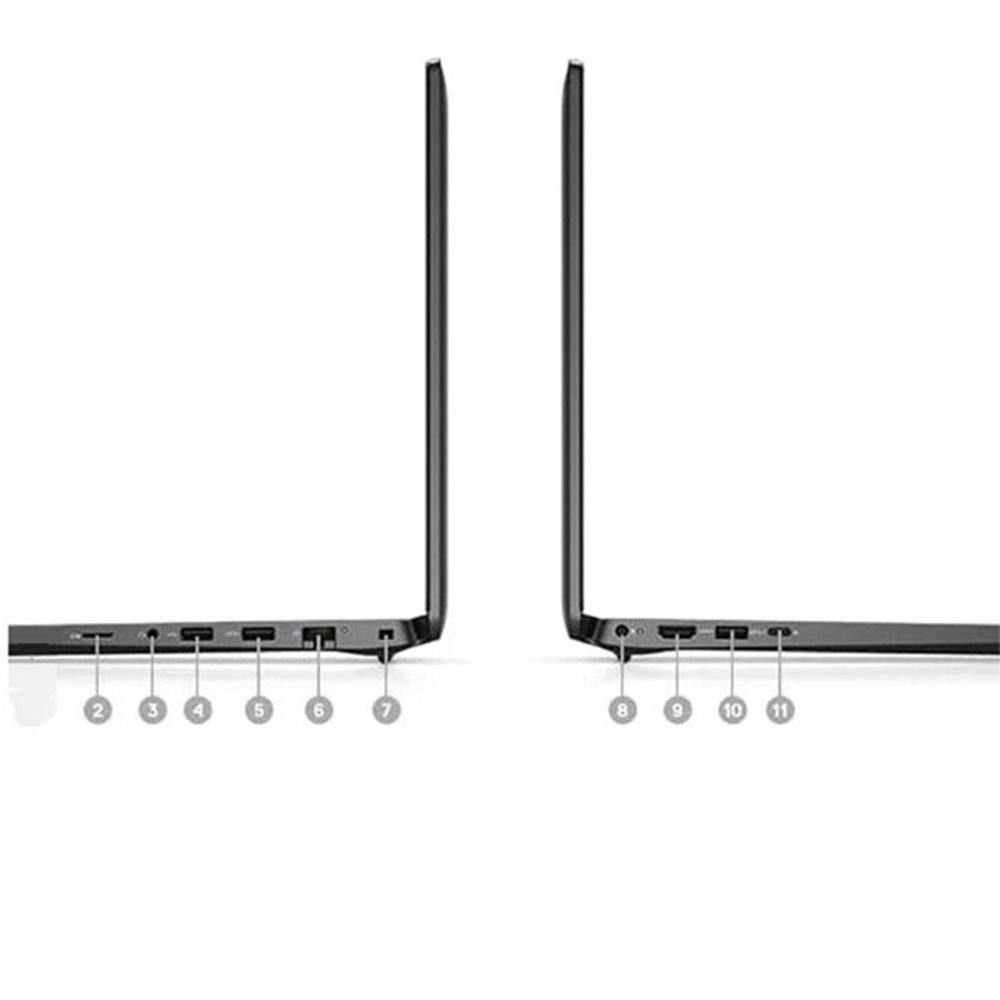
Port selection is one of the Latitude 3420’s practical strengths. Instead of requiring adapters for every common accessory, the laptop provides several connections for office equipment and peripherals.
Depending on configuration, the available physical connections include:
- One USB Type-C 3.2 Gen 2 port with DisplayPort and Power Delivery
- Two USB 3.2 Gen 1 Type-A ports, including PowerShare support
- One USB 2.0 port
- One HDMI 1.4a port
- One RJ-45 Ethernet port
- One universal audio jack
- One microSD card reader
- One wedge-shaped security lock slot
The Ethernet connection is particularly useful in offices that rely on wired networks. Meanwhile, HDMI can connect the laptop to compatible monitors or projectors, and the USB ports accommodate common accessories such as keyboards, mice and external storage.
Wireless connectivity varies by configuration and may include Wi-Fi 6 and Bluetooth 5.1. Buyers who require a specific wireless standard should therefore verify the installed adapter.
Conventional Business Design and Battery Considerations
The Latitude 3420 follows a conventional business-laptop design rather than a convertible or detachable format. With a starting weight of approximately 1.52 kg, it remains manageable for commuting between home, office and educational environments.
Battery capacity also varies by configuration. Dell lists a 54Wh battery option for the model. Actual operating time, however, depends on factors such as battery health, display brightness, background processes and workload.
The model was also available with business-oriented features such as an HD webcam, optional IR camera and fingerprint reader. Since these features are configuration-dependent, they should be confirmed on the specific laptop rather than assumed from the model name alone.
Who Should Consider the Dell Latitude 3420?
The Core i7 and 16GB configuration makes the Latitude 3420 particularly relevant to users who need dependable productivity performance and more multitasking capacity than a basic office configuration provides.
Office professionals can use it for documents, spreadsheets, email, presentations and browser-based business platforms.
Administrative teams can benefit from its combination of memory capacity, Ethernet connectivity and conventional business ports.
Students can use the laptop for research, assignments, presentations, online classes and general study.
Remote workers can move between communication platforms, documents and browser applications without being limited to a basic 8GB memory configuration.
Small businesses can deploy it for routine administrative and operational workloads where dedicated graphics performance is not a priority.
For intensive 3D creation, professional rendering or graphics-heavy gaming, a system with a substantially stronger GPU would be more appropriate.
Advantages and Limitations
Advantages
- 11th Generation Intel Core i7 processor options
- 16GB DDR4 memory for more flexible multitasking
- Two SODIMM slots with support for up to 32GB RAM
- 256GB PCIe NVMe SSD
- Practical 14-inch form factor
- Intel Iris Xe graphics on documented Core i7-1165G7 configurations
- Ethernet, HDMI, USB-C and multiple USB-A connections
- Manageable starting weight of approximately 1.52 kg
Limitations
- The exact Core i7 model should be verified because
Ci7-11XXXis not a complete CPU designation - 256GB storage may be limiting for users with large local file collections
- Display resolution and touchscreen availability vary between configurations
- Graphics hardware can differ, including configurations with discrete NVIDIA graphics
- Battery capacity and runtime depend on the individual configuration and battery condition
- Optional security and camera features are not necessarily included on every unit
What to Verify Before Ordering
Because the Latitude 3420 was sold in multiple configurations, the model number alone does not establish every specification.
Before ordering or publishing a product listing, verify:
- The exact 11th Gen Core i7 processor model
- Whether the 16GB RAM uses one or two SODIMM modules
- The installed graphics solution
- Whether the display is HD or Full HD
- Whether the panel supports touch input
- The installed battery capacity
- The exact wireless adapter
- The operating system
- Whether optional IR camera or fingerprint hardware is installed
Final Verdict
The Dell Latitude 3420 with an 11th Gen Intel Core i7, 16GB RAM and 256GB SSD offers a sensible balance for users focused on everyday productivity. Its larger memory configuration supports more flexible multitasking, while the 14-inch design and broad selection of physical ports make it practical for conventional office environments.
Its upgradeable SODIMM memory also gives the platform useful long-term flexibility. At the same time, buyers should pay close attention to the exact configuration because the processor, graphics, display and optional business features can differ between individual Latitude 3420 units.
For office work, administration, study and general professional use, the Latitude 3420 remains focused on the essentials rather than unnecessary high-end hardware.
| Brand | |
|---|---|
| Model | Latitude 3420 |
| Processor | |
| RAM | |
| Storage | |
| Graphics | |
| Screen Size | |
| Camera | Integrated Camera |
| Color | |
| Keyboard | Backlit Keyboard |
| Operating System | Windows 11 Pro |
| Condition | Used-Excellent (Fully Tested) |
| Battery | |
| Weight | 1.52 kg |
| Warranty | 3 Months |
Based on 0 reviews
Only logged in customers who have purchased this product may leave a review.
Related products
-
Business Laptops, HP Elitebook, Office and Student
HP EliteBook 840 G6 – Intel Core i5-8th | 8GB RAM | 256GB SSD | 14 inch Display | Windows 10 Home
-7% Business Laptops, HP Elitebook, Office and Student
HP EliteBook 840 G6 – Intel Core i5-8th | 8GB RAM | 256GB SSD | 14 inch Display | Windows 10 Home
Business Laptops, HP Elitebook, Office and StudentHP EliteBook 840 G6 – Intel Core i5-8th | 8GB RAM | 256GB SSD | 14 inch Display | Windows 10 Home
SKU: n/a -
Business Laptops, HP Elitebook, Office and Student
HP EliteBook 840 G3 Laptop–Intel Core i7-6th Gen | 8GB RAM | 256GB SSD | 14 Inch Display | Windows 10 Home
-3% Business Laptops, HP Elitebook, Office and Student
HP EliteBook 840 G3 Laptop–Intel Core i7-6th Gen | 8GB RAM | 256GB SSD | 14 Inch Display | Windows 10 Home
Business Laptops, HP Elitebook, Office and StudentHP EliteBook 840 G3 Laptop–Intel Core i7-6th Gen | 8GB RAM | 256GB SSD | 14 Inch Display | Windows 10 Home
SKU: n/a -
Business Laptops, Office and Student, Ultrabook and X360
HP EliteBook 1040 G8 2-in-1 | Intel Core i7-1165G7 | 16GB RAM | 512GB SSD
-9% Business Laptops, Office and Student, Ultrabook and X360
HP EliteBook 1040 G8 2-in-1 | Intel Core i7-1165G7 | 16GB RAM | 512GB SSD
Business Laptops, Office and Student, Ultrabook and X360HP EliteBook 1040 G8 2-in-1 | Intel Core i7-1165G7 | 16GB RAM | 512GB SSD
Brand and Model HP Elitebook 1040 X360 G8 CPU model Intel Core i7-1165G7 Installed RAM memory size 16GB DDR4 Graphics card description Intel Iris X Hard disk size 512 GB SSD Nvme Screen size 14.1 Inches Full HD Colour Silver SKU: HP70184 -
Business Laptops, HP Elitebook, Ultrabook and X360
HP EliteBook 1040 G11 x360 | Ultra 7-155H | 16GB RAM | 512GB SSD
-9% Business Laptops, HP Elitebook, Ultrabook and X360
HP EliteBook 1040 G11 x360 | Ultra 7-155H | 16GB RAM | 512GB SSD
Business Laptops, HP Elitebook, Ultrabook and X360HP EliteBook 1040 G11 x360 | Ultra 7-155H | 16GB RAM | 512GB SSD
Brand and Model HP Elitebook 1040 x360 G11 CPU model Intel Ultra 7-155H Installed RAM memory size 16GB DDR4 Graphics card description Intel Iris Hard disk size 512 GB SSD Nvme Screen size 14.1 Inches Full HD Colour Silver SKU: HP70181
There are no reviews yet.