











Overview
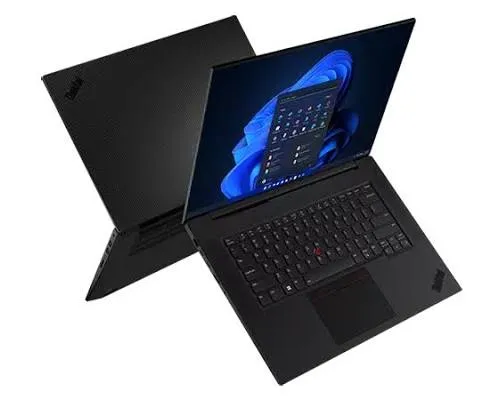
The Lenovo Lenovo P15 Gen 1 laptop is a professional mobile workstation built for users who need dependable computing power, dedicated graphics, and room for future hardware upgrades. This configuration is specified with an Intel Core i7-10850H processor, 16GB RAM, 512GB SSD storage, and NVIDIA Quadro T1000 4GB graphics. Unlike many thin everyday laptops, the ThinkPad P15 Gen 1 belongs to Lenovo’s workstation-focused P Series, with an upgrade-friendly internal platform designed for demanding professional environments.
For engineers, technical specialists, designers, and business users, the Lenovo P15 Gen 1 laptop offers a combination of processing performance and professional graphics capabilities. You can also explore other models in the Lenovo ThinkPad laptop category at IDITA to compare different workstation and business configurations.
Intel Core i7-10850H: Six-Core Performance for Demanding Applications
The processing power of this workstation comes from the Intel Core i7-10850H, a 10th Generation Intel Core processor designed for high-performance laptops. It features six cores and twelve threads, a base frequency of 2.7GHz, and a maximum turbo frequency of up to 5.1GHz. Its 12MB Intel Smart Cache helps the processor manage frequently accessed instructions and data.
This CPU is particularly useful when work involves several active applications rather than a single lightweight task. Developers can use it for compiling projects and running development environments, while engineering users can benefit from its multi-core processing in compatible technical software. It is also suitable for demanding office workloads, large spreadsheets, data handling, and intensive multitasking.
Although it belongs to an older processor generation, the i7-10850H remains a capable six-core option for many established professional applications. Actual performance depends on cooling, power settings, software optimisation, and the condition of the individual laptop.
Quadro T1000 4GB: Dedicated Graphics for Professional Work
The NVIDIA Quadro T1000 with 4GB GDDR6 memory is a professional graphics solution designed for workstation applications. It provides dedicated graphics resources for supported design, modelling, visualisation, and content-production workflows. Compared with relying only on integrated graphics, a dedicated Quadro GPU can offer better performance in applications that make effective use of its graphics hardware and professional driver support.
The T1000 is suitable for selected CAD projects, 2D and moderate 3D design tasks, technical visualisation, and multi-display productivity. However, it should not be confused with newer high-end RTX workstation GPUs. Complex simulations, advanced rendering, and very large 3D scenes may require a more powerful graphics card with greater memory capacity.
For professional buyers, software compatibility is just as important as raw GPU specifications. Check the requirements of your CAD, modelling, or visualisation application before choosing a workstation.
16GB RAM and a Platform Designed for Expansion
The supplied 16GB RAM provides a practical starting point for everyday professional computing, office applications, browsing, and moderate multitasking. Users working with larger datasets or several demanding applications may benefit from installing additional memory.
One of the most useful characteristics of the ThinkPad P15 Gen 1 is its memory architecture. The platform provides four DDR4 SO-DIMM memory slots and supports up to 128GB of DDR4 memory, subject to compatible modules and configuration requirements. This gives the workstation a meaningful upgrade path for professionals whose memory needs may increase over time.
Before upgrading, check the installed memory arrangement and use compatible modules. The exact memory configuration supplied with this product should be verified with the seller.
512GB SSD Storage for Faster Everyday Work
A 512GB SSD gives the system fast access to its operating system, applications, documents, and active project files. Solid-state storage helps reduce boot times and application loading delays compared with traditional mechanical drives. It also makes everyday file management feel more responsive.
The P15 Gen 1 platform supports up to two M.2 SSD drives, depending on the configuration. This is useful for users who want to keep their operating system and applications on one drive while using another for project files and working data. The advertised 512GB capacity describes the supplied storage, not the platform’s maximum expansion capability.
15.6-Inch Display for Detailed Professional Work
The 15.6-inch display gives users a larger working area for technical documents, spreadsheets, design interfaces, and multitasking. Lenovo offered several panel options for the P15 Gen 1, including Full HD and higher-resolution UHD configurations. Brightness, colour coverage, HDR support, and touch functionality depend on the installed panel.
For colour-sensitive design work, confirm the exact display specification rather than relying only on the model name. A suitable external monitor can also be connected when a larger workspace or more precise colour presentation is required.
Connectivity and Workstation Practicality
The ThinkPad P15 Gen 1 includes a range of connections intended for professional desk setups and mobile work. Depending on the configuration, the platform offers USB-A, USB-C, Thunderbolt 3, HDMI 2.0, Ethernet, an SD card reader, and a 3.5mm audio combination jack. These connections make it easier to work with external displays, storage devices, wired networks, and other office equipment.
Its workstation-oriented design prioritises expandability and practical connectivity. This makes the P15 Gen 1 an option for users who need a laptop that can also serve as the centre of a more complete desktop-style workspace.
Lenovo ThinkPad P15 Gen 1 Specifications
| Brand | Lenovo |
|---|---|
| Model | ThinkPad P15 Gen 1 |
| Product Type | Mobile Workstation Laptop |
| Processor | Intel Core i7-10850H |
| Processor Generation | 10th Generation Intel Core |
| CPU Cores / Threads | 6 Cores / 12 Threads |
| Base Frequency | 2.7GHz |
| Maximum Turbo Frequency | Up to 5.1GHz |
| Processor Cache | 12MB Intel Smart Cache |
| RAM | 16GB DDR4 (configuration to be verified) |
| Memory Slots | 4x SO-DIMM |
| Maximum Supported Memory | Up to 128GB DDR4 |
| Storage | 512GB SSD |
| Storage Expansion | Up to 2x M.2 SSD, configuration dependent |
| Graphics Card | NVIDIA Quadro T1000 |
| Graphics Memory | 4GB GDDR6 |
| Display Size | 15.6 Inches |
| Display Resolution | Configuration dependent; FHD and UHD options |
| Battery | 94Wh integrated battery on supported configurations |
| Laptop Series | Lenovo ThinkPad P Series |
Who Is the ThinkPad P15 Gen 1 Best For?
This workstation is worth considering for users who value upgrade flexibility and dedicated professional graphics more than having the latest-generation processor. Its hardware combination can suit several types of work:
- Engineering professionals: A practical platform for compatible CAD tools, technical documentation, and engineering applications.
- Design and modelling users: The Quadro T1000 can support selected 2D and moderate 3D workflows.
- Developers: Six CPU cores and upgradeable memory provide useful resources for programming environments and project compilation.
- Business users: Suitable for demanding spreadsheets, document management, research, and multitasking.
- Workstation buyers planning upgrades: Four memory slots and support for multiple SSDs provide flexibility beyond the initial configuration.
What to Consider Before Purchasing
The ThinkPad P15 Gen 1 is an older workstation platform, so the condition of the individual laptop matters. Before ordering, check battery health, cooling performance, keyboard condition, display quality, storage health, and the warranty offered by the seller. Also confirm that the installed graphics card is the Quadro T1000 4GB version specified in the listing.
It is especially important to verify the exact machine configuration. Lenovo’s P15 Gen 1 platform supports several processor and graphics combinations, but the processor, RAM, SSD, and GPU fitted to a particular unit should be confirmed using its machine type or serial configuration details.
Conclusion
The Lenovo P15 Gen 1 laptop is a workstation-focused choice for professionals who need dedicated graphics, strong six-core processing, and a flexible upgrade platform. Its Intel Core i7-10850H processor, 16GB RAM, 512GB SSD, and NVIDIA Quadro T1000 4GB graphics provide a useful foundation for compatible engineering, design, development, and business workloads. Its four memory slots and support for up to 128GB RAM are particularly valuable for users who want room to expand their system later.
If you are comparing Lenovo professional workstations, explore the Lenovo ThinkPad P Series category at IDITA. You can also browse the wider business laptops collection to compare other professional systems.
Frequently Asked Questions
1. Which processor is used in the Lenovo P15 Gen 1 laptop?
This listed configuration specifies the Intel Core i7-10850H, a 10th Generation processor with six cores, twelve threads, and a maximum turbo frequency of up to 5.1GHz.
2. Is the NVIDIA Quadro T1000 suitable for professional applications?
The Quadro T1000 4GB is designed for professional graphics workloads and can support compatible CAD, design, and visualisation applications. Performance depends on the software and complexity of the project.
3. Can the ThinkPad P15 Gen 1 RAM be upgraded?
Yes. The platform has four DDR4 SO-DIMM slots and supports up to 128GB of memory, subject to compatible modules and configuration requirements.
4. Can the Lenovo P15 Gen 1 support additional SSD storage?
The platform supports up to two M.2 SSD drives in supported configurations. The actual available slots depend on the installed hardware.
5. Is the ThinkPad P15 Gen 1 suitable for engineering and design work?
It can be suitable for selected engineering, CAD, design, and technical workloads. Check the application’s hardware requirements and confirm that the Quadro T1000 provides the performance and compatibility you need.
There are no reviews yet.