









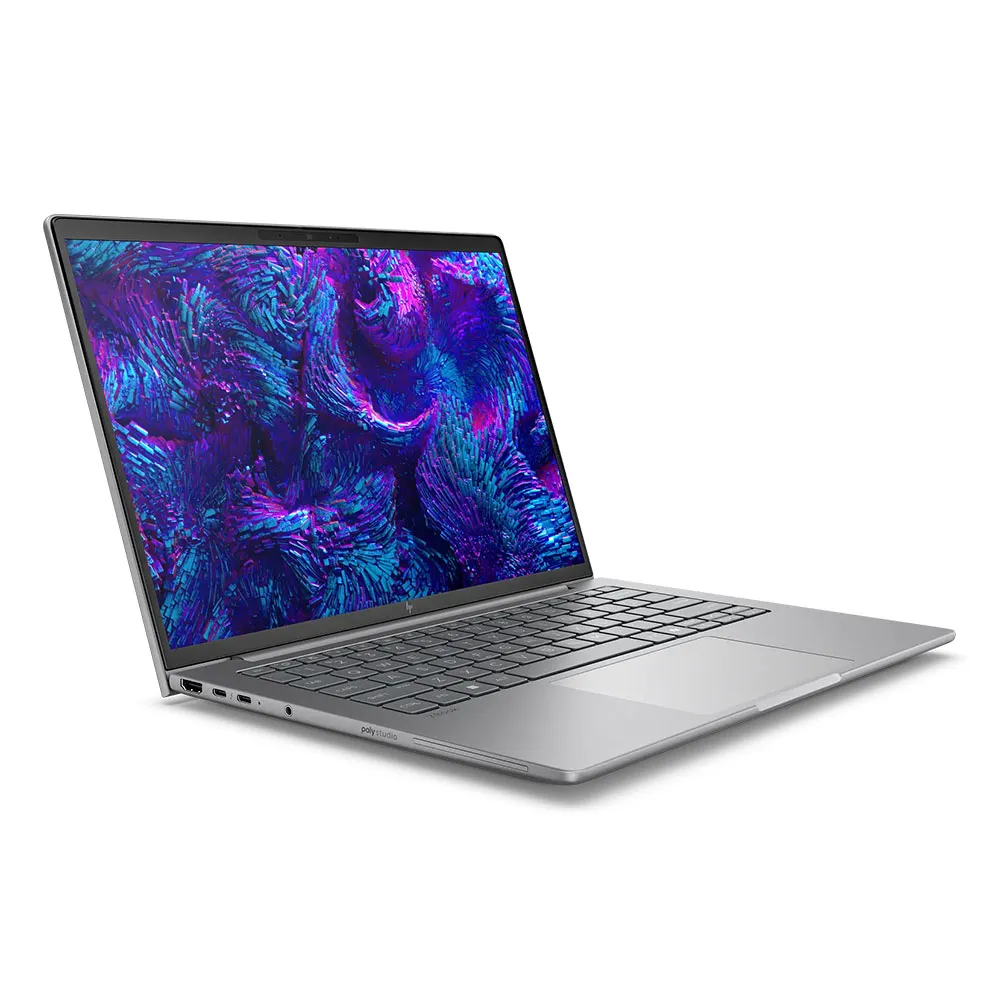


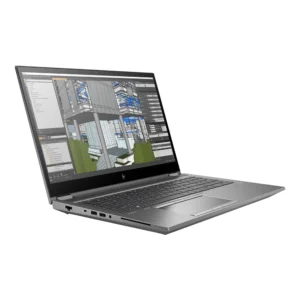
HP ZBook 8 G1i 14 Ultra 7 255H RTX 5000 Ada | 32GB 1TB

| Brand and Model | HP ZBook 8 G1i 14 |
|---|---|
| CPU model | Intel Core Ultra 7 255H |
| Installed RAM memory size | 32GB DDR5-6400 |
| Graphics card description | NVIDIA RTX 500 Ada Generation 4GB GDDR6 |
| Hard disk size | 1TB SSD NVMe PCIe Gen4 |
| Screen size | 14 Inches |
| Colour | Meteor Silver |
4,500 AED 5,000 AED
HP ZBook 8 G1i 14 Core Ultra 7 255H RTX 500 Ada
A 14-inch laptop does not usually leave much room for workstation hardware. The HP ZBook 8 G1i 14 takes a different approach by pairing a high-performance Intel Core Ultra 7 255H processor with dedicated NVIDIA professional graphics, 32GB of DDR5 memory, and a 1TB PCIe NVMe SSD. The result is a compact mobile workstation aimed at people who need more than standard office performance without moving to a larger 16-inch system.
The configuration covered here is HP ZBook 8 G1i 14 A3ZU8ET#ABD. It combines the Core Ultra 7 255H with an NVIDIA RTX 500 Ada Generation Laptop GPU featuring 4GB of dedicated GDDR6 memory. The display is another major part of the specification, with a 14-inch 2560 × 1600 IPS panel, 120Hz refresh rate, 400-nit brightness, and 100% DCI-P3 coverage.
HP ZBook 8 G1i 14 Specifications
| Specification | Details |
|---|---|
| Brand | HP |
| Product | HP ZBook 8 G1i 14 |
| Exact SKU | A3ZU8ET#ABD |
| Category | Mobile workstation |
| Processor | Intel Core Ultra 7 255H |
| CPU | 16 cores / 16 threads |
| Maximum CPU Frequency | Up to 5.1 GHz |
| L3 Cache | 24MB |
| NPU | Intel AI Boost, up to 13 NPU TOPS |
| RAM | 32GB DDR5-6400 |
| RAM Configuration | 2 × 16GB |
| Memory Slots | 2 SODIMM |
| Maximum RAM | 64GB |
| Storage | 1TB PCIe Gen4 NVMe TLC M.2 SSD |
| Discrete GPU | NVIDIA RTX 500 Ada Generation Laptop GPU |
| GPU Memory | 4GB GDDR6 |
| Integrated GPU | Intel Arc 140T |
| Display | 14-inch IPS |
| Resolution | 2560 × 1600 |
| Refresh Rate | 120Hz |
| Brightness | 400 nits |
| Color Coverage | 100% DCI-P3 |
| Display Surface | Anti-glare |
| Battery | 77Wh, 8-cell |
| Wireless | Wi-Fi 7 |
| Bluetooth | Bluetooth 5.4 |
| Ethernet | RJ-45 |
| Thunderbolt | 2 × Thunderbolt 4 |
| USB-A | 1 × USB-A 5Gbps |
| Additional USB-C | 1 × USB-C 20Gbps |
| Video Output | HDMI 2.1 and DisplayPort over USB-C |
| Webcam | 5MP IR camera |
| Keyboard | HP Premium backlit, spill-resistant |
| Power Adapter | 140W USB-C |
| Operating System | Windows 11 Pro |
| Weight | Starting at 1.43kg |
| Dimensions | 31.56 × 22.2 × 1.89cm |
Why a 14-Inch Workstation Makes Sense
The main attraction of this ZBook is not simply its processor or graphics card. It is the amount of professional hardware fitted into a relatively compact chassis.
At 14 inches, the laptop remains easier to carry between an office, client site, university, or different work locations than many larger mobile workstations. At the same time, the hardware goes beyond the typical integrated-graphics business laptop.
That makes the ZBook 8 G1i 14 particularly interesting for professionals who regularly switch between locations but still need dedicated graphics acceleration. Engineers working away from their main desk, developers using demanding local environments, and designers who need a color-focused display can all benefit from this format.
There is, however, a trade-off. A compact workstation cannot offer the same upgrade and cooling headroom as every larger ZBook configuration. The RTX 500 Ada is also positioned below NVIDIA’s higher-tier professional workstation GPUs, so the exact workload matters.
Core Ultra 7 255H: Built Around CPU-Heavy Work
The Intel Core Ultra 7 255H gives this configuration 16 cores and 16 threads, with a maximum turbo frequency of up to 5.1GHz and 24MB of L3 cache.
That specification is useful when the laptop has to keep several professional applications active at the same time. Development environments, browser sessions, documentation, databases, engineering software, and communication tools can all compete for CPU resources during a typical workday.
The processor also includes Intel AI Boost with up to 13 NPU TOPS. The NPU is intended for compatible AI workloads rather than acting as a universal replacement for the CPU or GPU. Application support therefore remains important when evaluating AI-related performance.
For CPU-intensive work, this is a more appropriate platform than a thin business laptop built primarily around low-power processors. Actual performance will still vary with thermals, power settings, software optimization, and workload duration.
RTX 500 Ada: The Specification That Needs Careful Attention
One of the most important corrections to the original listing is the graphics-card name.
The exact A3ZU8ET#ABD configuration uses the NVIDIA RTX 500 Ada Generation Laptop GPU with 4GB of GDDR6 memory. It should not be presented as an RTX 5000 Ada GPU.
That distinction matters because RTX 500 Ada and RTX 5000 Ada belong to very different performance tiers. Calling this laptop an RTX 5000 Ada workstation would give buyers an inaccurate impression of its graphics capabilities.
The RTX 500 Ada is a professional discrete GPU designed for supported CAD, engineering, visualization, and creative applications. It also provides GPU acceleration where compatible software can take advantage of NVIDIA hardware.
The 4GB VRAM capacity is the main limitation to keep in mind. It can be perfectly reasonable for lighter professional 3D and GPU-accelerated tasks, but users handling very large scenes, complex models, demanding visual effects, or workloads that require substantial GPU memory should consider a higher-tier workstation GPU.
32GB DDR5 and 1TB Storage: A Practical Starting Point
This configuration comes with 32GB of DDR5-6400 memory arranged as two 16GB modules. The laptop has two SODIMM slots, and the documented maximum memory capacity is 64GB.
Using two modules also gives the configuration a dual-channel memory setup. For professional multitasking, 32GB provides considerably more working room than the 16GB commonly found in entry-level business systems.
Developers can use that capacity for IDEs, local services, containers, databases, and multiple browser sessions. Engineering users can keep project software and supporting applications open together. Creative users can also benefit when working with several applications at once.
Storage is handled by a 1TB PCIe Gen4 NVMe TLC M.2 SSD. This gives the system enough local capacity for professional software, active projects, documents, and sizeable working files without immediately requiring external storage.
Users who maintain large datasets, extensive media libraries, or multiple virtual machines should still plan their storage strategy before purchase.
A 2.5K Display in a Compact Workspace
The display changes the character of this 14-inch ZBook.
Instead of a basic Full HD panel, the specified configuration uses a 2560 × 1600 IPS display. The higher resolution provides more workspace for application interfaces, code, documents, design tools, and engineering software.
The 120Hz refresh rate is another useful feature. It makes scrolling and interface movement appear smoother than on a conventional 60Hz panel. That does not turn the ZBook into a gaming laptop, but it improves the everyday visual experience.
For creative work, the 400-nit brightness and 100% DCI-P3 coverage are especially relevant. A wide color gamut gives compatible applications a stronger foundation for color-sensitive workflows.
Even so, display specifications should not be interpreted as a guarantee of professional color accuracy in every situation. Calibration, software, lighting conditions, and the actual workflow still matter.
Connectivity for a Desk-Based Workflow
A mobile workstation often spends part of its life connected to a desk. The ZBook 8 G1i 14 is well equipped for that role.
The configuration includes two Thunderbolt 4 ports, an additional USB-C port, USB-A, HDMI 2.1, RJ-45 Ethernet, and DisplayPort over USB-C. This makes it possible to build a more capable workstation setup around the laptop without relying entirely on wireless peripherals.
Thunderbolt 4 is particularly useful for compatible docks, external displays, high-speed storage, and other professional peripherals.
Wi-Fi 7 and Bluetooth 5.4 provide modern wireless connectivity, while the RJ-45 port remains useful when a stable wired network connection is preferred.
Where This ZBook Fits Best
CAD and Engineering
The dedicated RTX 500 Ada graphics solution gives this configuration an advantage over integrated-graphics laptops when professional applications can use GPU acceleration.
The Core Ultra 7 255H and 32GB RAM also provide a solid platform for engineering software and multitasking. However, users working on exceptionally complex 3D assemblies should evaluate GPU memory requirements before choosing this particular configuration.
Software Development
For programming, the system has plenty of CPU and memory resources for large development environments.
The 1TB SSD can accommodate multiple development tools, SDKs, local databases, project files, and container images. Developers who run numerous virtual machines or memory-heavy local workloads may eventually benefit from moving to the 64GB maximum supported memory.
Graphic and Creative Work
The combination of a 2560 × 1600 display, 100% DCI-P3 coverage, and professional NVIDIA graphics makes the laptop relevant to design and content-creation workflows.
It is particularly attractive when portability matters. The 14-inch format offers a smaller footprint than many workstation laptops while retaining dedicated graphics.
For heavier video production or GPU-intensive 3D work, however, the 4GB VRAM capacity should be treated as a meaningful limitation.
AI-Assisted Work
The laptop has two different forms of acceleration: Intel AI Boost on the processor side and NVIDIA GPU acceleration through the RTX 500 Ada.
That does not mean every AI application will automatically use both. Software determines whether a workload runs on the CPU, NPU, or GPU. Buyers should therefore evaluate the requirements of the specific AI software they intend to use rather than choosing the laptop solely because it carries an NPU.
What You Gain and What You Give Up
Advantages
- Compact 14-inch mobile workstation format.
- Intel Core Ultra 7 255H with 16 cores and 16 threads.
- 32GB DDR5-6400 installed through two SODIMMs.
- 1TB PCIe Gen4 NVMe SSD.
- Professional NVIDIA RTX 500 Ada graphics with 4GB GDDR6.
- 2560 × 1600 IPS display with 120Hz refresh rate.
- 400-nit brightness and 100% DCI-P3 coverage.
- Two Thunderbolt 4 ports.
- Wi-Fi 7 and Bluetooth 5.4.
- Starting weight of approximately 1.43kg.
Limitations
- RTX 500 Ada is an entry-level professional RTX solution, not an RTX 5000-class GPU.
- 4GB of dedicated VRAM can restrict demanding GPU workloads.
- A 14-inch chassis offers less physical workspace than a 16-inch workstation.
- Battery runtime will vary significantly with workload and power settings.
- Final UAE price, stock, and commercial warranty should be confirmed before publication.
Who Should Choose the ZBook 8 G1i 14?
This configuration makes the most sense for someone who wants professional hardware in a genuinely portable format.
It is a good match for engineers, developers, designers, technical consultants, and other users whose workloads benefit from dedicated graphics but who do not want to carry a large workstation every day.
A different ZBook configuration would make more sense for users whose work depends heavily on GPU memory. In that situation, moving to a higher-tier professional GPU can be more important than simply increasing CPU performance.
Likewise, buyers who spend most of their time at a fixed desk may prefer a larger 16-inch workstation with more screen area.
Final Verdict
The HP ZBook 8 G1i 14 A3ZU8ET#ABD stands out because of its balance rather than a single extreme specification. The Core Ultra 7 255H handles demanding multitasking, 32GB of DDR5 provides useful working headroom, and the 1TB SSD gives the system a practical amount of fast local storage.
The RTX 500 Ada adds professional GPU capability, while the 2.5K 120Hz display with 100% DCI-P3 coverage makes the compact format more appealing for design and technical work.
The most important point is to buy this configuration for what it actually is: a compact workstation with an RTX 500 Ada 4GB, not an RTX 5000 Ada system. For moderate professional graphics workloads, development, engineering, and mobile productivity, that distinction makes the specification easier to judge realistically.
Before publication or ordering in the UAE, confirm the exact SKU, display, GPU, warranty, availability, and final AED price.
Frequently Asked Questions
Is the HP ZBook 8 G1i 14 A3ZU8ET#ABD equipped with an RTX 5000 Ada?
No. The exact configuration uses the NVIDIA RTX 500 Ada Generation Laptop GPU with 4GB of GDDR6 memory. RTX 500 Ada and RTX 5000 Ada are different GPU classes.
How much RAM does this ZBook have?
It has 32GB of DDR5-6400 memory configured as two 16GB modules. The system has two SODIMM slots and supports up to 64GB.
Is the ZBook 8 G1i 14 suitable for CAD?
It can be a good choice for many CAD and engineering workloads because it combines the Core Ultra 7 255H, 32GB RAM, and a dedicated NVIDIA RTX 500 Ada GPU. Performance will depend on the specific CAD application and project complexity.
Is the 14-inch display good for design work?
The specified panel has a 2560 × 1600 resolution, IPS technology, 120Hz refresh rate, 400-nit brightness, and 100% DCI-P3 coverage. Those specifications make it relevant to color-conscious creative workflows, although calibration requirements still depend on the user and application.
Can the memory be upgraded?
Yes. The system has two SODIMM slots and supports up to 64GB of memory. This configuration already occupies both slots with two 16GB modules.
What should I verify before buying this ZBook in the UAE?
Check the exact SKU, RTX 500 Ada GPU, 32GB RAM, 1TB SSD, display specification, warranty terms, stock availability, and final AED price. This is particularly important because ZBook 8 G1i configurations can differ considerably.
| Brand | |
|---|---|
| Model | HP ZBook 8 G1i 14 |
| Processor | |
| RAM | |
| Storage | |
| Graphics | |
| Screen Size | |
| Camera | Integrated Camera |
| Color | |
| Keyboard | US-English |
| Operating System | Windows 11 Pro |
| Condition | Used-Excellent (Fully Tested) |
| Battery | |
| Warranty | 3 Months |
Based on 0 reviews
Only logged in customers who have purchased this product may leave a review.
Related products
-
Dell Precision Series, Workstation Laptops
Dell Precision 5570 | Intel Core i7-12700H | 32GB RAM | 512GB SSD | NVIDIA RTX A1000 4GB | 15 inch | Renewed
-11% Dell Precision Series, Workstation Laptops
Dell Precision 5570 | Intel Core i7-12700H | 32GB RAM | 512GB SSD | NVIDIA RTX A1000 4GB | 15 inch | Renewed
Dell Precision Series, Workstation LaptopsDell Precision 5570 | Intel Core i7-12700H | 32GB RAM | 512GB SSD | NVIDIA RTX A1000 4GB | 15 inch | Renewed
Brand & Model Dell Precision 5570 Processor Intel Core i7-12700H (12th Generation, 14 Cores, 20 Threads, Up to 4.70GHz) Memory (RAM) 32GB DDR5 4800MHz Storage 512GB M.2 PCIe NVMe SSD Graphic Card NVIDIA RTX A1000 – 4GB GDDR6 Dedicated Graphics Memory Display 15.6-inch FHD+ (1920 × 1200) InfinityEdge Display Color Black Condition Used SKU: n/a -
HP Zbook Series, Workstation Laptops
ZBook Fury 16 G11 | 32GB 1TB 16GB Graphics
HP Zbook Series, Workstation LaptopsZBook Fury 16 G11 | 32GB 1TB 16GB Graphics
Brand and Model HP ZBook Fury 16 G11 CPU model Intel Core i7-13th Gen Installed RAM memory size 16GB DDR4 Graphics card description 16GB Nvidia Graphics Hard disk size 1TB SSD Nvme Screen size 12.3 Inches Full HD Colour Silver SKU: Zb70117 -
Dell Precision 5000 Series, Dell Precision Series, Workstation Laptops
Dell Precision 5550 | Intel Core i7-10750H | 32GB RAM | 512GB SSD | NVIDIA Quadro T2000 4GB | 15 inch | Renewed
-8% Dell Precision 5000 Series, Dell Precision Series, Workstation Laptops
Dell Precision 5550 | Intel Core i7-10750H | 32GB RAM | 512GB SSD | NVIDIA Quadro T2000 4GB | 15 inch | Renewed
Dell Precision 5000 Series, Dell Precision Series, Workstation LaptopsDell Precision 5550 | Intel Core i7-10750H | 32GB RAM | 512GB SSD | NVIDIA Quadro T2000 4GB | 15 inch | Renewed
Brand & Model Dell Precision 5550 Processor Intel Core i7-10750H (10th Generation, 6 Cores, 12 Threads, Up to 5.00GHz) Memory (RAM) 32GB DDR4 2933MHz Storage 512GB M.2 PCIe NVMe SSD Graphic Card NVIDIA Quadro T1000 – 4GB GDDR6 Dedicated Graphics Memory Display 15.6-inch FHD+ (1920 × 1200) Display Color Silver Condition Used SKU: Dell5550 -
HP Zbook Series, Workstation Laptops
HP ZBook Fury 16 G10 with Core i7-13850HX
HP Zbook Series, Workstation LaptopsHP ZBook Fury 16 G10 with Core i7-13850HX
Brand and Model HP ZBook Firefly G9 CPU model Intel Core i7-13850HX Installed RAM memory size 16GB DDR5 Graphics card description NVIDIA RTX 2000 (12GB) Hard disk size 1TBGB SSD Nvme Screen size 16 Inches Full HD Colour Grey SKU: Zb70116
There are no reviews yet.