







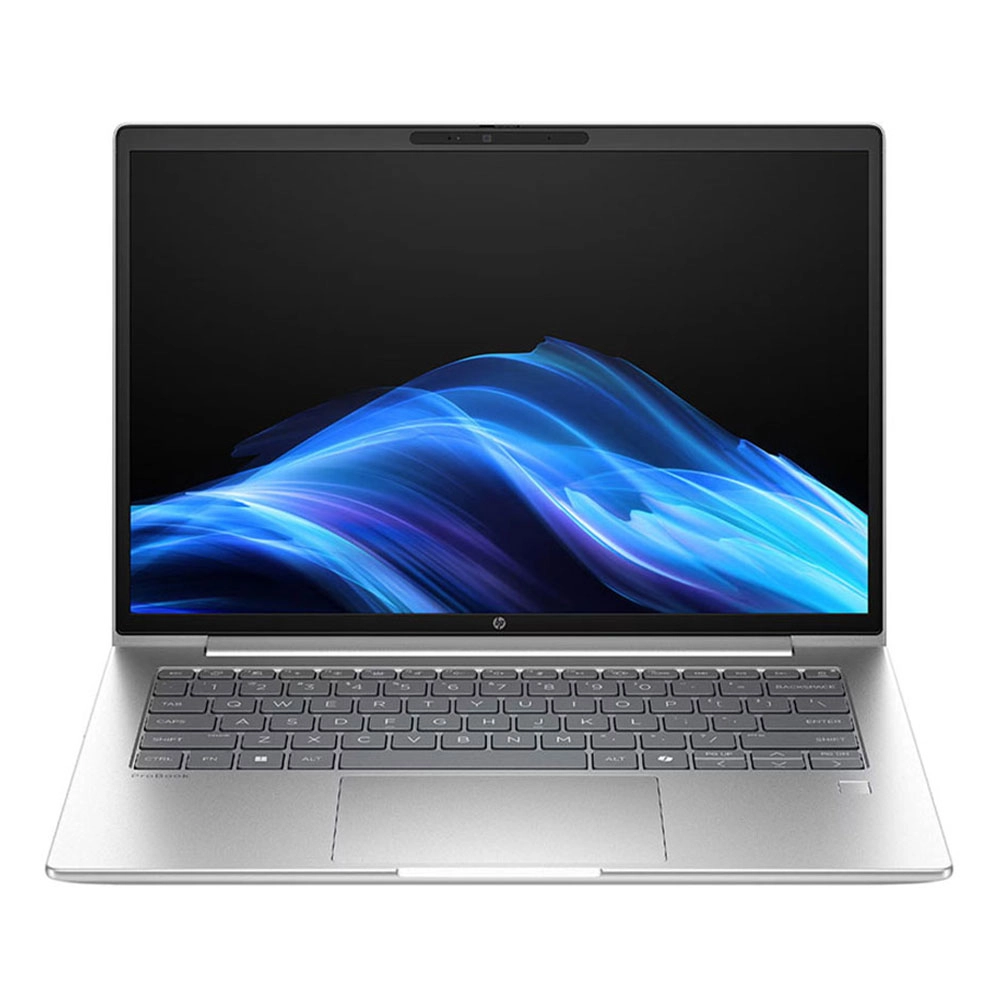



HP Probook 4 G1a 14 Laptop – AMD Ryzen AI 7-350, 16GB PC5, 512 SSD, 14 inch

| Brand and Model | HP ProBook 4 G1a 14 |
|---|---|
| CPU model | AMD Ryzen AI 7-350 |
| Installed RAM memory size | 16GB DDR5-5600 |
| Graphics card description | AMD Radeon 860M Graphics |
| Hard disk size | 512GB SSD NVMe |
| Screen size | 14 Inches |
| Colour | Pike Silver |
2,500 AED 3,100 AED
HP Probook 4 G1a 14 Laptop – AMD Ryzen AI 7-350, 16GB PC5, 512 SSD, 14 inch
A 14-inch business laptop does not have to sacrifice processing capability for portability. The HP Probook 4 G1a 14 laptop in this configuration takes a more performance-oriented approach by pairing the compact ProBook platform with an AMD Ryzen AI 7-350 processor, 16GB of PC5 memory, 512GB SSD storage, and integrated AMD Radeon graphics. For professionals, developers, students, and mobile users who regularly move between several applications, this combination offers a stronger foundation than a basic office notebook.
The most important part of this configuration is its processor. The Ryzen AI 7-350 brings eight CPU cores, sixteen threads, a boost clock of up to 5.0GHz, and a dedicated NPU capable of up to 50 TOPS. At the same time, the integrated Radeon 860M graphics give the laptop more graphical capability without requiring a separate discrete GPU.
Key Specifications
| Specification | Details |
|---|---|
| Brand | HP |
| Model | ProBook 4 G1a 14 |
| Processor | AMD Ryzen AI 7-350 |
| CPU Cores / Threads | 8 Cores / 16 Threads |
| Base Clock | 2.0GHz |
| Max Boost Clock | Up to 5.0GHz |
| CPU Architecture | Zen 5 / Zen 5c |
| NPU | Up to 50 TOPS |
| Integrated Graphics | AMD Radeon 860M |
| Graphics Architecture | RDNA 3.5 |
| RAM | 16GB PC5 / DDR5 |
| Memory Speed | Up to DDR5-5600 on the HP platform |
| Storage | 512GB SSD |
| Display Size | 14 inch |
| Display Aspect Ratio | 16:10 on supported HP configurations |
| Memory Upgrade | Two accessible SODIMM slots on the platform |
| Maximum Memory | Up to 48GB, with 64GB supported in selected regions/configurations |
| External Display Support | Up to 4 displays; docking may be required |
| HDMI | HDMI 2.1 |
| Graphics Type | Integrated AMD Radeon |
| Primary Positioning | Business, productivity, programming and mobile professional work |
Memory, display, and connectivity options can vary by exact regional configuration. The 16GB RAM and 512GB SSD combination above refers to the supplied product configuration.
A 14-Inch Laptop Built Around More Processing Headroom
The size of a laptop often determines how much performance buyers expect from it. A 14-inch machine is usually chosen because it is easier to carry, fits smaller workspaces, and works well for commuting. The ProBook 4 G1a 14 adds a different consideration: the processor has enough resources to handle workloads that go beyond basic documents and browser tabs.
That distinction matters when a typical workday includes spreadsheets, meetings, cloud applications, research tabs, coding tools, communication software, and background services running together. Instead of treating the 14-inch format as an entry-level category, this configuration gives it a much more capable processing platform.
Ryzen AI 7-350: The Core of This Configuration
AMD’s Ryzen AI 7-350 uses a hybrid Zen 5 and Zen 5c architecture with 8 cores and 16 threads. It operates from a 2.0GHz base clock and can reach up to 5.0GHz boost frequency, while offering 24MB of total cache. AMD specifies a configurable TDP range of 15–54W, so actual performance and power behavior depend on the laptop’s implementation and operating conditions.
For everyday productivity, the additional cores and threads are particularly useful when several demanding applications need to remain responsive at the same time. Programming environments, large spreadsheets, browser-heavy research, virtual meetings, and file-processing utilities can all benefit from having more CPU resources available.
The processor also changes the role of this laptop in another way. It is not only a conventional CPU; the Ryzen AI 7-350 includes an NPU designed for supported AI workloads. AMD rates its AI processing capability at up to 50 TOPS.
What the NPU Adds to Everyday Work
AI hardware is becoming a practical part of modern Windows laptops rather than a specification reserved for specialized systems. The Ryzen AI 7-350 includes an NPU based on AMD’s XDNA 2 architecture, allowing supported applications to use dedicated AI acceleration instead of relying entirely on the CPU.
That can be relevant for AI-assisted productivity, compatible creative applications, local AI features, and other software designed to take advantage of an NPU. However, the presence of an NPU does not mean every application will automatically become faster. The software must support the relevant AI acceleration features.
For buyers interested in a laptop that can remain relevant as AI-enabled applications become more common, this is one of the defining characteristics of the configuration.
16GB Memory Leaves Room for Real Multitasking
The supplied configuration includes 16GB of PC5 memory, giving the system a useful amount of working memory for modern productivity.
HP’s ProBook 4 G1a 14 platform uses accessible SODIMM slots and supports DDR5-5600 memory. Depending on the exact regional configuration, HP lists configurations ranging from 8GB to higher capacities, with two-slot configurations and higher maximum capacities available in certain markets.
That upgrade path is important for buyers who expect their workload to grow. A user may begin with office applications, browser tabs, and communication tools, then move toward heavier development environments, larger datasets, virtual machines, or more demanding professional software.
For the supplied 16GB configuration, the starting point is already practical for everyday business and professional multitasking.
512GB SSD: A Practical Working Space
The 512GB SSD gives this HP laptop enough local storage for a typical combination of applications, documents, project files, and personal data.
An SSD also suits the working style expected from a modern business laptop. Applications and files can be accessed without relying on the slower mechanical storage traditionally found in older notebooks. For users who work with cloud services but still need local project folders, 512GB represents a useful middle ground between limited entry-level storage and the higher cost of very large drives.
If the laptop will hold extensive video libraries, large datasets, virtual machines, or substantial creative archives, external or additional storage may still be worth considering.
Radeon 860M Handles the Graphics Side
Graphics processing comes from the integrated AMD Radeon 860M. This is not a discrete graphics card, so the laptop should not be evaluated as a workstation or high-end gaming machine. Instead, the Radeon 860M is designed as part of the processor platform, providing graphical acceleration while keeping the overall system design compact. AMD specifies eight graphics cores and a graphics frequency of up to 3.0GHz for the Ryzen AI 7-350.
For business applications, web-based tools, presentations, multimedia, programming environments, and light creative work, integrated graphics can be sufficient. The stronger graphics engine also gives the system more flexibility than a basic integrated-GPU business laptop.
Heavy 3D production, professional GPU rendering, and demanding AAA gaming remain outside the main purpose of this configuration. Those workloads generally call for a laptop with a dedicated GPU and a different cooling and power design.
The 14-Inch Format Works Differently in Practice
A 14-inch display strikes a useful balance between screen space and portability. It provides more working area than many smaller ultraportable systems while remaining easier to carry than a 15- or 16-inch notebook.
HP lists several display configurations for the ProBook 4 G1a 14 platform, including WUXGA and 2.2K options, with both touchscreen and non-touch panels depending on the configuration. Some options offer 400 nits and 100% sRGB, while others use a 300-nit panel with 62.5% sRGB. The platform uses a 16:10 aspect ratio, and display availability varies by market.
Because the supplied product information identifies the screen size but not the exact panel variant, the exact resolution, brightness, color coverage, and touch capability should be confirmed against the specific SKU before purchase.
A Better Match for Professional Multitasking
The strength of this configuration becomes clearer when looking at how people actually use a business laptop.
Business Productivity
Office applications, email, browser-based platforms, video meetings, document work, and spreadsheets are natural workloads for this system. The eight-core Ryzen AI 7-350 provides substantial CPU resources for users who regularly keep several applications active.
Programming and Development
Developers can benefit from the 8-core/16-thread processor when working with IDEs, local development servers, browser documentation, databases, and communication tools at the same time. The 16GB memory configuration provides a practical starting point for many development environments, while the accessible memory slots offer an upgrade path on the HP platform.
AI-Assisted Productivity
The NPU is one of the most distinctive features here. Supported AI applications can use the Ryzen AI hardware to accelerate compatible workloads, making the laptop relevant to users who want AI capabilities built into their everyday computing platform.
Study and Research
Students and researchers often move between browser tabs, PDFs, note-taking applications, presentations, communication tools, and online services. The 14-inch format keeps the machine manageable for travel between home, campus, meetings, or libraries.
Light Creative Work
The Radeon 860M can support everyday visual workloads and lighter creative tasks. It is a sensible fit for image adjustments, presentation design, web content, and similar work. More demanding professional video production or 3D rendering should be approached with a system equipped with a dedicated GPU.
Connectivity for a Modern Workstation Setup
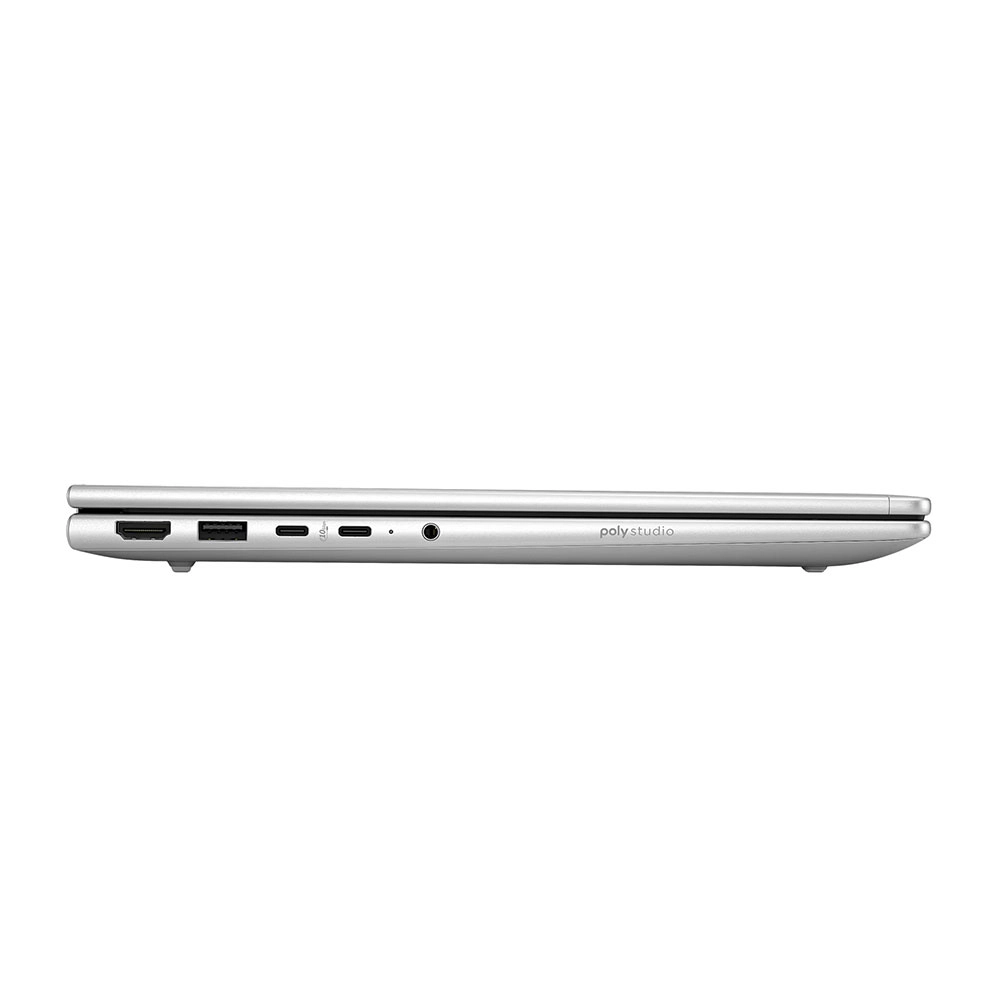
The ProBook 4 G1a 14 platform supports HDMI 2.1 and can drive up to four displays, although docking may be required for some multi-monitor arrangements.
This makes the laptop more adaptable when used at a desk. A professional can work with the notebook as the primary computer and connect it to a larger external display or a multi-screen workstation when needed.
The exact port and wireless configuration should still be checked against the regional product SKU, since hardware options can vary between configurations.
Why the Upgrade Path Matters
One of the more useful characteristics of this ProBook platform is that the memory is not simply locked into a fixed configuration. HP specifies two accessible SODIMM slots, with DDR5-5600 support and higher memory capacities available depending on the market.
That gives the laptop a longer practical life. Someone buying the 16GB configuration today may not need more memory immediately, but the option to expand later can become valuable as applications and workloads become more demanding.
This is especially relevant for developers, technical professionals, and power users who may gradually move from standard productivity work toward heavier multitasking.
Advantages and Limitations
Pros
- AMD Ryzen AI 7-350 with 8 cores and 16 threads provides a strong CPU foundation for multitasking.
- 50-TOPS NPU adds dedicated AI acceleration for compatible applications.
- Radeon 860M integrated graphics offers more graphical capability without requiring a separate GPU.
- 16GB PC5 memory is a practical starting point for business, development, and study workloads.
- Two accessible SODIMM slots provide an upgrade path on the HP platform.
- 14-inch form factor makes the configuration easier to integrate into mobile and hybrid work routines.
Cons
- The Radeon 860M is integrated graphics, so demanding professional 3D and high-end gaming workloads are not its primary target.
- The exact display quality depends on the selected regional configuration; the ProBook 4 G1a 14 platform has several panel options.
- Users working with large media libraries, extensive datasets, or virtual machines may eventually need more than 512GB of local storage.
- Exact battery life depends on the battery, display, workload, and power configuration of the specific SKU.
Who Should Choose This HP Ryzen Laptop?
This configuration makes the most sense for someone who wants a 14-inch business laptop with above-average processing capability and modern AI hardware.
It is particularly interesting for professionals who multitask heavily, developers who need a responsive mobile development machine, students who want a laptop that can handle demanding academic workloads, and users who expect AI-assisted applications to become a larger part of their workflow.
The Ryzen AI 7-350 also gives the machine a stronger performance profile than configurations built around lower-tier processors. That difference becomes more noticeable when the workload involves multiple CPU-intensive applications rather than simple document editing.
Who May Need a Different Laptop?
A different type of laptop would make more sense for users whose priorities fall outside this configuration’s design.
For example, professional 3D artists, GPU-focused video editors, CAD users with demanding visualization requirements, and serious gamers should look for a system with a dedicated graphics processor.
Likewise, buyers who care specifically about a high-end display should verify the exact panel before ordering, because the ProBook 4 G1a 14 family is available with several different screen specifications.
Frequently Asked Questions
Is the HP Probook 4 G1a 14 with Ryzen AI 7-350 good for business work?
Yes. The eight-core, 16-thread Ryzen AI 7-350 gives the laptop substantial processing capacity for office applications, multitasking, communication software, research, and professional workloads.
Does the Ryzen AI 7-350 have a dedicated AI processor?
Yes. It includes an NPU with up to 50 TOPS of AI processing capability. Compatible software can use the NPU for supported AI workloads.
What graphics does the Ryzen AI 7-350 use?
The processor includes AMD Radeon 860M integrated graphics with eight graphics cores.
Can the ProBook 4 G1a 14 memory be upgraded?
HP specifies two accessible SODIMM slots on the platform, with DDR5-5600 support. Maximum capacity varies by region and configuration.
Is this laptop suitable for programming?
Yes. The 8-core/16-thread processor, 16GB memory configuration, SSD storage, and compact 14-inch format make it a strong match for many programming and development workloads.
Is it a gaming laptop?
No. Although the Radeon 860M is capable of handling some graphics workloads, this is primarily a business and productivity laptop with integrated graphics rather than a dedicated gaming system.
Final Verdict
The HP Probook 4 G1a 14 laptop with AMD Ryzen AI 7-350 takes a compact business format and gives it a noticeably stronger technical foundation. Eight CPU cores, sixteen threads, Radeon 860M graphics, and a 50-TOPS NPU put the processor at the center of the configuration, while 16GB of PC5 memory and 512GB SSD storage provide a practical starting point for everyday professional work.
Its strongest argument is not simply portability. Instead, it is the combination of 14-inch mobility and Ryzen AI 7-class processing power. For business users, developers, students, and professionals who want a compact laptop capable of handling more demanding multitasking and emerging AI workloads, this configuration offers a well-balanced direction.
Before purchasing, however, verify the exact regional SKU for the display, ports, battery, operating system, and other configuration-specific features. HP lists multiple hardware options for the ProBook 4 G1a 14 platform, so those details should not be assumed from the model name alone.
| Brand | |
|---|---|
| Model | Probook 4 G1a 14 |
| Processor | |
| RAM | |
| Storage | |
| Graphics | |
| Screen Size | |
| Camera | Integrated Camera |
| Color | |
| Keyboard | Spill-Resistant Backlit Keyboard |
| Operating System | Windows 11 Pro |
| Condition | Used-Excellent (Fully Tested) |
| Battery | |
| Weight | 1.4 kg |
| Warranty | 3 Months |
Based on 0 reviews
Only logged in customers who have purchased this product may leave a review.
Related products
-
Office and Student, Surface Laptop
Microsoft Surface Laptop3 Intel Core i7-1065G7 | 8GB 256GB
Office and Student, Surface LaptopMicrosoft Surface Laptop3 Intel Core i7-1065G7 | 8GB 256GB
</tr> class=”a-size-base a-text-bold”>Colour
</tbody>
role=”listitem”></table>
<tbody><tr class=”a-spacing-small po-color”><strong>Graphics card description“a-span9″ role=”presentation”>Intel UHD<strong>lass=”a-size-base a-text-bold”>Hard disk sizeScreen size12.3 Inches Full HD</td><span</strong></strong></td>Silver</td>
=”presentation”>Brand and Model class=”a-span9″ role=”presentation”><strong>Microsoft Surface Laptop 3 lass=”a-span3″ role=”presentation”><strong>CPU model lass=”a-span9″ role=”presentation”>Intel Core i7-10th e=”presentation”><span class=”a-size-base a-text-bold”>Installed RAM memory size</td> <span class=”a-size-base po-break-word”>16GB DDR4 SKU: Su70164 -
Office and Student, Surface Laptop
Surface Laptop 4-Ryzen 5 4680U | 16GB RAM | 256GB SSD (Microsoft)
-13% Office and Student, Surface Laptop
Surface Laptop 4-Ryzen 5 4680U | 16GB RAM | 256GB SSD (Microsoft)
Office and Student, Surface LaptopSurface Laptop 4-Ryzen 5 4680U | 16GB RAM | 256GB SSD (Microsoft)
Brand and Model Microsoft Surface Laptop 4 CPU model AMD Ryzen 5 Installed RAM memory size 16GB DDR4 Graphics card description AMD Radeon Hard disk size 256GB SSD Nvme Screen size 12.3 Inches Full HD Colour Platinum SKU: Su70158 -
HP Probook, Office and Student, Ultrabook and X360
HP ProBook 435 G10 x360 AMD Ryzen 5 | 8Gb RAM |512Gb SSD
-11% HP Probook, Office and Student, Ultrabook and X360
HP ProBook 435 G10 x360 AMD Ryzen 5 | 8Gb RAM |512Gb SSD
HP Probook, Office and Student, Ultrabook and X360HP ProBook 435 G10 x360 AMD Ryzen 5 | 8Gb RAM |512Gb SSD
role=”listitem”>
“484”>class=”a-spacing-small po-model_name” role=”listitem”>CPU model<strong data-start=”964″ data-e=””>nd=”989″>AMD Ryzen 5 processor”a-spacing-small po-display.size”>
AMD Radeon Graphics</strong></td>
</tbody>
e=”list” width=”"Graphics”>;/strong></td>”><span class=”a-size-base po-break-word”>512GB SSD Nvme<td class=”a-span3″ role=”presentation”><strong>ColourSilver
Hard disk size< “a-size-base a-text-bold”>Screen size</span></strong> 13.6 Inches Full HD</td> SKU: HP70177 -
Office and Student, Surface Laptop
Surface Laptop 3 i5 10th Gen | 16GB 256GB
Office and Student, Surface LaptopSurface Laptop 3 i5 10th Gen | 16GB 256GB
“a-spacing-small po-ram_memory.installed_size” role=”listitem”>
class=”a-span3″ role=”presentation”>Brand and Model Microsoft Surface Laptop 3 CPU model Intel Core i5-10th Installed RAM memory size 16GB DDR4 <span class=”yoast-text-mark”>class=”a-size-base a-text-bold”>Graphics card description Intel UHD</strong> Hard disk size</span> 256GB SSD Nvme lass=”a-span3″ role=”presentation”><span class=”a-size-base a-text-bold”>Screen size lass=”a-span9″ role=”presentation”>12.3 Inches Full HD Colour Silver SKU: Su70165
There are no reviews yet.