








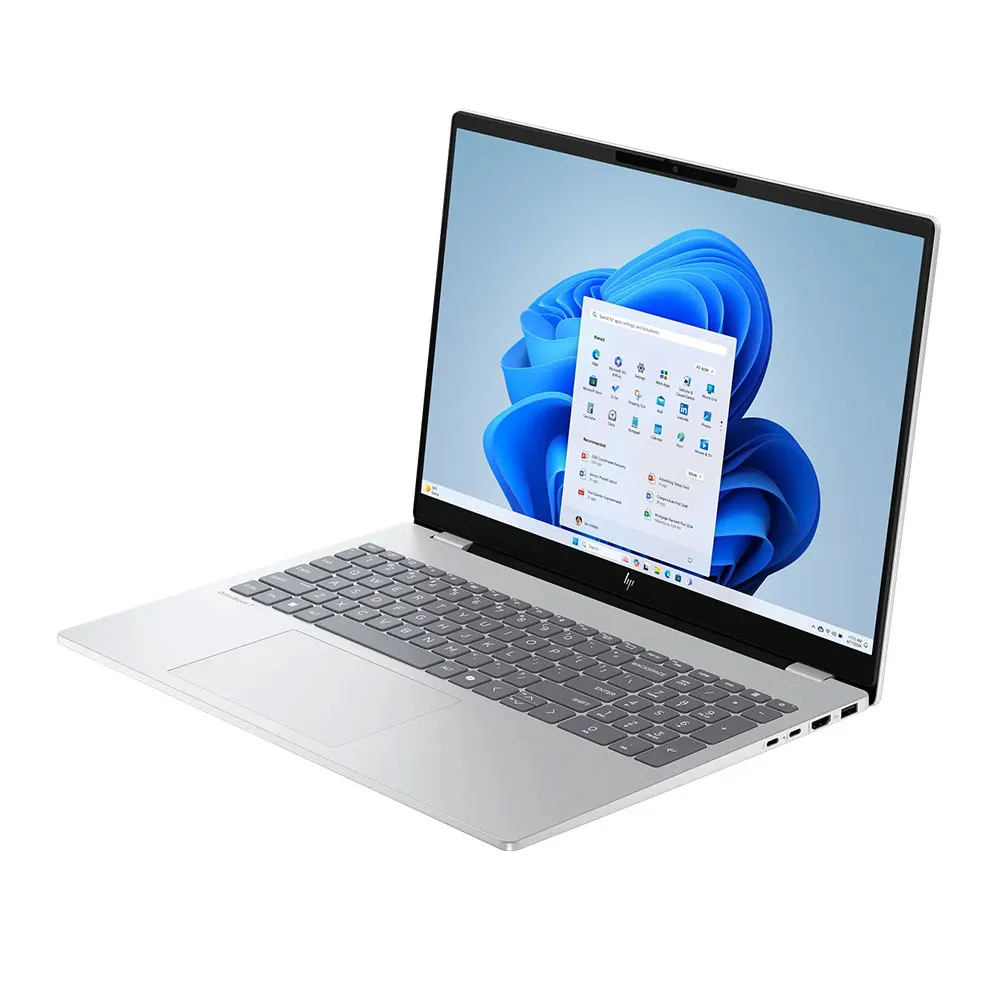
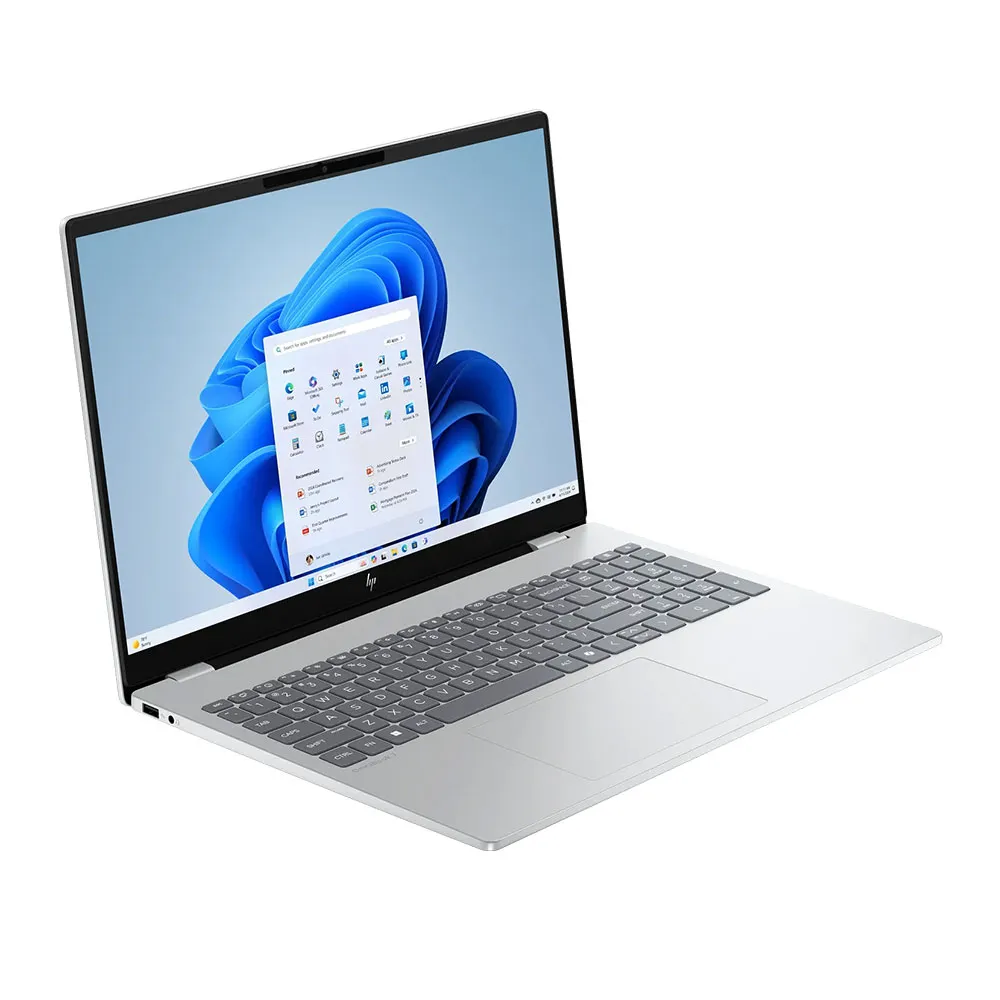


HP OmniBook 7 16 RTX 4050 | Ultra 7 255H 32GB 1TB

| Brand and Model | HP OmniBook 7 16 – Core Ultra 7 255H |
|---|---|
| CPU model | Intel Core Ultra 7 255H |
| Installed RAM memory size | 32GB DDR5-5600 |
| Graphics card description | NVIDIA GeForce RTX 4050 6GB GDDR6 |
| Hard disk size | 1TB PCIe Gen4 NVMe SSD |
| Screen size | 16 Inches 2K Touchscreen |
| Colour | Glacier Silver Aluminium |
4,200 AED 5,000 AED
HP OmniBook 7 16 Ultra 7 255H, 32GB RAM, 1TB SSD, RTX 4050
The HP OmniBook 7 16 RTX 4050 combines a high-performance Intel processor, dedicated NVIDIA graphics and a detailed OLED touchscreen in a 16-inch laptop. This configuration pairs the Intel Core Ultra 7 255H with 32GB DDR5 memory and a 1TB PCIe Gen4 NVMe SSD. More importantly, its 6GB GeForce RTX 4050 GPU gives the system a separate graphics processor for workloads that demand more than integrated graphics can provide. The combination creates a versatile hardware platform for multitasking, visual content creation and graphics-intensive applications.
Display Technology and Visual Experience
The 16-inch OLED touchscreen is one of the defining components of this OmniBook configuration. HP specifies a 2048 × 1280 resolution, a 16:10 aspect ratio and a 120Hz refresh rate. The panel also supports multitouch input, allowing direct interaction with compatible Windows applications.
OLED technology gives the display individually illuminated pixels. Consequently, dark areas can appear deeper, while bright image elements remain distinct. The panel also covers 100% of the DCI-P3 colour space, which provides a broad colour range for compatible visual content.
HP lists 400 nits of typical SDR brightness and up to 620 nits for HDR content in the exact D7YJ0EA specification. In addition, the 0.2ms response-time specification supports quick pixel transitions, while the low-blue-light feature addresses display comfort during extended sessions.
The 16:10 layout provides more vertical space than a traditional 16:9 screen. Therefore, spreadsheets, editing timelines, documents and development environments can display more content vertically. The touchscreen adds another input method for navigation, annotation and compatible creative workflows.
Intel Core Ultra 7 255H: Processing Architecture
The Intel Core Ultra 7 255H supplies the main computing power. It belongs to Intel’s Core Ultra Series 2 processor family and features 16 cores and 16 threads, with a maximum turbo frequency of 5.1GHz and 24MB of L3 cache.
This hybrid processor architecture combines performance and efficiency cores to manage different levels of processing demand. For example, demanding applications can use the higher-performance cores, while lighter background tasks can run on efficiency-oriented cores.
The processor can handle demanding multitasking, software development, office workloads, data processing and content-production applications. Its integrated Intel AI Boost NPU also provides up to 13 TOPS of AI processing capability. Compatible applications can use this dedicated hardware for selected AI functions, although the exact benefit depends on software support.
Dedicated NVIDIA GeForce RTX 4050 Graphics
Unlike configurations that rely exclusively on integrated graphics, this model includes an NVIDIA GeForce RTX 4050 Laptop GPU with 6GB of dedicated GDDR6 memory. The dedicated graphics processor handles supported rendering and graphics workloads separately from the CPU’s integrated graphics.
The RTX 4050 uses NVIDIA’s Ada Lovelace architecture and supports technologies such as ray tracing and DLSS in compatible applications. These capabilities can improve supported 3D rendering and gaming workloads. Furthermore, GPU acceleration can benefit creative software that uses NVIDIA graphics hardware for rendering, effects or processing.
The laptop also uses hybrid graphics. Its Intel Arc 140T integrated GPU can handle lighter visual tasks, while the RTX 4050 provides additional graphics resources when applications require them.
However, the RTX 4050 remains a laptop-class GPU with 6GB of dedicated memory. Very complex 3D scenes, large professional projects and graphics workloads that require more VRAM can exceed its practical limits. Performance also depends on the laptop’s GPU power configuration, cooling system and application settings.
32GB DDR5 Memory Configuration
The system includes 32GB of DDR5-5600 memory, configured as a single 32GB module in the official D7YJ0EA specification. This capacity provides room for several demanding applications to remain active simultaneously.
For instance, users can work with large spreadsheets, multiple browser sessions, communication software and development tools while keeping other applications available in the background. The memory capacity also supports creative workflows that use larger project files and multiple editing applications.
The single-module configuration is an important technical detail. It differs from a dual-module 2 × 16GB arrangement, so memory-channel behaviour may differ from systems with two populated modules. The exact upgrade options should be checked against the machine’s service documentation and regional product configuration.
1TB PCIe Gen4 NVMe Storage
A 1TB PCIe Gen4 NVMe M.2 SSD provides the laptop’s internal storage. It offers space for the operating system, applications, working files, media libraries and project data.
The NVMe interface supports fast communication between the SSD and the system. As a result, file transfers and application loading can feel responsive, although actual speeds depend on the installed drive and workload.
The 1TB capacity is particularly relevant when working with large creative projects, high-resolution media or extensive software libraries. Nevertheless, users who maintain substantial video archives or large datasets may still need external storage.
Chassis, Dimensions and Input Devices
HP builds this OmniBook 7 configuration with an aluminium chassis in Glacier Silver. Its dimensions are approximately 35.78 × 25.48 × 1.5 cm, and the documented weight is around 1.91kg.
The 16-inch display provides a larger working area than compact notebooks, although the chassis also occupies more space in a bag. Its weight reflects the combination of the large screen, dedicated graphics hardware and internal cooling requirements.
The full-size backlit keyboard includes a numeric keypad. This layout provides dedicated number-entry keys for spreadsheet work and calculations. HP also equips the system with an HP Imagepad touchpad for pointer control and multi-touch gestures.
Cooling, Battery and Power
The combination of a 16-core processor and a dedicated RTX graphics processor creates higher thermal demands than a system with integrated graphics alone. The laptop therefore relies on its internal cooling design to manage heat during sustained workloads.
HP specifies a 70Wh four-cell lithium-ion polymer battery for the D7YJ0EA configuration. The manufacturer lists battery life of up to 14 hours and 15 minutes under its stated test conditions. Actual runtime can vary considerably with display brightness, GPU activity, software load, wireless connections and power settings.
The system includes a 100W USB-C power adapter and supports battery fast charging. HP states that the battery can reach approximately 50% charge in 30 minutes under the specified charging conditions.
Connectivity and External Displays
The OmniBook 7 16 provides several connection options for external displays, storage and accessories. Its documented port selection includes:
- One Thunderbolt 4 USB-C port with up to 40Gbps signalling
- One USB-C port with up to 10Gbps signalling
- One USB-A port with up to 10Gbps signalling
- One USB-A port with up to 5Gbps signalling
- One HDMI 2.1 output
- One combined headphone and microphone jack
The Thunderbolt 4 port supports USB Power Delivery 3.1 and DisplayPort 2.1. The additional USB-C connection supports USB Power Delivery 3.1 and DisplayPort 1.4a. Consequently, the laptop can connect to compatible docks, external displays and high-speed accessories.
For wireless networking, the exact D7YJ0EA configuration lists Intel Wi-Fi 6E AX211 and Bluetooth 5.3. This is worth distinguishing from other OmniBook 7 configurations that may use different wireless hardware.
Camera, Audio and Security Features
HP equips this configuration with a 5MP infrared camera featuring temporal noise reduction. The camera also includes a privacy shutter, while the integrated dual-array digital microphones support voice capture during online meetings.
The audio system uses dual speakers with DTS:X Ultra, HP Audio Boost and Poly Studio features. These technologies support media playback, video meetings and everyday audio tasks.
For platform security, HP lists firmware-based TPM support, a microphone mute key and a camera privacy shutter. Windows 11 Home is the operating system supplied with the referenced D7YJ0EA configuration.
Technical Specifications
| Specification | Details |
|---|---|
| Brand | HP |
| Product Family | OmniBook 7 |
| Model | OmniBook 7 16-ay0009ne |
| Product Number | D7YJ0EA |
| Processor | Intel Core Ultra 7 255H |
| Processor Cores / Threads | 16 cores / 16 threads |
| Maximum Turbo Frequency | Up to 5.1GHz |
| L3 Cache | 24MB |
| NPU | Intel AI Boost, up to 13 TOPS |
| RAM | 32GB DDR5-5600 |
| Memory Configuration | 1 × 32GB |
| Storage | 1TB PCIe Gen4 NVMe M.2 SSD |
| Integrated Graphics | Intel Arc 140T |
| Dedicated Graphics | NVIDIA GeForce RTX 4050 Laptop GPU |
| Dedicated Graphics Memory | 6GB GDDR6 |
| Graphics Mode | Hybrid Graphics |
| Display Size | 16 inches |
| Display Resolution | 2048 × 1280 |
| Display Technology | OLED |
| Touchscreen | Yes, multitouch |
| Refresh Rate | 120Hz |
| Response Time | 0.2ms |
| SDR Brightness | 400 nits |
| HDR Brightness | Up to 620 nits |
| Colour Coverage | 100% DCI-P3 |
| Aspect Ratio | 16:10 |
| Wireless | Intel Wi-Fi 6E AX211 |
| Bluetooth | Bluetooth 5.3 |
| USB-C | 1 × Thunderbolt 4, 1 × USB-C 10Gbps |
| USB-A | 1 × USB-A 10Gbps, 1 × USB-A 5Gbps |
| HDMI | HDMI 2.1 |
| Camera | 5MP IR with privacy shutter |
| Audio | Dual speakers, DTS:X Ultra, Poly Studio |
| Keyboard | Backlit, full-size with numeric keypad |
| Battery | 70Wh, 4-cell Li-ion polymer |
| Power Adapter | 100W USB-C |
| Dimensions | 35.78 × 25.48 × 1.5 cm |
| Weight | Approximately 1.91kg |
| Operating System | Windows 11 Home |
| Product Colour | Glacier Silver |
Hardware Advantages and Limitations
Advantages
- Dedicated RTX graphics: The 6GB GeForce RTX 4050 provides hardware acceleration for compatible creative, rendering and graphics-intensive applications.
- High-resolution OLED touchscreen: The 16-inch 2K panel combines 120Hz refresh, multitouch support and 100% DCI-P3 colour coverage.
- 16-core processor: The Core Ultra 7 255H offers 16 cores, 16 threads and boost frequencies up to 5.1GHz.
- 32GB DDR5 memory: The installed capacity supports multitasking and larger application workloads.
- Modern external connectivity: Thunderbolt 4, HDMI 2.1 and USB-C DisplayPort support a range of external devices.
- Large battery capacity: The 70Wh battery provides the system’s documented power capacity, with fast charging support.
Limitations
- Dedicated GPU power requirements: The RTX 4050 increases thermal and power demands during graphics-intensive workloads.
- 6GB graphics memory: Some demanding 3D projects and high-resolution creative workloads may require more VRAM.
- Large chassis: The 16-inch design and approximately 1.91kg weight make it less compact than smaller mobile laptops.
- Single-module memory configuration: The official 1 × 32GB arrangement differs from a dual-module memory setup.
- Battery life varies by workload: Intensive CPU and GPU activity can reduce runtime substantially compared with HP’s maximum test figure.
Overall Hardware Assessment
The HP OmniBook 7 16 combines three major hardware elements: the Core Ultra 7 255H processor, NVIDIA GeForce RTX 4050 graphics and a 16-inch OLED touchscreen. Together, they create a system with more graphics capability than integrated-GPU-only notebooks, while the 32GB memory and 1TB SSD provide substantial resources for multitasking and local project storage.
Its display is particularly notable because it combines OLED contrast, a 120Hz refresh rate, touch input and wide DCI-P3 colour coverage. Meanwhile, the dedicated RTX graphics processor expands the range of compatible creative and GPU-accelerated applications.
The main trade-offs are its larger physical footprint, the power demands of dedicated graphics and the 6GB VRAM limit. These characteristics define the system’s hardware profile more accurately than describing it as a general-purpose laptop without acknowledging its graphics capabilities.
| Brand | |
|---|---|
| Model | HP OmniBook 7 16 |
| Processor | |
| RAM | |
| Storage | |
| Graphics | |
| Screen Size | |
| Camera | Integrated Camera |
| Color | |
| Keyboard | Backlit Keyboard, US-English |
| Operating System | Windows 11 Pro |
| Condition | Used-Excellent (Fully Tested) |
| Battery | |
| Weight | 1.91 kg |
| Warranty | 3 Months |
Based on 0 reviews
Only logged in customers who have purchased this product may leave a review.
Related products
-
Business Laptops, HP Elitebook, Ultrabook and X360
HP EliteBook 1040 G10 X360 Intel Core i5-1355U | 16GB RAM | 512GB SSD
-8% Business Laptops, HP Elitebook, Ultrabook and X360
HP EliteBook 1040 G10 X360 Intel Core i5-1355U | 16GB RAM | 512GB SSD
Business Laptops, HP Elitebook, Ultrabook and X360HP EliteBook 1040 G10 X360 Intel Core i5-1355U | 16GB RAM | 512GB SSD
Brand and Model HP Elitebook 1040 x360 G10 CPU model Intel Core i5-1335U Installed RAM memory size 16GB DDR4 Graphics card description Intel Iris Xe Graphics Hard disk size 512 GB SSD Nvme Screen size 14.1 Inches Full HD Colour Silver SKU: HP70182 -
Business Laptops, Lenovo Thinkpad, Office and Student
Lenovo ThinkPad T480s Core i7 8th 16GB 256GB
-11% Business Laptops, Lenovo Thinkpad, Office and Student
Lenovo ThinkPad T480s Core i7 8th 16GB 256GB
Business Laptops, Lenovo Thinkpad, Office and StudentLenovo ThinkPad T480s Core i7 8th 16GB 256GB
Brand and Model Lenovo Thinkpad T480s CPU model Intel Core i7 8th Gen Installed RAM memory size 16GB DDR4 Graphics card description 2GB Nvidia graphics Hard disk size 256 GB SSD Nvme Screen size 14.1 Inches Full HD Colour Black SKU: n/a -
Business Laptops, HP Elitebook, Office and Student
HP EliteBook 840 G3 Laptop–Intel Core i7-6th Gen | 8GB RAM | 256GB SSD | 14 Inch Display | Windows 10 Home
-3% Business Laptops, HP Elitebook, Office and Student
HP EliteBook 840 G3 Laptop–Intel Core i7-6th Gen | 8GB RAM | 256GB SSD | 14 Inch Display | Windows 10 Home
Business Laptops, HP Elitebook, Office and StudentHP EliteBook 840 G3 Laptop–Intel Core i7-6th Gen | 8GB RAM | 256GB SSD | 14 Inch Display | Windows 10 Home
SKU: n/a
There are no reviews yet.