








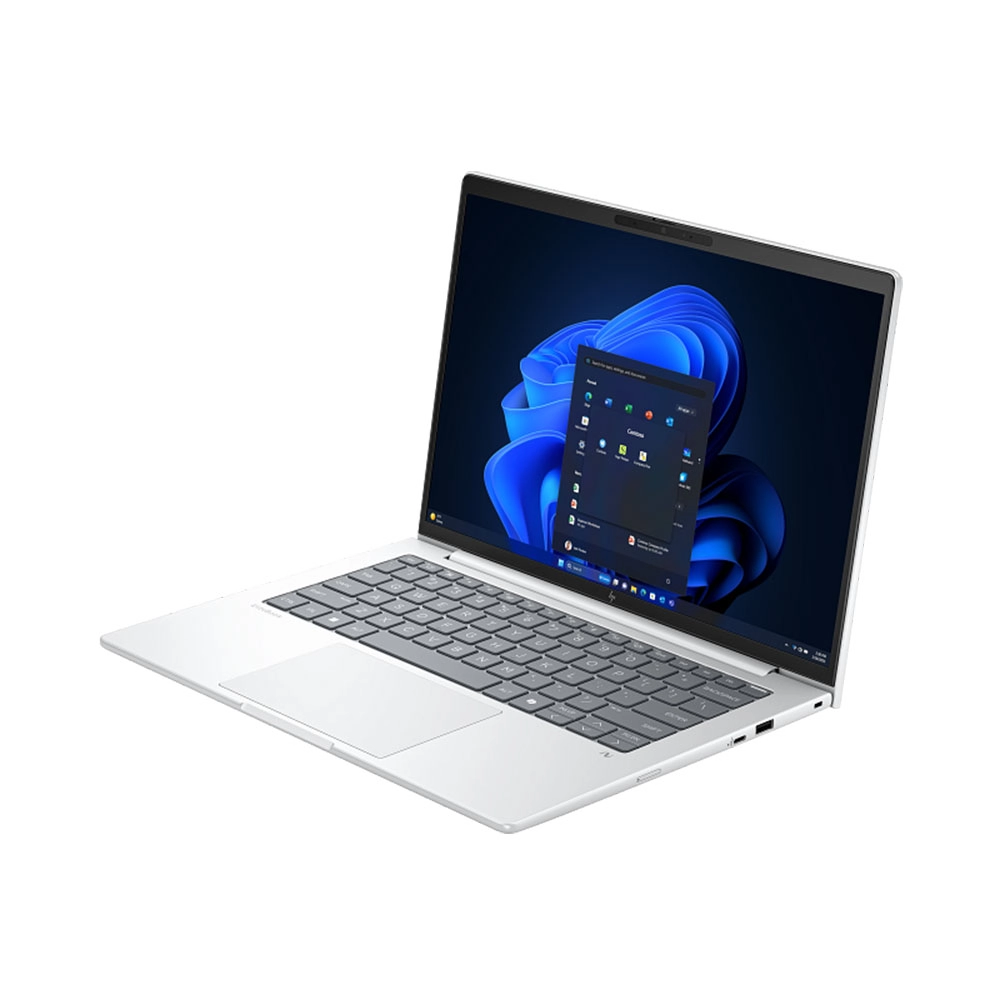
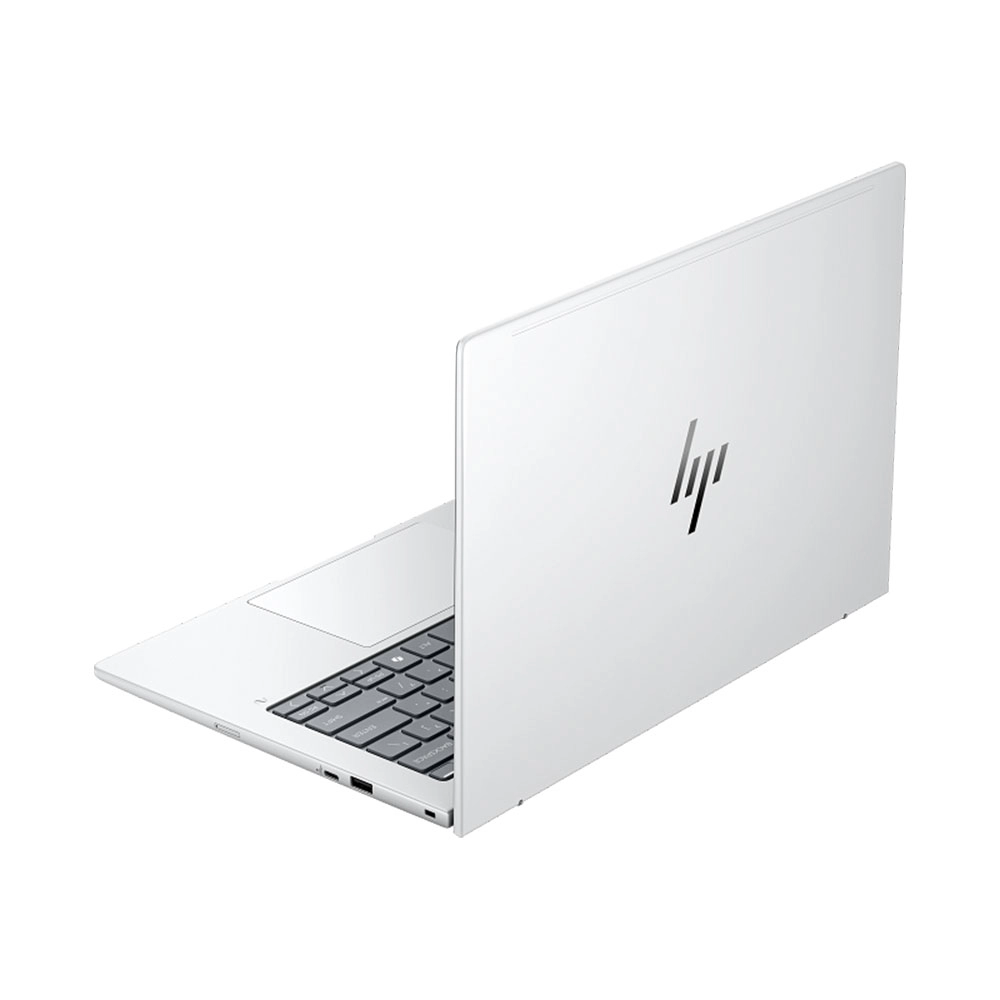
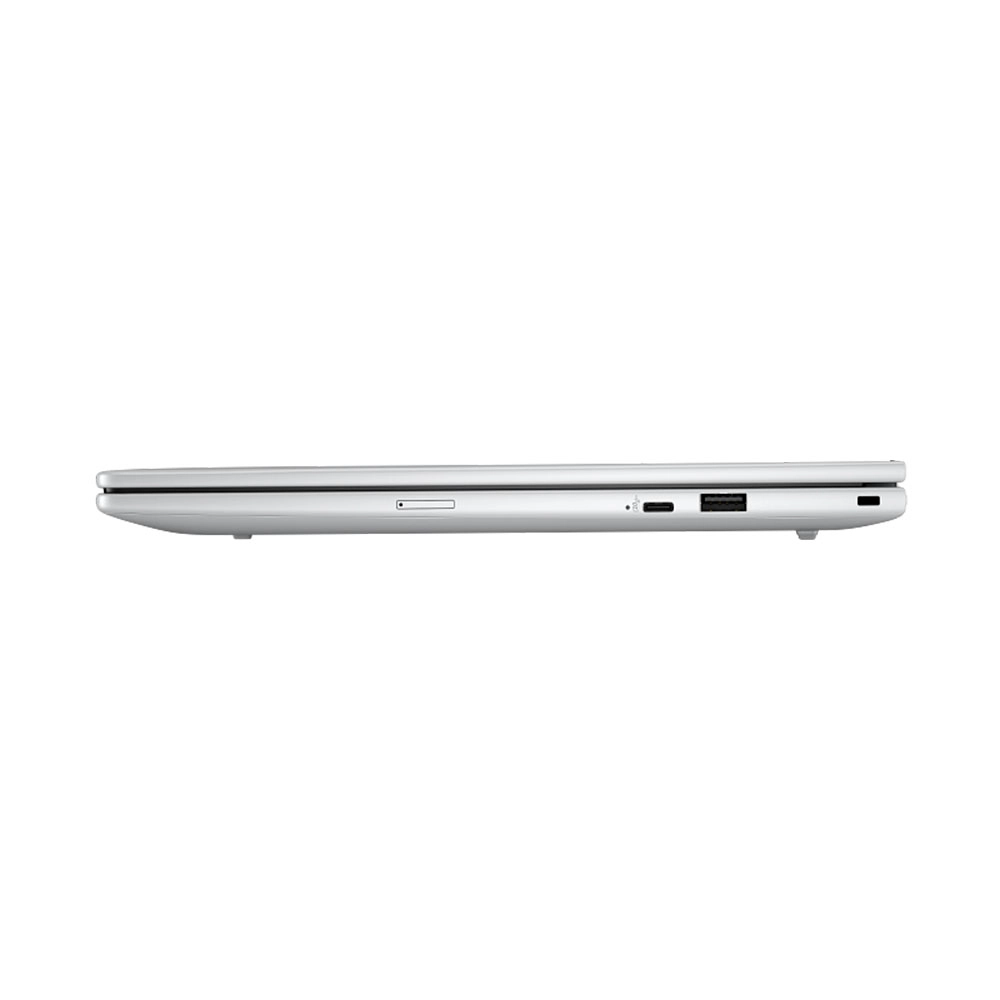
HP Elitebook 8 G1a 14 Laptop – AMD Ryzen AI 5-340, 16GB PC5, 512 SSD, 14 inch

| Brand and Model | HP EliteBook 8 G1a 14 |
|---|---|
| CPU model | AMD Ryzen AI 5-340 |
| Installed RAM memory size | 16GB DDR5-5600 |
| Graphics card description | AMD Radeon 840M Graphics |
| Hard disk size | 512GB SSD NVMe |
| Screen size | 14 Inches |
| Colour | Glacier Silver |
2,600 AED 2,900 AED
HP Elitebook 8 G1a 14 Laptop – AMD Ryzen AI 5-340, 16GB PC5, 512 SSD, 14 inch
The HP Elitebook 8 G1a 14 laptop combines a compact 14-inch business design with AMD Ryzen AI processing, 16GB of DDR5 memory, and 512GB SSD storage. This configuration is designed for users who want a professional laptop that handles everyday office work, multitasking, communication, and productivity without moving to a larger 16-inch chassis.
At the center of this configuration is the AMD Ryzen AI 5-340 processor. It provides 6 CPU cores and 12 threads, with a maximum boost frequency of up to 4.8GHz. In addition, the processor includes an NPU designed for AI workloads. Together with 16GB of memory and fast SSD storage, the platform provides a practical foundation for business and productivity tasks.
HP Elitebook 8 G1a 14 Key Specifications
| Specification | Details |
|---|---|
| Brand | HP |
| Model | EliteBook 8 G1a 14 |
| Processor | AMD Ryzen AI 5-340 |
| CPU Cores / Threads | 6 Cores / 12 Threads |
| Max Boost Frequency | Up to 4.8GHz |
| Processor Cache | 16MB L3 |
| NPU | Up to 50 TOPS |
| RAM | 16GB DDR5-5600 |
| RAM Slots | 2 SODIMM slots |
| Maximum Supported RAM | Up to 64GB |
| Storage | 512GB SSD |
| Available SSD Type | PCIe Gen4 x4 NVMe options |
| Graphics | AMD Radeon integrated graphics |
| Display Size | 14 inch |
| Display Aspect Ratio | 16:10 |
| Display Options | WUXGA and other configuration-dependent panels |
| Operating System | Configuration dependent |
| Wireless | Configuration dependent |
| Condition | Confirm according to the product listing |
| Warranty | Confirm according to the product listing |
The processor, memory options, graphics architecture, display choices, and storage options are supported by HP’s official documentation. HP also confirms that the EliteBook 8 G1a 14 uses two accessible SODIMM slots and supports up to 64GB of DDR5-5600 memory.
AMD Ryzen AI 5-340 Performance
The AMD Ryzen AI 5-340 gives this laptop a different performance profile from traditional entry-level business notebooks. It features 6 cores and 12 threads, a 2.0GHz base clock, and a maximum boost clock of up to 4.8GHz. The processor also includes 16MB of L3 cache and an NPU rated at up to 50 TOPS for supported AI workloads.
For everyday work, the combination is well suited to applications such as web browsing, Microsoft Office, email, video meetings, document management, and multitasking. Because the processor has 12 threads, it can also manage several applications at the same time more comfortably than a basic low-core business CPU.
Moreover, the integrated NPU gives the platform a dedicated component for compatible AI features. However, AI acceleration does not mean that every AI application will automatically run faster. The actual benefit depends on software support and workload.
For programming, business analysis, and general professional software, the Ryzen AI 5-340 provides a strong balance between responsiveness and efficiency. Heavy professional workloads, however, should still be evaluated according to their software requirements.
16GB DDR5 Memory for Everyday Multitasking
This HP Elitebook 8 G1a 14 16GB PC5 laptop comes with 16GB of DDR5 memory. HP specifies DDR5-5600 memory support for this platform.
The 16GB capacity is a sensible level for users who regularly keep multiple browser tabs, office applications, communication tools, and background services open. It also gives the laptop more room for multitasking than an 8GB configuration.
Importantly, HP lists two SODIMM slots and a maximum supported memory capacity of 64GB. Therefore, the platform provides an upgrade path when future workloads require more memory.
This flexibility can matter for business users who plan to keep the laptop for several years. A user working mainly with documents and web applications may find 16GB sufficient, while developers or professionals working with larger datasets can consider a future RAM upgrade.
512GB SSD Storage
The HP Elitebook 8 G1a 14 512 SSD laptop provides 512GB of solid-state storage. HP lists several 512GB PCIe Gen4 x4 NVMe SSD options for the EliteBook 8 G1a 14 family.
Compared with a traditional hard drive, an NVMe SSD provides a much more responsive storage experience. Windows and applications can load quickly, while opening documents and moving between files feels more immediate.
The 512GB capacity also offers a useful balance for business users. It provides enough space for office documents, applications, projects, and everyday files without making the laptop unnecessarily expensive or bulky.
Still, users who regularly store large video libraries, extensive photo collections, or large professional project files may eventually need additional storage.
AMD Radeon Integrated Graphics
The graphics solution is based on AMD Radeon integrated graphics rather than a separate dedicated GPU. HP’s official specifications identify integrated AMD Radeon graphics for the EliteBook 8 G1a 14 platform.
This design makes sense for a business-oriented 14-inch notebook. Integrated graphics can handle everyday visual tasks, office applications, high-resolution media playback, and many productivity workloads without the additional size and power demands of a dedicated graphics card.
The laptop can also be suitable for light creative work and basic image editing. However, it should not be presented as a dedicated gaming or workstation laptop. Users working with demanding 3D rendering, professional GPU-accelerated production, or modern high-end games should consider a model with a dedicated graphics processor.
14-Inch Display for a More Portable Workspace
The HP Elitebook 8 G1a 14 14 inch laptop uses a 14-inch display format with a 16:10 aspect ratio. HP offers several display configurations for this model, including WUXGA 1920 × 1200 panels and higher-end options depending on the configuration.
The 16:10 ratio is particularly useful for productivity because it provides additional vertical workspace compared with a conventional 16:9 screen. As a result, users can see more rows in documents, spreadsheets, and web pages without increasing the physical width of the laptop.
HP’s documented display options include WUXGA panels with different brightness and color-gamut specifications, as well as a 2.5K 2560 × 1600 120Hz option. Because these are configuration choices, the exact panel should be matched with the specific unit being sold rather than assumed from the model name alone.
Business-Oriented Design and Portability
A major reason to consider this model is its 14-inch form factor. Compared with larger business laptops, a 14-inch design is easier to carry between an office, meeting room, university, home workspace, or business trip.
The EliteBook family is positioned around professional use rather than gaming aesthetics. Therefore, this configuration makes more sense for users who value productivity, portability, connectivity, and long-term business use over a large gaming-focused chassis.
The hinge design also allows the display to open to approximately 169 degrees on the EliteBook 8 G1a 14 platform.
However, exact chassis weight, dimensions, keyboard layout, and selected port configuration should be checked against the specific product configuration before publication. HP provides multiple configurations for this platform, so these details should not be copied from a different SKU.
Connectivity and Expansion
HP lists multiple connectivity configurations for the EliteBook 8 G1a 14, including Wi-Fi 7 and Bluetooth 5.4 options, as well as a MediaTek Wi-Fi 6E/Bluetooth 5.3 option. The platform also supports HDMI 2.1 and can support multiple external displays, with docking potentially required for some setups.
For business users, this makes the laptop suitable for desk-based workflows involving external displays, wireless peripherals, and other office equipment.
The exact wireless card and complete port selection should nevertheless be checked against the product’s final configuration. This distinction is important because HP explicitly notes that hardware features vary between custom configurations.
Who Is the HP Elitebook 8 G1a 14 Laptop For?
This configuration is primarily aimed at users who need a professional 14-inch laptop rather than a gaming machine.
Business and Office Work
The combination of Ryzen AI 5-340, 16GB RAM, and 512GB SSD makes the laptop a practical choice for office applications, spreadsheets, presentations, email, browser-based work, and video meetings.
Students and Researchers
Students can benefit from the portable 14-inch format and 16GB memory. The system can comfortably support research, online learning, writing, presentations, and multiple browser tabs.
Programming
For software development, the 6-core/12-thread processor and 16GB memory provide a capable starting point for coding environments, browsers, databases, and development tools.
However, developers working with large virtual machines, containers, or memory-intensive projects may eventually benefit from upgrading the RAM.
Productivity and AI-Assisted Workflows
The Ryzen AI platform adds an NPU for compatible AI workloads. This makes the laptop relevant to users who increasingly rely on AI-enabled applications, provided that their software can take advantage of local NPU acceleration.
Light Creative Work
The integrated AMD Radeon graphics can support everyday image editing and lighter creative workloads. Nevertheless, professionals who depend on intensive GPU rendering or advanced video production should choose a laptop with stronger dedicated graphics.
Advantages and Limitations
Pros
- Ryzen AI 5-340 with 6 cores and 12 threads provides a strong foundation for business multitasking and productivity.
- 16GB DDR5-5600 memory offers a practical capacity for modern office and professional workloads.
- 512GB NVMe SSD storage provides fast application and file access while maintaining useful everyday capacity.
- Two SODIMM slots with support for up to 64GB RAM provide a clear upgrade path for future workloads.
- 14-inch 16:10 format offers a useful balance between portability and workspace.
- Integrated NPU adds dedicated hardware for supported AI workloads.
Limitations
- Integrated AMD Radeon graphics are not intended to replace a dedicated GPU for demanding 3D work or high-end gaming.
- 16GB RAM may become limiting for users running multiple virtual machines or particularly memory-intensive professional applications.
- Display specifications vary by configuration, so buyers should verify the exact panel before purchase.
- Wireless, operating system, and some hardware features can vary between configurations, making exact SKU verification important.
Frequently Asked Questions
Is the HP Elitebook 8 G1a 14 good for business use?
Yes. The Ryzen AI 5-340 processor, 16GB DDR5 memory, 512GB SSD, and compact 14-inch format make this configuration well suited to office, communication, productivity, and professional workloads.
Is 16GB RAM enough for this HP Ryzen laptop?
For everyday office work, programming, study, browsing, and general multitasking, 16GB is a practical capacity. Users with heavier memory requirements can benefit from the platform’s two SODIMM slots and support for up to 64GB.
Can this laptop handle gaming?
The integrated AMD Radeon graphics can handle lighter graphical workloads, but this configuration should not be positioned as a gaming laptop. Users who need demanding gaming performance should look for a system with a dedicated GPU.
Is the 512GB SSD enough?
For office work, study, programming, and general productivity, 512GB is a useful starting capacity. Users who store large media collections or professional project files may eventually need additional storage.
Does the laptop support AI workloads?
Yes. The AMD Ryzen AI 5-340 includes an NPU rated at up to 50 TOPS. The practical benefit depends on whether the applications being used support NPU acceleration.
What display does the HP Elitebook 8 G1a 14 use?
HP offers several display configurations for the 14-inch model. These include WUXGA 1920 × 1200 options and a higher-resolution 2.5K 2560 × 1600 120Hz option. Therefore, the exact display should be confirmed for the specific product configuration.
Final Verdict
The HP Elitebook 8 G1a 14 laptop with AMD Ryzen AI 5-340 is a strong choice for users who want a compact professional computer with modern CPU performance, AI acceleration, upgradeable DDR5 memory, and fast SSD storage.
Its strongest combination is the balance between portability and productivity. The 14-inch 16:10 format keeps the system practical for mobile work, while the Ryzen AI 5-340 and 16GB of RAM provide enough headroom for demanding everyday multitasking.
At the same time, the integrated Radeon graphics define an important boundary. This laptop is better suited to business, programming, education, communication, and productivity than to demanding gaming or professional GPU rendering.
Before placing an order, buyers should check the exact display, operating system, wireless configuration, product condition, warranty, price, and current stock status listed by the seller. This ensures that the selected unit matches the intended configuration rather than relying on specifications from another EliteBook 8 G1a 14 variant.
| Brand | |
|---|---|
| Model | HP EliteBook 8 G1a 14 |
| Processor | |
| RAM | |
| Storage | |
| Graphics | |
| Screen Size | |
| Camera | Integrated Camera |
| Color | |
| Keyboard | Backlit Keyboard, US-English |
| Operating System | Windows 11 Pro |
| Condition | Used-Excellent (Fully Tested) |
| Battery | |
| Weight | 1.4 kg |
| Warranty | 3 Months |
Based on 0 reviews
Only logged in customers who have purchased this product may leave a review.
Related products
-
Business Laptops, Lenovo Thinkpad, Office and Student
Lenovo ThinkPad T480s Core i7 8th 16GB 256GB
-11% Business Laptops, Lenovo Thinkpad, Office and Student
Lenovo ThinkPad T480s Core i7 8th 16GB 256GB
Business Laptops, Lenovo Thinkpad, Office and StudentLenovo ThinkPad T480s Core i7 8th 16GB 256GB
Brand and Model Lenovo Thinkpad T480s CPU model Intel Core i7 8th Gen Installed RAM memory size 16GB DDR4 Graphics card description 2GB Nvidia graphics Hard disk size 256 GB SSD Nvme Screen size 14.1 Inches Full HD Colour Black SKU: n/a -
Business Laptops, HP Elitebook, HP Elitebook 1000 Series, Ultrabook and X360
HP EliteBook 1040 G11 x360 G11 Ultra 5-125H | 16GB RAM | 512GB SSD
-13% Business Laptops, HP Elitebook, HP Elitebook 1000 Series, Ultrabook and X360
HP EliteBook 1040 G11 x360 G11 Ultra 5-125H | 16GB RAM | 512GB SSD
Business Laptops, HP Elitebook, HP Elitebook 1000 Series, Ultrabook and X360HP EliteBook 1040 G11 x360 G11 Ultra 5-125H | 16GB RAM | 512GB SSD
</tr>rong>Screen size
<td class=”yoast-text-mark”>lass=”a-span9″ role=”presentation”>512 GB SSD Nvme&lt;/strong><st<strong>14.1 Inches Full HDss=”a-spacing-small po-ram_memory.installed_size” role=”listitem”>
Intel Ultra 5-125H</span>
ole=”listitem”><td class=”a-span3″ role=”presentation”><strong>Colour</td>
e=”presentation”>Brand and Model HP EliteBook 1040 x360 CPU model</strong> ass=”a-span3″ role=”presentation”><span class=”a-size-base a-text-bold”>Installed RAM memory size >role=”presentation”>>16GB DDR4 role=”presentation”>Graphics card description Intel Iris Graphics class=”a-span3″ role=”presentation”><span class=”a-size-base a-text-bold”>Hard disk size Silver SKU: HP70180 -
Business Laptops, Gaming Laptops, Office and Student, Tablet and Detachable
Surface Book 2 with Core i7-8th | 16GB 512GB
-13% Business Laptops, Gaming Laptops, Office and Student, Tablet and Detachable
Surface Book 2 with Core i7-8th | 16GB 512GB
Business Laptops, Gaming Laptops, Office and Student, Tablet and DetachableSurface Book 2 with Core i7-8th | 16GB 512GB
“>ss=”a-span3″ role=”presentation”>Graphics card description“presentation”>6GB Graphics (NVIDIA)
&am p;lt
;sp
an class=”a-size-base a-text-bold”>Brand and Model lass=”a-size-
base po-bre
ak-word”>Microsoft Surface Book 2&amp;amp;lt;/strong>e=”presentation”><strong>CPU model<strong>Intel Core i7-8thInstalled RAM memory size</span>16GB DDR4s=”a-span3″>e=”presentation”>Hard disk size<strong><span class=”a-size-base po-break-word”>512GB SSD NvmeScreen size</strong>
15.6 Inches Full HDColourSilver
SKU: Su70148 -
Business Laptops, HP Elitebook, Office and Student
HP EliteBook 840 G5 Laptop – Intel Core i5-8th Gen | 8GB RAM | 256GB SSD | 14 inch Display | Win 10
-6% Business Laptops, HP Elitebook, Office and Student
HP EliteBook 840 G5 Laptop – Intel Core i5-8th Gen | 8GB RAM | 256GB SSD | 14 inch Display | Win 10
Business Laptops, HP Elitebook, Office and StudentHP EliteBook 840 G5 Laptop – Intel Core i5-8th Gen | 8GB RAM | 256GB SSD | 14 inch Display | Win 10
SKU: n/a
There are no reviews yet.