







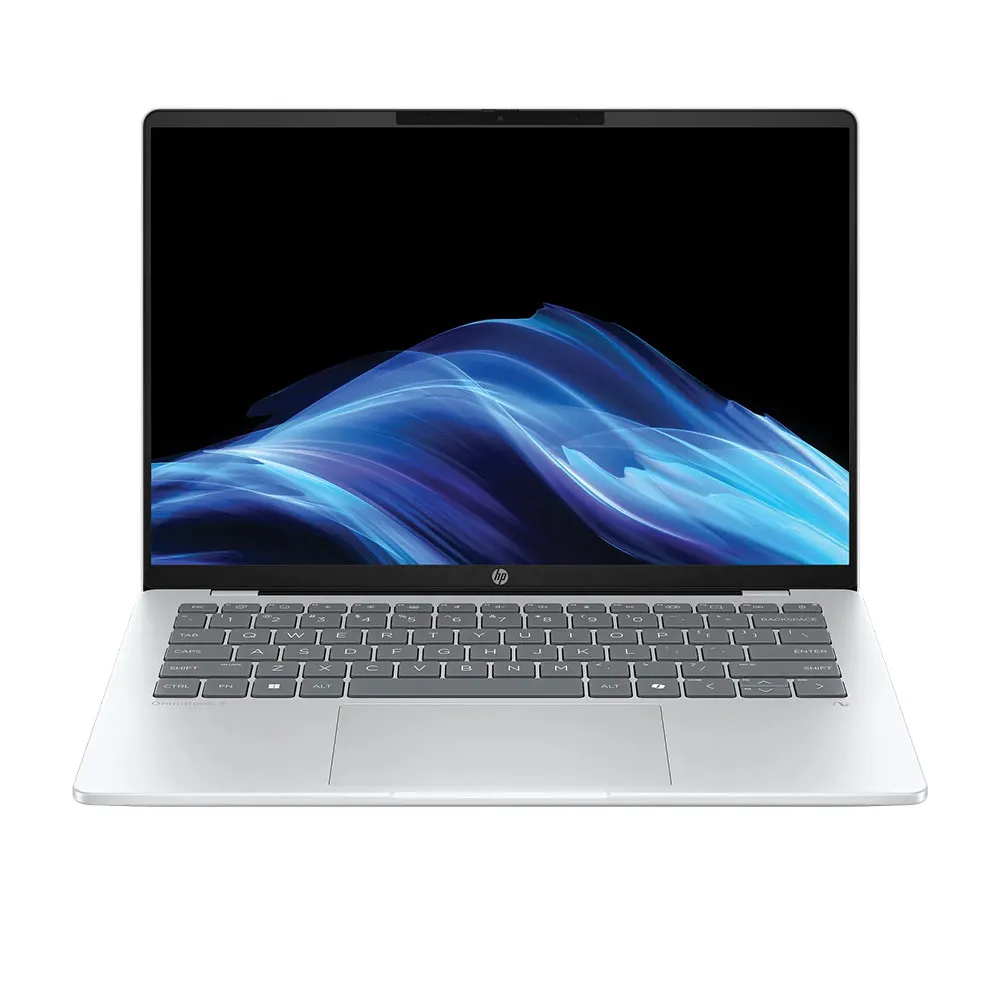


HP EliteBook 8 G1i 14 Ultra 5 125U | 16GB RAM, 512GB SSD

| Brand and Model | HP EliteBook 8 G1i 14 |
|---|---|
| CPU Model | Intel Core Ultra 5 125U |
| Installed RAM Memory Size | 16GB DDR5 |
| Graphics Card Description | Intel Graphics |
| Hard Disk Size | 512GB SSD |
| Screen Size | 14 Inches |
| Colour | Silver |
2,500 AED 3,000 AED
Overview
The HP EliteBook 8 G1i 14 Ultra 5 125U is a business laptop for professionals who need a reliable device for daily work. It combines an Intel Core Ultra 5 processor, 16GB DDR5 RAM, and a 512GB SSD. As a result, users can handle office tasks, browse the web, join online meetings, and work with several applications.
In addition, its 14-inch display offers a practical size for both office use and travel. The compact design also makes it easier to carry between meetings, workspaces, and business trips. If you need a laptop for everyday professional tasks, this model is worth considering.
Before you buy, however, check the exact product configuration with the seller. HP offers several EliteBook models, and their specifications can vary by product number.
HP EliteBook 8 G1i 14 Ultra 5 125U Specifications
| Specification | Details |
|---|---|
| Brand | HP |
| Product series | EliteBook 8 G1i |
| Processor | Intel Core Ultra 5 125U |
| Memory | 16GB DDR5 RAM |
| Storage | 512GB SSD |
| Graphics | Intel Graphics |
| Display size | 14 inches |
| Laptop type | Business laptop |
| Best for | Office work, study, business tasks, and everyday productivity |
1. Intel Core Ultra 5 125U Processor
The Intel Core Ultra 5 125U processor supports everyday business tasks. For example, you can use office software, browse websites, manage email, and join video calls. It also suits users who often switch between common work applications.
Moreover, a suitable processor helps keep daily tasks running smoothly when you use compatible software and maintain enough free system resources. However, performance can vary based on the application, system settings, and exact laptop configuration.
Therefore, this laptop may suit professionals who need a practical device for regular office work rather than a dedicated system for demanding gaming or advanced graphics projects.
2. 16GB DDR5 RAM for Everyday Multitasking
The laptop comes with 16GB DDR5 RAM. This memory capacity gives users room to run several everyday applications at the same time. For instance, you can open documents, use a browser, check email, and attend an online meeting without constantly closing programs.
In addition, DDR5 memory supports modern computing systems. This makes the configuration a useful option for office workers, students, and business users who want a responsive work experience.
Still, your results will depend on the programs you use. Heavy editing tools and other demanding applications may need more memory, so check their system requirements before buying.
3. 512GB SSD for Files and Applications
The 512GB SSD provides space for documents, work files, applications, and personal data. It also helps the system start up and load files quickly compared with many traditional hard drives.
For example, you can keep presentations, spreadsheets, PDFs, and everyday software on the laptop. In addition, solid-state storage has no moving parts, which makes it a practical choice for a portable business computer.
However, the operating system and installed applications will use some of the available space. Therefore, consider your storage needs before you buy. If you regularly work with large video files or extensive project folders, you may need external storage as well.
4. Intel Graphics for Daily Business Tasks
The Intel Graphics solution supports common visual tasks, including web browsing, office applications, video playback, and online meetings. As a result, it can meet the needs of many office users who do not require a separate high-performance graphics card.
Furthermore, integrated graphics can help keep a business laptop practical for everyday use. You can prepare presentations, review documents, and work with standard visual content.
On the other hand, users who edit complex 3D projects, create demanding visual effects, or play graphics-intensive games should review the software requirements first. A laptop with a dedicated graphics card may suit those tasks better.
5. 14-Inch Display for Work and Travel
The 14-inch display offers a balance between screen space and portability. It gives you room to work on documents and spreadsheets while keeping the laptop convenient to carry.
For example, professionals can take it to meetings, use it at a shared desk, or pack it for a business trip. Likewise, students can use the screen for research, writing, and online classes.
Before purchasing, check the exact display resolution, brightness, panel type, and available display features. These details can vary between configurations, so do not rely on screen size alone when comparing laptops.
6. A Practical Laptop for Business Users
The HP EliteBook series focuses on professional computing. This model’s listed configuration combines a modern processor with 16GB RAM and SSD storage, making it a potential fit for everyday business use.
For example, it may suit:
- Office workers who use documents, spreadsheets, and email.
- Business owners who need a portable work computer.
- Students who need a laptop for research and assignments.
- Professionals who attend online meetings and work across several applications.
- Users who want a compact laptop for the office and travel.
If you want to compare other options, visit our business laptops category. You can also explore the HP EliteBook laptop range to review related models.
7. Why Consider the HP EliteBook 8 G1i?
This configuration brings together several features that matter for daily work. First, the Intel Core Ultra 5 processor supports common productivity tasks. Second, 16GB DDR5 RAM helps with everyday multitasking. Finally, the 512GB SSD provides space for your applications and files.
The 14-inch screen also makes the laptop easier to carry than many larger models. In addition, its business-focused design makes it a useful option for people who work in different places.
Nevertheless, you should compare the full specifications before making a decision. Check the product number, display details, processor, memory, storage, warranty, and included accessories. These steps can help you choose the right configuration for your needs.
For further details, you can consult the official HP product documentation. Make sure the document matches the exact model offered by your seller.
Conclusion
The HP EliteBook 8 G1i 14 Ultra 5 125U may be a suitable choice for users who need a portable laptop for everyday business tasks. Its listed configuration includes an Intel Core Ultra 5 processor, 16GB DDR5 RAM, a 512GB SSD, Intel Graphics, and a 14-inch display.
Overall, these specifications make it worth considering for office work, study, and routine productivity. Before you buy, however, confirm the exact model and all listed features with the seller. This final check helps you make a more informed decision.
Frequently Asked Questions
1. Is the HP EliteBook 8 G1i suitable for office work?
Yes. The listed processor, 16GB RAM, and 512GB SSD can support common office tasks, such as working with documents, browsing the web, and joining online meetings.
2. Can I use this laptop for multitasking?
Yes. The 16GB DDR5 RAM can support several everyday applications at once. However, demanding programs may require more memory or additional system resources.
3. Is the 512GB SSD enough for business use?
For many users, 512GB provides enough space for applications, documents, and regular work files. If you store large media files or extensive project data, consider using external storage.
4. Can this laptop handle gaming or advanced graphics work?
The listed Intel Graphics solution targets everyday visual tasks. Therefore, users who need advanced 3D performance or demanding gaming features should check the requirements of their preferred software before buying.
5. What should I check before buying this HP EliteBook?
Confirm the exact model number and verify the processor, RAM, storage, display specifications, warranty, and seller details. Since HP sells different configurations within its laptop ranges, checking the product number helps you avoid ordering the wrong version.
| Brand | |
|---|---|
| Model | HP EliteBook 8 G1i |
| Processor | |
| RAM | |
| Storage | |
| Graphics | |
| Screen Size | |
| Color | |
| Camera | Integrated Camera |
| Operating System | Windows 11 Pro |
| Battery | |
| Weight | 1.39 kg |
| Condition | Used-Excellent (Fully Tested) |
| Warranty | 3 Months |
| Keyboard | US-English |
Based on 0 reviews
Only logged in customers who have purchased this product may leave a review.
Related products
-
Business Laptops, HP Elite 8 (Latest Series), HP Elitebook
HP EliteBook 8 G1a 16 Ryzen 7 250 Laptop
-14% Business Laptops, HP Elite 8 (Latest Series), HP Elitebook
HP EliteBook 8 G1a 16 Ryzen 7 250 Laptop
Business Laptops, HP Elite 8 (Latest Series), HP ElitebookHP EliteBook 8 G1a 16 Ryzen 7 250 Laptop
Brand and Model HP EliteBook 8 G1a 16 CPU Model AMD Ryzen 7 250 Installed RAM Memory Size 16GB DDR5 Graphics Card Description AMD Radeon 780M Hard Disk Size 512GB SSD Screen Size 16 Inches Colour Silver SKU: n/a -
Business Laptops, HP Elite 8 (Latest Series), HP Elitebook
HP EliteBook 8 G1a 14 Ryzen 5 230 Laptop
-17% Business Laptops, HP Elite 8 (Latest Series), HP Elitebook
HP EliteBook 8 G1a 14 Ryzen 5 230 Laptop
Business Laptops, HP Elite 8 (Latest Series), HP ElitebookHP EliteBook 8 G1a 14 Ryzen 5 230 Laptop
Brand and Model HP EliteBook 8 G1a 14 CPU Model AMD Ryzen 5 230 Installed RAM Memory Size 16GB DDR5 Graphics Card Description AMD Radeon Graphics Hard Disk Size 512GB SSD Screen Size 14 Inches Colour Silver SKU: n/a -
Gaming Laptops, Lenovo Legion
Lenovo Legion Gaming Laptop Ryzen 7 5800H 16GB 1TB SSD 6GB Graphics
-20% Gaming Laptops, Lenovo Legion
Lenovo Legion Gaming Laptop Ryzen 7 5800H 16GB 1TB SSD 6GB Graphics
Gaming Laptops, Lenovo LegionLenovo Legion Gaming Laptop Ryzen 7 5800H 16GB 1TB SSD 6GB Graphics
>Graphics card8GB Nvidia</tr><td class=”a-span9″ role=”presentation”>14.1 Inches Full HD
<td class=”a-span9″ role=”presentation”>Lenovo Legion 15.6 Gaming Laptop
</tr>span class=”a-size-base po-break-word”>Silver
=”a-spacing-small po-brand” role=”listitem”>le=”presentation”>&amp;amp;lt;span class=”a-size-base a-text-bold”>Brand and Model
“>ss=”a-span3” role=”presentation”><strong>Installed RAM memory sizerole=”presentation”><strong><span class=”a-size-base po-break-word”>16GB DDR4</strong>Hard disk size512GB SSD Nvme</span></td>Screen sizes=”a-span3″ role=”presentation”>ass=”a-size-base a-text-bold”>Colour
ole=”list” width=”484″>
ass=”a-spacing-small po-model_name” role=”listitem”>ss=”a-span3″ role=”presentation”><strong>CPU model</td>ass=”a-span9″ role=”presentation”>ss=”a-size-base po-break-word”>AMD Ryzen 7</strong>
< SKU: legionpc1 -
Business Laptops, HP Elite 8 (Latest Series), HP Elitebook
HP EliteBook 8 G1a 14 Ryzen AI 5 340 Laptop
-14% Business Laptops, HP Elite 8 (Latest Series), HP Elitebook
HP EliteBook 8 G1a 14 Ryzen AI 5 340 Laptop
Business Laptops, HP Elite 8 (Latest Series), HP ElitebookHP EliteBook 8 G1a 14 Ryzen AI 5 340 Laptop
Brand and Model HP EliteBook 8 G1a 14 CPU Model AMD Ryzen AI 5 340 Installed RAM Memory Size 32GB DDR5 Graphics Card Description AMD Radeon 840M Hard Disk Size 512GB SSD Screen Size 14 Inches Colour Silver AI Features Copilot+ PC SKU: n/a
There are no reviews yet.