









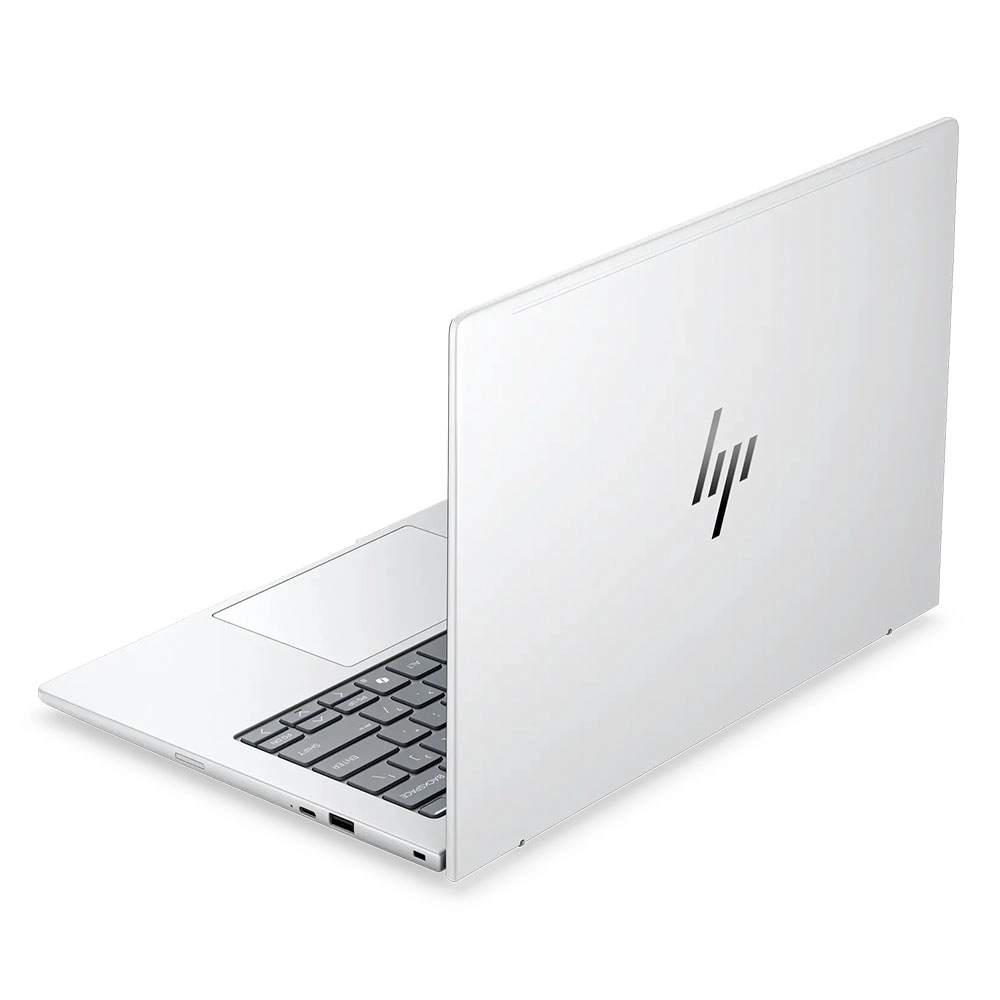

HP Elitebook 8 G2a 14 Laptop – AMD Ryzen AI 7-450, 32GB PC5, 512 SSD, 14 inch

| Brand and Model | HP EliteBook 8 G2a 14 |
|---|---|
| CPU model | AMD Ryzen AI 7-450 |
| Installed RAM memory size | 32GB DDR5-5600 |
| Graphics card description | AMD Radeon 860M Graphics |
| Hard disk size | 512GB SSD NVMe |
| Screen size | 14 Inches |
| Colour | Glacier Silver |
4,300 AED 4,500 AED
HP Elitebook 8 G2a 14 Laptop – AMD Ryzen AI 7-450, 32GB PC5, 512 SSD, 14 inch
A compact laptop does not have to mean modest performance. The HP Elitebook 8 G2a 14 laptop is designed for professionals who need substantial processing power in a portable 14-inch business machine. This configuration features the AMD Ryzen AI 7 450 processor, 32GB of DDR5 memory, a 512GB SSD, and integrated AMD Radeon 860M graphics.
The hardware is particularly well suited to demanding productivity, business applications, programming, multitasking, and AI-assisted workflows. Its 14-inch 16:10 display format also gives users more vertical workspace than a conventional 16:9 panel. For professionals who regularly move between meetings, offices, home, and travel locations, that balance can be more valuable than the larger footprint of a 16-inch notebook.
HP Elitebook 8 G2a 14 Specifications
| Specification | Details |
|---|---|
| Brand | HP |
| Product Family | HP EliteBook |
| Model | EliteBook 8 G2a 14 |
| Processor | AMD Ryzen AI 7 450 |
| CPU Cores / Threads | 8 cores / 16 threads |
| Maximum Boost Frequency | Up to 5.1 GHz |
| L3 Cache | 16 MB |
| NPU | Up to 50 TOPS |
| Graphics | AMD Radeon 860M integrated graphics |
| Graphics Architecture | AMD RDNA 3.5 |
| Memory | 32GB DDR5 |
| Memory Speed | Up to 5600 MT/s |
| Maximum Supported Memory | Up to 64GB |
| Memory Slots | 2 SODIMM slots |
| Storage | 512GB SSD |
| Display Size | 14 inch |
| Typical Resolution Options | WUXGA 1920 × 1200 |
| Aspect Ratio | 16:10 |
| Operating System | Windows 11 Pro on supported configurations |
| Wireless Options | Wi-Fi 7 / Bluetooth 6.0 or Wi-Fi 6E / Bluetooth 5.3, depending on configuration |
| Graphics API | DirectX 12 |
| HDMI | HDMI 2.1 support |
| Display Options | Multiple WUXGA and higher-resolution configurations are available |
A Smaller Business Laptop with More Headroom
The HP Elitebook 8 G2a 14 inch laptop targets users who want mobility without stepping down to entry-level hardware. A 14-inch chassis is easier to fit into a work bag, and the 16:10 format makes the available screen area more useful for documents, spreadsheets, browser windows, and code.
HP offers this model with several display configurations, so buyers should check the exact SKU before ordering. Available panels include WUXGA options as well as higher-end configurations with features such as 400-nit brightness, 100% sRGB coverage, 120Hz refresh, or OLED technology.
That flexibility is important. The EliteBook 8 G2a platform can be configured for different professional requirements rather than relying on one fixed display specification.
AMD Ryzen AI 7 450: Eight Cores for Demanding Workloads
Processing power comes from the AMD Ryzen AI 7 450. It provides eight CPU cores and sixteen threads, with a maximum boost clock of up to 5.1 GHz and 16MB of L3 cache.
For office work, the extra CPU capacity becomes useful when several demanding applications run simultaneously. Large Excel workbooks, browser-heavy research, communication software, presentations, databases, and development environments can all compete for processor resources. Eight cores give the system more room to handle that kind of workload.
The processor also belongs to AMD’s Ryzen AI 400 series. Its integrated NPU can deliver up to 50 TOPS for supported AI workloads. Consequently, compatible AI features can use dedicated neural-processing hardware instead of placing the entire workload on the CPU.
Clock speed should not be viewed in isolation, though. Actual performance depends on the application, power mode, thermal conditions, and system configuration.
32GB DDR5 Memory and Upgrade Potential
The HP Elitebook 8 G2a 14 32GB PC5 laptop has enough memory for users who expect more from a business notebook than email and web browsing.
The platform supports DDR5-5600 memory and provides two replaceable SODIMM slots, with HP listing support for up to 64GB in this model family. That means the memory architecture is more flexible than the onboard-only designs found in some thin laptops.
With 32GB installed, demanding multitasking becomes much more comfortable. Running an IDE, multiple browser sessions, Teams or another communication application, spreadsheets, and background utilities at the same time is a realistic use case.
For buyers planning a longer ownership period, the upgradeable SODIMM design is also worth noting. The exact memory configuration should still be checked against the product SKU because HP offers different RAM combinations.
512GB SSD for Everyday Professional Storage
Storage capacity sits at 512GB in this configuration. The SSD provides the responsiveness expected from modern NVMe storage, helping Windows, applications, and frequently accessed files load quickly.
A HP Elitebook 8 G2a 14 512 SSD laptop with 512GB is a practical choice for documents, presentations, business software, development projects, photos, and moderate media storage.
There is a straightforward trade-off. Users who maintain large video archives, extensive datasets, or sizable game libraries may eventually need external storage or a higher-capacity SSD. For conventional business workloads, however, 512GB provides a useful starting point.
Radeon 860M Graphics: Integrated, but Far from Basic
Graphics processing is handled by the AMD Radeon 860M. It is an integrated GPU based on AMD’s RDNA 3.5 architecture, with eight graphics cores.
Because it is integrated rather than a separate dedicated graphics card, it shares system resources with the rest of the platform. Even so, it provides considerably more flexibility than the basic graphics solutions found in many entry-level office laptops.
Everyday graphics acceleration, high-resolution displays, photo editing, multimedia, web applications, and lighter creative workloads are appropriate areas for this GPU.
The limitations become clearer with heavier workloads. Professional 3D rendering, complex CAD scenes, serious local AI model training, and modern AAA gaming are better matched with a laptop that includes a dedicated GPU.
14-Inch Display Options for Different Professional Needs
The HP Elitebook 8 G2a 14 14 inch laptop is available with several display choices. The common WUXGA resolution is 1920 × 1200, while HP also lists a 2.5K 2560 × 1600 120Hz panel among the available options.
The 16:10 aspect ratio is particularly useful for work. More vertical pixels mean less scrolling through long documents, webpages, spreadsheets, and programming files.
Display quality can vary substantially between configurations. HP lists panels ranging from 300-nit WUXGA screens to brighter 400-nit and 800-nit options, while color coverage can reach 100% sRGB or, on selected higher-end panels, 100% DCI-P3 and Adobe RGB coverage.
For that reason, the display should be treated as a configuration-specific specification rather than a universal feature of every EliteBook 8 G2a 14.
Connectivity for Office and Mobile Work
A modern business notebook needs more than CPU performance. The EliteBook 8 G2a 14 platform supports current wireless standards, including Wi-Fi 7 and Bluetooth 6.0 on selected configurations.
HP also specifies HDMI 2.1 support, allowing compatible external displays to connect directly to the notebook. USB connectivity and docking support further expand the system’s usefulness in office environments.
For professionals who move between a desk and meeting rooms, this matters because the laptop can function as both a mobile workstation and the center of a larger desktop setup.
Business Productivity
Business productivity is where this HP Ryzen laptop makes the most sense.
The Ryzen AI 7 450 gives the system enough CPU capacity for demanding multitasking, while 32GB of memory prevents many of the slowdowns associated with running numerous applications simultaneously.
Typical workloads include:
- Microsoft Word, Excel, PowerPoint, and Outlook
- Financial and accounting applications
- CRM and ERP software
- Web-based business platforms
- Video conferencing
- Research and data analysis
- Large browser workloads
- Remote and hybrid work
- AI-assisted office applications
- Programming and development environments
Users who spend most of their working day switching between multiple applications can make particularly good use of the available memory and CPU resources.
Programming and Development
Developers have several reasons to consider this configuration.
The eight-core Ryzen AI 7 450 can handle compilers, IDEs, local services, databases, browsers, and development utilities simultaneously. With 32GB of RAM, developers can also work with heavier projects without immediately running into memory limitations.
The 512GB SSD provides a responsive environment for source code, development tools, virtual environments, and project files. If several large virtual machines or extensive local datasets are involved, additional storage capacity may eventually become desirable.
For AI development, the integrated NPU is useful for supported AI features and workloads. It does not replace a dedicated high-end GPU for intensive model training, so users with GPU-heavy machine-learning requirements should choose hardware accordingly.
Creative and Professional Applications
Creative users can take advantage of the higher-end display options offered for this platform. A 100% sRGB panel can be useful for web graphics, photography, presentations, and content production, while the higher-end 2.5K display options offer additional workspace and image detail.
The Radeon 860M is suitable for lighter GPU-assisted editing and content creation. Photo editing, graphic design, presentation design, and moderate video work are reasonable expectations.
Heavy 3D rendering and professional video production require a more specialized graphics solution. A dedicated GPU would provide a stronger foundation for workloads where rendering time and GPU acceleration dominate the workflow.
Gaming: Capable of Casual Play, Not a Gaming Laptop
Despite its relatively strong integrated graphics, the HP Elitebook 8 G2a 14 laptop remains a business-oriented machine.
Less demanding games and esports titles can be suitable with sensible graphics settings. Older games may also run comfortably depending on the title and selected resolution.
Modern AAA games present a different challenge. The Radeon 860M does not have the dedicated VRAM and raw GPU resources of a high-end gaming graphics card. Therefore, anyone purchasing primarily for gaming should consider a dedicated-GPU laptop instead.
Security and Professional Features
EliteBook is positioned as HP’s business-oriented laptop family, and the 8 G2a platform reflects that focus.
Depending on the exact configuration, HP offers features such as Windows 11 Pro, business security options, privacy-focused display technology, IR camera functionality, and enterprise-oriented support features.
These features matter more in professional environments than they do for casual home use. Companies managing sensitive information, remote employees, and multiple business devices can benefit from a platform designed with business deployment in mind.
Pros and Cons
Pros
- AMD Ryzen AI 7 450 with 8 cores and 16 threads
- Up to 5.1 GHz maximum boost frequency
- 50-TOPS NPU for supported AI workloads
- 32GB DDR5 memory
- Two replaceable SODIMM slots with support up to 64GB
- Fast 512GB SSD configuration
- Integrated AMD Radeon 860M graphics
- 14-inch 16:10 display format
- Multiple display choices, including high-quality 2.5K options
- Modern Wi-Fi 7 and Bluetooth 6.0 options
- HDMI 2.1 support
- Strong fit for business and professional multitasking
Cons
- Display specifications vary considerably between SKUs
- Integrated Radeon 860M is not a replacement for a dedicated high-end GPU
- 512GB may be insufficient for users with large media collections
- Actual wireless and display features depend on the selected configuration
- Buyers should verify the exact RAM arrangement and display before purchase
Who Is the HP Elitebook 8 G2a 14 For?
This laptop makes the most sense for professionals who value mobility but do not want to compromise heavily on processing resources.
The HP Elitebook 8 G2a 14 laptop is a good match for:
- Business professionals
- Managers and consultants
- Programmers
- Students working with demanding applications
- Data and research professionals
- Remote workers
- Office users with heavy multitasking requirements
- Professionals using supported AI productivity features
- Users who need a portable business computer with upgradeable memory
A different class of laptop would be more appropriate for serious gaming, advanced 3D rendering, or sustained GPU-intensive production.
Frequently Asked Questions
What processor is inside the HP Elitebook 8 G2a 14?
This configuration uses the AMD Ryzen AI 7 450. It has 8 CPU cores, 16 threads, a maximum boost frequency of up to 5.1 GHz, and a 16MB L3 cache.
How much RAM does the HP Elitebook 8 G2a 14 support?
HP lists two replaceable SODIMM slots and a maximum supported memory capacity of 64GB. The 32GB configuration can therefore provide substantial multitasking capacity while retaining an upgrade path.
Does the Elitebook 8 G2a 14 have a dedicated graphics card?
No. It uses integrated AMD Radeon 860M graphics. The GPU is capable of everyday graphics acceleration and lighter creative or gaming workloads, but it is not intended to replace a dedicated workstation or gaming GPU.
Is the 14-inch screen suitable for business work?
Yes. The 16:10 format is especially useful for documents, spreadsheets, web applications, and programming. However, HP offers several display configurations, so brightness, resolution, refresh rate, and color coverage should be checked for the exact SKU.
Is 512GB enough for professional use?
For most office, programming, and general productivity workloads, 512GB is a practical capacity. Users storing large video projects, datasets, or extensive media libraries may prefer additional storage.
Can the HP Elitebook 8 G2a 14 handle AI applications?
The Ryzen AI 7 450 includes an NPU rated at up to 50 TOPS. Supported AI features can use this dedicated hardware. More demanding AI development and local model training may still require a dedicated GPU.
Final Verdict
The HP Elitebook 8 G2a 14 laptop brings an unusually capable processor into a compact business format. The Ryzen AI 7 450 provides eight cores and sixteen threads, while its integrated NPU adds dedicated acceleration for compatible AI workloads.
Memory capacity is another strong point. With 32GB DDR5 and an upgradeable SODIMM platform, the notebook has enough flexibility for demanding multitasking today and potential expansion later. The 512GB SSD completes a storage setup that fits most professional productivity requirements.
Its integrated Radeon 860M is well suited to everyday graphics and lighter creative workloads, but it does not turn the EliteBook into a gaming or workstation machine. Likewise, buyers should pay close attention to the exact display configuration because HP offers several significantly different 14-inch panels.
For UAE professionals looking for a portable Windows business laptop with strong CPU performance, generous memory, modern AI capabilities, and a practical 14-inch footprint, this configuration deserves serious consideration. Before ordering, confirm the exact SKU, display, RAM configuration, warranty, availability, and after-sales coverage for the UAE market.
| Brand | |
|---|---|
| Model | Elitebook 8 G2a 14 |
| Processor | |
| RAM | |
| Storage | |
| Graphics | |
| Screen Size | |
| Camera | Integrated Camera |
| Color | |
| Keyboard | HP Premium Backlit Keyboard with Numeric Keypad |
| Operating System | Windows 11 Pro |
| Condition | Used-Excellent (Fully Tested) |
| Battery | |
| Weight | 1.44 kg |
| Warranty | 3 Months |
Based on 0 reviews
Only logged in customers who have purchased this product may leave a review.
Related products
-
Business Laptops, HP Elitebook, Ultrabook and X360
HP EliteBook 1040 G10 X360 Intel Core i5-1355U | 16GB RAM | 512GB SSD
-8% Business Laptops, HP Elitebook, Ultrabook and X360
HP EliteBook 1040 G10 X360 Intel Core i5-1355U | 16GB RAM | 512GB SSD
Business Laptops, HP Elitebook, Ultrabook and X360HP EliteBook 1040 G10 X360 Intel Core i5-1355U | 16GB RAM | 512GB SSD
Brand and Model HP Elitebook 1040 x360 G10 CPU model Intel Core i5-1335U Installed RAM memory size 16GB DDR4 Graphics card description Intel Iris Xe Graphics Hard disk size 512 GB SSD Nvme Screen size 14.1 Inches Full HD Colour Silver SKU: HP70182 -
Business Laptops, HP Elitebook, Office and Student
HP EliteBook 840 G8 14 – Intel Core i7-11th Gen | 16GB RAM | 256GB SSD | 14 inch Display | Windows 11 Pro
-4% Business Laptops, HP Elitebook, Office and Student
HP EliteBook 840 G8 14 – Intel Core i7-11th Gen | 16GB RAM | 256GB SSD | 14 inch Display | Windows 11 Pro
Business Laptops, HP Elitebook, Office and StudentHP EliteBook 840 G8 14 – Intel Core i7-11th Gen | 16GB RAM | 256GB SSD | 14 inch Display | Windows 11 Pro
SKU: n/a -
Business Laptops, HP Pavilion, Office and Student, Ultrabook and X360
HP Pavilion 14 x360 Core i5-8265U | 16GB 512GB
-19% Business Laptops, HP Pavilion, Office and Student, Ultrabook and X360
HP Pavilion 14 x360 Core i5-8265U | 16GB 512GB
Business Laptops, HP Pavilion, Office and Student, Ultrabook and X360HP Pavilion 14 x360 Core i5-8265U | 16GB 512GB
</tr>
</tr>/span>class=””a-size-base”>”>16GB DDR4</strong>
lass=”yoast-text-mark”>lass=”yoast-text-mark”>lass=”yoast-text-mark”>lass=”yoast-text-mark”>lass=”a-span3″>e=”presentation”>Brand and Model </td> =”presentation”>HP Pavilion 14 x360</td></td> lass=”a-span3″ role=”presentation”><strong>“a-size-base a-text-bold”>CPU model Intel Core i5-8265U Installed RAM memory size< <span class=”a-size-base a-text-bold”>Graphics card description ss=”a-span9″ role=”presentation”><strong>Intel UHD</strong></td> “>ass=”a-size-base a-text-bold”>Hard disk size “a-size-base po-break-word”>512GB SSD Nvme</td> >Screen size 14.6 Inches Full HD Colour Platinum SKU: HP70176 -
Business Laptops, Gaming Laptops, Office and Student, Tablet and Detachable
Surface Book 2 with Core i7-8th | 16GB 512GB
-13% Business Laptops, Gaming Laptops, Office and Student, Tablet and Detachable
Surface Book 2 with Core i7-8th | 16GB 512GB
Business Laptops, Gaming Laptops, Office and Student, Tablet and DetachableSurface Book 2 with Core i7-8th | 16GB 512GB
“>ss=”a-span3″ role=”presentation”>Graphics card description“presentation”>6GB Graphics (NVIDIA)
&am p;lt
;sp
an class=”a-size-base a-text-bold”>Brand and Model lass=”a-size-
base po-bre
ak-word”>Microsoft Surface Book 2&amp;amp;lt;/strong>e=”presentation”><strong>CPU model<strong>Intel Core i7-8thInstalled RAM memory size</span>16GB DDR4s=”a-span3″>e=”presentation”>Hard disk size<strong><span class=”a-size-base po-break-word”>512GB SSD NvmeScreen size</strong>
15.6 Inches Full HDColourSilver
SKU: Su70148
There are no reviews yet.