








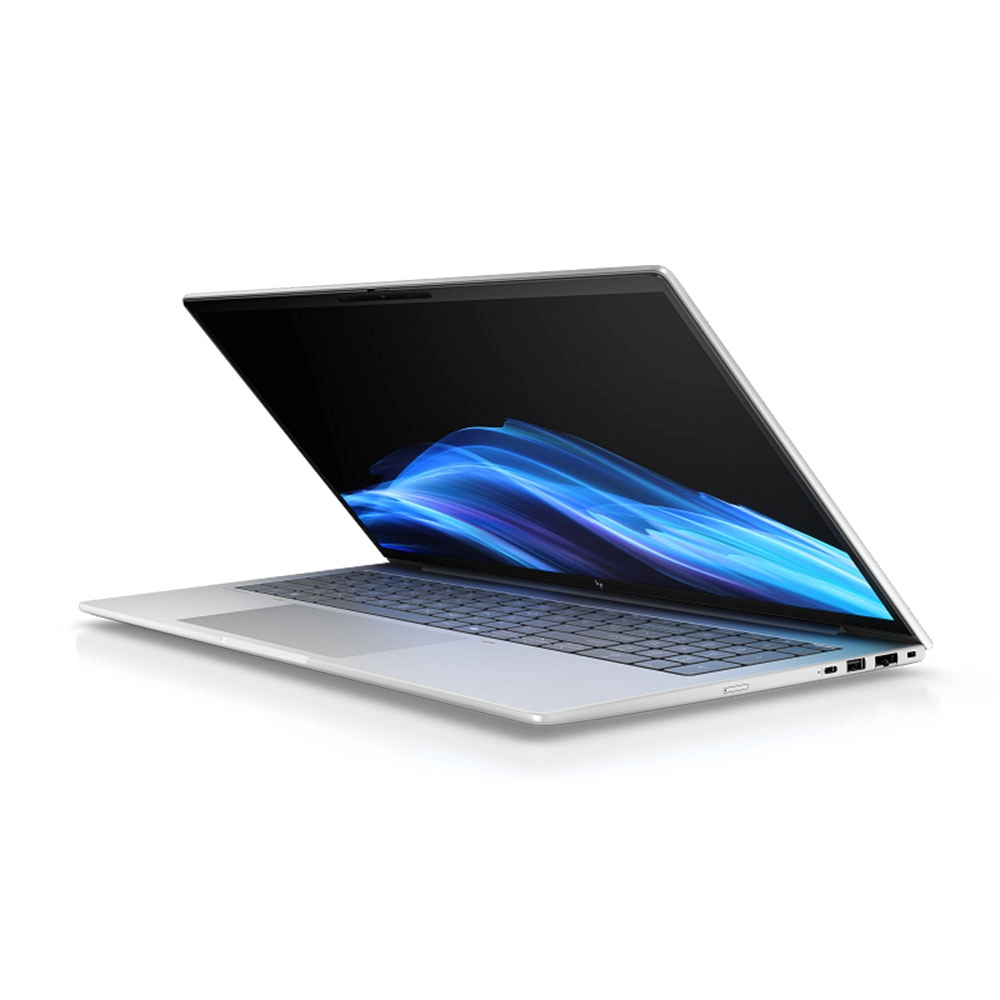


HP Elitebook 8 G1a 16 Laptop – AMD Ryzen AI 7-350, 32GB PC5, 512 SSD, 16 inch

| Brand and Model | HP EliteBook 8 G1a 16 |
|---|---|
| CPU model | AMD Ryzen AI 7-350 |
| Installed RAM memory size | 32GB DDR5-5600 |
| Graphics card description | AMD Radeon 860M Graphics |
| Hard disk size | 512GB SSD NVMe |
| Screen size | 16 Inches |
| Colour | Glacier Silver |
3,600 AED 4,000 AED
HP Elitebook 8 G1a 16 Laptop – AMD Ryzen AI 7-350, 32GB PC5, 512 SSD, 16 inch
The HP Elitebook 8 G1a 16 laptop is designed for professionals who want a larger workspace without giving up modern mobile performance. This configuration combines the AMD Ryzen AI 7-350 processor with 32GB of DDR5 memory, 512GB SSD storage, and a 16-inch display.
Instead of targeting one narrow type of user, this laptop focuses on a balanced professional experience. The larger screen gives office applications, spreadsheets, documents, and multitasking more room, while the Ryzen AI 7-350 provides the processing capacity needed for demanding everyday workloads.
The result is a business-oriented laptop that can fit naturally into office work, programming, research, content-related tasks, and AI-assisted productivity.
HP Elitebook 8 G1a 16 Specifications
| Specification | Details |
|---|---|
| Brand | HP |
| Model | EliteBook 8 G1a 16 |
| Processor | AMD Ryzen AI 7-350 |
| CPU Architecture | Zen 5 / Zen 5c |
| Cores / Threads | 8 Cores / 16 Threads |
| Base Frequency | 2.0GHz |
| Maximum Boost | Up to 5.0GHz |
| Total Cache | 24MB |
| NPU | Up to 50 TOPS |
| Graphics | AMD Radeon 860M |
| RAM | 32GB DDR5 |
| Memory Speed | DDR5-5600 supported |
| Storage | 512GB SSD |
| Display Size | 16 inch |
| Display Resolution | 1920 × 1200 WUXGA on the verified configuration |
| Aspect Ratio | 16:10 |
| Operating System | Windows 11 Pro on the verified HP configuration |
| Display Type | IPS on the verified configuration |
| Product Class | Business / Professional Laptop |
HP’s official product listing confirms a 16-inch EliteBook 8 G1a configuration with Ryzen AI 7 350, 32GB DDR5, 512GB SSD, WUXGA display, and Windows 11 Pro. AMD confirms the processor’s 8-core/16-thread design and up to 5.0GHz boost speed.
A Larger Screen for Professional Work
The first thing that separates this configuration from a typical compact business notebook is the 16-inch display.
A larger screen can make a practical difference when working with spreadsheets, dashboards, long documents, browser-based applications, or side-by-side windows. Instead of constantly switching between applications, users can keep more information visible at once.
The verified HP configuration uses a 1920 × 1200 WUXGA display with a 16:10 aspect ratio. The extra vertical space compared with a conventional 16:9 screen is useful for documents and productivity applications because more content can fit on the screen at the same time.
For business users, this screen size can be especially useful when the laptop serves as the primary work computer rather than a secondary travel device.
AMD Ryzen AI 7-350: Built for Multitasking
The processor gives this configuration its main performance advantage.
The AMD Ryzen AI 7-350 features 8 CPU cores and 16 threads. Its base frequency is 2.0GHz, while the maximum boost frequency reaches up to 5.0GHz. AMD also specifies 24MB of total cache and a 50 TOPS NPU for AI processing.
These specifications make the processor well suited to workloads that involve several applications at the same time. For example, a professional can work with a large spreadsheet while keeping a browser, email client, video meeting, document editor, and communication application open.
The 8-core/16-thread design also gives programmers and technical users more CPU resources for development tools and parallel workloads.
However, processor specifications alone do not guarantee identical performance in every application. Actual results depend on software optimization, workload, power settings, cooling, and the specific task being performed.
32GB PC5 Memory for Serious Productivity
The HP Elitebook 8 G1a 16 32GB PC5 laptop is equipped with 32GB of DDR5 memory.
That capacity changes the way the laptop fits into a professional workflow. Instead of focusing only on basic office applications, the system has enough memory headroom for more demanding multitasking.
A user can keep multiple browser sessions, office applications, communication tools, development environments, and other professional software active without making memory capacity the first limitation.
For programming, 32GB can also be useful when working with local databases, containers, development environments, or other memory-demanding tools.
Likewise, professionals who work with large spreadsheets and multiple data sources can benefit from the additional capacity.
Still, 32GB is not a guarantee that every application will perform faster. The benefit becomes more noticeable when the workload actually consumes substantial memory.
512GB SSD for Everyday Professional Storage
The HP Elitebook 8 G1a 16 512 SSD laptop combines its 32GB memory with 512GB of SSD storage.
Solid-state storage keeps the system responsive during normal use. Applications can launch quickly, documents can open without the delays associated with mechanical drives, and everyday file operations remain convenient.
For a professional laptop, 512GB offers a sensible balance. It provides room for productivity software, documents, presentations, project files, development tools, and personal data.
There is also a practical limitation. Users who regularly work with large video projects, extensive image libraries, virtual machines, or large datasets may eventually need additional storage.
Therefore, 512GB works particularly well for general professional use, while storage-heavy users should plan their long-term capacity needs.
AMD Radeon 860M Graphics
Graphics processing comes from the AMD Radeon 860M, which is integrated into the Ryzen AI 7-350 platform. AMD specifies 8 graphics cores for the Radeon 860M.
This solution fits the overall character of the laptop. The EliteBook 8 G1a 16 is primarily a professional productivity system, so it does not rely on a separate high-power graphics card.
The integrated Radeon graphics can handle everyday visual workloads, office applications, presentations, media playback, and moderate creative tasks.
It can also support lighter graphics-oriented work. However, users should distinguish this from a laptop with a dedicated GPU.
For demanding 3D rendering, professional GPU-accelerated applications, or high-end gaming, a dedicated graphics laptop remains the better choice.
AI Features with Ryzen AI
The Ryzen AI 7-350 adds another dimension to the laptop beyond conventional CPU performance.
AMD specifies up to 50 TOPS of NPU performance for this processor. The NPU is designed to accelerate compatible AI workloads without relying entirely on the CPU.
This can become useful as more productivity and creative applications add local AI features. For example, supported software may use AI hardware for tasks such as intelligent assistance, image processing, or other local AI operations.
However, the NPU should not be treated as a universal performance accelerator. The actual advantage depends on software support and the type of AI workload.
For users interested in newer AI-enabled PCs, though, the Ryzen AI platform gives this configuration a more modern foundation than a conventional non-AI business laptop.
16:10 Display for Multitasking
The HP Elitebook 8 G1a 16 16 inch laptop is particularly interesting for users who spend much of their day looking at documents and applications.
The verified configuration uses a 16-inch 1920 × 1200 WUXGA display. Its 16:10 ratio provides more vertical workspace than a traditional 16:9 screen.
That extra space can help when:
- Reviewing long documents
- Working with spreadsheets
- Comparing information across windows
- Managing dashboards
- Reading websites and research material
- Writing code
- Working with business applications
The larger panel also makes the laptop more suitable for users who prefer to use the built-in screen as their main workspace.
At the same time, a 16-inch notebook occupies more physical space than a 14-inch model. Therefore, users who prioritize minimum size and weight for frequent travel may prefer the smaller EliteBook format.
Business-Oriented Design
The EliteBook 8 G1a 16 belongs to HP’s professional laptop family. Its configuration focuses on productivity rather than gaming aesthetics.
That positioning makes it a natural fit for office environments, professional workspaces, remote work, and business travel where screen space matters.
The 16-inch format creates a useful middle ground. It offers a larger workspace than a compact business laptop without moving into the territory of a desktop replacement with a very large display.
For users who work primarily at a desk, this can be a particularly practical choice. The screen provides more room for applications, while the laptop remains flexible enough to move when necessary.
Connectivity and Professional Use
The EliteBook 8 G1a 16 platform supports a range of business-oriented connectivity options, although the exact configuration can vary by SKU.
HP’s platform documentation includes modern USB connectivity, USB-C support, display connectivity, and wireless configurations. Because individual EliteBook configurations can differ, buyers should match the complete port and wireless specification with the exact unit listed by the seller.
This matters for professionals who plan to connect external monitors, docking stations, storage devices, wired accessories, or other office equipment.
For a laptop that may serve as a primary business computer, connectivity can be just as important as CPU performance.
Performance for Business and Productivity
The HP Elitebook 8 G1a 16 laptop for business and productivity is best understood as a multitasking-focused system.
The combination of 8 CPU cores, 16 threads, 32GB RAM, and 512GB SSD provides a strong foundation for modern professional workloads.
A typical workday might include:
- Microsoft Office applications
- Large spreadsheets
- Email and communication tools
- Dozens of browser tabs
- Video meetings
- Cloud applications
- Business management software
- Programming tools
- Research applications
The laptop can also make sense for professionals who want additional performance headroom instead of buying a system designed only for basic office work.
Programming and Technical Work
Developers can benefit from the Ryzen AI 7-350’s 8-core/16-thread design and 32GB memory.
The configuration is suitable for common development workflows involving IDEs, browsers, databases, local services, and development tools.
The 32GB memory capacity is particularly useful when a workflow includes several resource-intensive applications at the same time.
However, specialized workloads still need individual consideration. Large-scale virtual machines, heavy local AI models, or highly demanding compilation workloads can require more specialized hardware.
Content Creation and Graphics Work
The integrated Radeon 860M provides more graphics capability than a basic display adapter, so the laptop can handle moderate creative workloads.
It can make sense for:
- Basic photo editing
- Presentation design
- Social media content preparation
- Light video editing
- General multimedia work
Nevertheless, professionals who depend on intensive 3D rendering, advanced video effects, or GPU-heavy creative applications should consider a laptop with a dedicated graphics processor.
This distinction is important because the Ryzen AI 7-350 offers strong CPU performance, but CPU strength does not turn an integrated GPU into a workstation-class graphics solution.
Is This Laptop Suitable for Gaming?
The HP Elitebook 8 G1a 16 is not primarily a gaming laptop.
The Radeon 860M can handle lighter gaming workloads, but the system lacks the dedicated GPU class typically chosen for demanding modern games.
Therefore, casual or less demanding gaming can be reasonable, while users specifically shopping for high-end gaming performance should select a gaming-focused laptop with a dedicated graphics card.
This approach also reflects the intended design of the EliteBook family: professional productivity comes first.
Pros and Cons
Pros
- AMD Ryzen AI 7-350 with 8 cores and 16 threads provides strong processing capacity for multitasking.
- 32GB DDR5 memory gives professional users substantial headroom for demanding workflows.
- 512GB SSD storage offers a practical balance of speed and capacity.
- 16-inch WUXGA 16:10 display provides more workspace for documents, spreadsheets, and multitasking.
- Radeon 860M integrated graphics handles everyday graphical workloads without requiring a separate GPU.
- 50 TOPS NPU capability gives the platform dedicated hardware for supported AI workloads.
Cons
- Integrated graphics are not a replacement for a dedicated GPU in demanding gaming or professional 3D workloads.
- 16-inch size is less compact than a 14-inch business laptop, which can matter for frequent travelers.
- 512GB storage may become limiting for users who keep large media collections or professional project archives.
- Actual connectivity and some configuration features can vary by SKU, so buyers should verify the exact listing.
Who Should Choose the HP Elitebook 8 G1a 16?
This configuration makes the most sense for users who want a larger professional workspace and substantial multitasking capacity.
It is a strong match for:
- Business professionals
- Office managers
- Analysts
- Programmers
- Researchers
- Students in technical fields
- Remote workers
- Professionals using AI-enabled productivity software
- Users who prefer a 16-inch screen for daily work
It is less suitable for users whose main priority is high-end gaming or professional GPU rendering.
Frequently Asked Questions
Is the HP Elitebook 8 G1a 16 good for business?
Yes. The Ryzen AI 7-350, 32GB RAM, 512GB SSD, and 16-inch WUXGA display create a strong combination for office work, multitasking, communication, research, and professional applications.
Is 32GB RAM enough for professional work?
For most business, programming, research, and productivity workloads, 32GB provides substantial memory capacity. It is particularly useful for users who regularly keep several demanding applications open.
What graphics does the Ryzen AI 7-350 use?
The Ryzen AI 7-350 uses integrated AMD Radeon 860M graphics. AMD specifies 8 graphics cores for this GPU.
Is the 16-inch display good for productivity?
Yes. The larger display and 16:10 aspect ratio provide more workspace for documents, spreadsheets, websites, and multiple applications.
Can this HP Ryzen laptop handle gaming?
It can handle lighter gaming workloads, but it is not designed as a high-end gaming laptop. Users who need demanding gaming performance should choose a model with a dedicated GPU.
Does the Ryzen AI 7-350 support AI workloads?
Yes. AMD specifies up to 50 TOPS of NPU performance for the Ryzen AI 7-350. Compatible software can use this dedicated AI hardware for supported workloads.
Is 512GB SSD enough?
For general business, office, programming, and productivity use, 512GB is a practical capacity. Users working with large video, photography, or data archives may need additional storage.
What is the display resolution?
The verified HP 16-inch configuration uses a 1920 × 1200 WUXGA display.
Final Verdict
The HP Elitebook 8 G1a 16 laptop with AMD Ryzen AI 7-350 is built around a simple idea: give professional users more workspace and more performance headroom without turning the system into a gaming-oriented machine.
Its 8-core/16-thread Ryzen AI 7-350, 32GB DDR5 memory, and 512GB SSD create a strong foundation for multitasking. Meanwhile, the 16-inch WUXGA display gives documents, spreadsheets, dashboards, and applications more room to breathe.
The integrated Radeon 860M is another practical part of the design. It handles everyday graphical workloads well, although it does not target the same users as laptops with dedicated high-performance GPUs.
Overall, this configuration is particularly well suited to professionals who spend long hours working with multiple applications and prefer a larger screen. It is also a sensible choice for programming, research, business productivity, and AI-enabled workflows.
Before ordering, buyers should confirm the exact display, operating system, wireless configuration, ports, keyboard layout, warranty, condition, price, and stock status shown on the UAE product listing. That final verification ensures that the delivered unit matches the advertised configuration.
| Brand | |
|---|---|
| Model | HP EliteBook 8 G1a 16 |
| Processor | |
| RAM | |
| Storage | |
| Graphics | |
| Screen Size | |
| Camera | Integrated Camera |
| Color | |
| Keyboard | HP Premium Backlit Keyboard with Numeric Keypad |
| Operating System | Windows 11 Pro |
| Condition | Used-Excellent (Fully Tested) |
| Battery | |
| Weight | 1.69 kg |
| Warranty | 3 Months |
Based on 0 reviews
Only logged in customers who have purchased this product may leave a review.
Related products
-
Business Laptops, HP Elitebook, Office and Student
HP EliteBook 840 G3 Laptop–Intel Core i7-6th Gen | 8GB RAM | 256GB SSD | 14 Inch Display | Windows 10 Home
-3% Business Laptops, HP Elitebook, Office and Student
HP EliteBook 840 G3 Laptop–Intel Core i7-6th Gen | 8GB RAM | 256GB SSD | 14 Inch Display | Windows 10 Home
Business Laptops, HP Elitebook, Office and StudentHP EliteBook 840 G3 Laptop–Intel Core i7-6th Gen | 8GB RAM | 256GB SSD | 14 Inch Display | Windows 10 Home
SKU: n/a -
Business Laptops, HP Elitebook, Ultrabook and X360
HP EliteBook 1040 G11 x360 | Ultra 7-155H | 16GB RAM | 512GB SSD
-9% Business Laptops, HP Elitebook, Ultrabook and X360
HP EliteBook 1040 G11 x360 | Ultra 7-155H | 16GB RAM | 512GB SSD
Business Laptops, HP Elitebook, Ultrabook and X360HP EliteBook 1040 G11 x360 | Ultra 7-155H | 16GB RAM | 512GB SSD
Brand and Model HP Elitebook 1040 x360 G11 CPU model Intel Ultra 7-155H Installed RAM memory size 16GB DDR4 Graphics card description Intel Iris Hard disk size 512 GB SSD Nvme Screen size 14.1 Inches Full HD Colour Silver SKU: HP70181 -
Business Laptops, HP Elitebook, Office and Student
HP EliteBook 840 G7- Intel Core i7-10th Gen | 16GB RAM | 256GB SSD | 14 inch Display | Windows 10 Pr.
-12% Business Laptops, HP Elitebook, Office and Student
HP EliteBook 840 G7- Intel Core i7-10th Gen | 16GB RAM | 256GB SSD | 14 inch Display | Windows 10 Pr.
Business Laptops, HP Elitebook, Office and StudentHP EliteBook 840 G7- Intel Core i7-10th Gen | 16GB RAM | 256GB SSD | 14 inch Display | Windows 10 Pr.
SKU: n/a -
Business Laptops, Gaming Laptops, Office and Student, Tablet and Detachable
Surface Book 2 with Core i7-8th | 16GB 512GB
-13% Business Laptops, Gaming Laptops, Office and Student, Tablet and Detachable
Surface Book 2 with Core i7-8th | 16GB 512GB
Business Laptops, Gaming Laptops, Office and Student, Tablet and DetachableSurface Book 2 with Core i7-8th | 16GB 512GB
“>ss=”a-span3″ role=”presentation”>Graphics card description“presentation”>6GB Graphics (NVIDIA)
&am p;lt
;sp
an class=”a-size-base a-text-bold”>Brand and Model lass=”a-size-
base po-bre
ak-word”>Microsoft Surface Book 2&amp;amp;lt;/strong>e=”presentation”><strong>CPU model<strong>Intel Core i7-8thInstalled RAM memory size</span>16GB DDR4s=”a-span3″>e=”presentation”>Hard disk size<strong><span class=”a-size-base po-break-word”>512GB SSD NvmeScreen size</strong>
15.6 Inches Full HDColourSilver
SKU: Su70148
There are no reviews yet.