








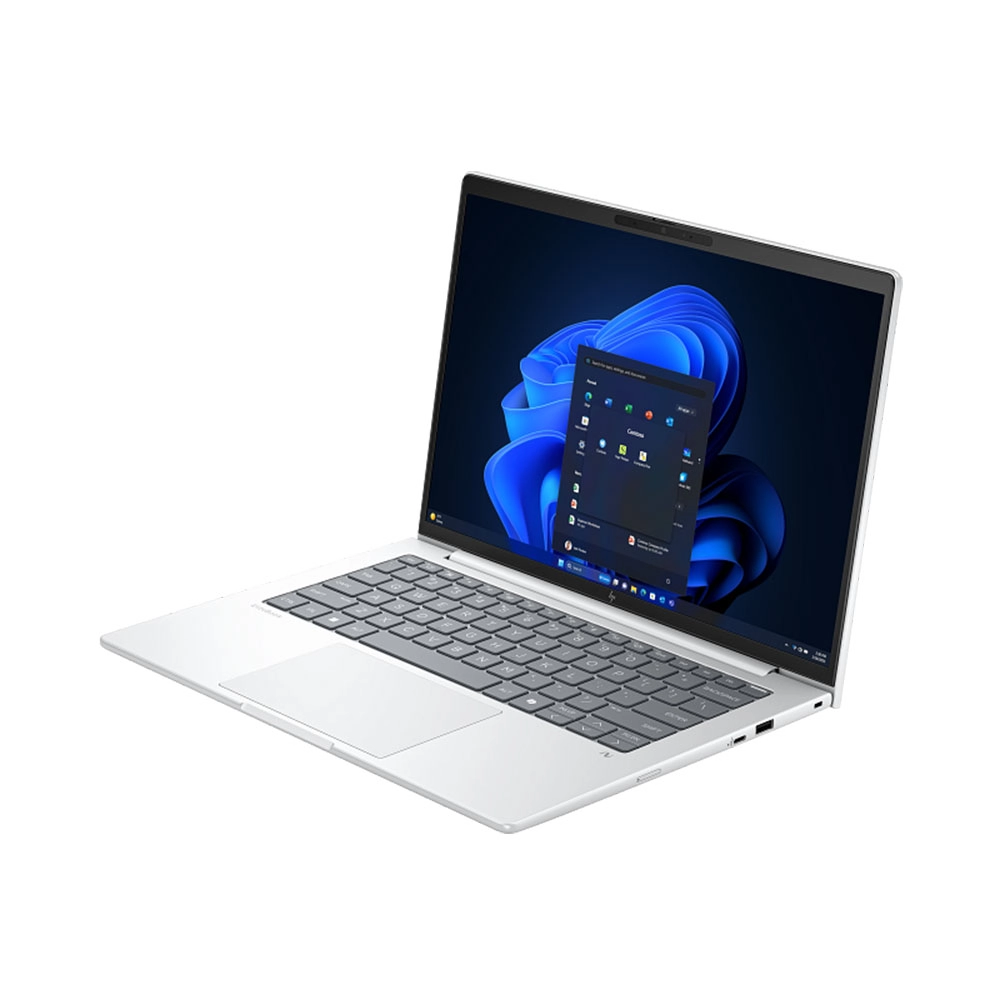


HP Elitebook 8 G1a 14 Laptop – AMD Ryzen AI 7-350, 32GB PC5, 512 SSD, 14 inch

| Brand and Model | HP EliteBook 8 G1a 14 |
|---|---|
| CPU model | AMD Ryzen AI 7-350 |
| Installed RAM memory size | 32GB DDR5-5600 |
| Graphics card description | AMD Radeon Graphics |
| Hard disk size | 512GB SSD NVMe |
| Screen size | 14 Inches |
| Colour | Glacier Silver |
3,400 AED 3,800 AED
HP Elitebook 8 G1a 14 Laptop – AMD Ryzen AI 7-350, 32GB PC5, 512 SSD, 14 inch
The HP Elitebook 8 G1a 14 laptop brings together a powerful AMD Ryzen AI 7-350 processor, 32GB of DDR5 memory, 512GB SSD storage, and a compact 14-inch business design. Rather than focusing on gaming-oriented hardware, this configuration targets professionals who need strong multitasking performance in a portable machine.
The key difference in this configuration is the move to the AMD Ryzen AI 7-350 processor. With 8 cores and 16 threads and a maximum boost frequency of up to 5.0GHz, it provides more processing headroom for demanding productivity workloads. The processor also includes dedicated AI processing capabilities, while the integrated AMD Radeon graphics handle the visual side of everyday computing.
With 32GB of memory and a 512GB SSD, the laptop also focuses on users who regularly work with several applications, large browser sessions, professional software, and sizeable project files.
HP Elitebook 8 G1a 14 Specifications
| Specification | Details |
|---|---|
| Brand | HP |
| Model | EliteBook 8 G1a 14 |
| Processor | AMD Ryzen AI 7-350 |
| CPU Cores | 8 Cores |
| CPU Threads | 16 Threads |
| Maximum Boost Frequency | Up to 5.0GHz |
| L3 Cache | 16MB |
| RAM | 32GB PC5 / DDR5 |
| Memory Speed | DDR5-5600 supported |
| Storage | 512GB SSD |
| SSD Interface | PCIe NVMe options |
| Graphics | AMD Radeon integrated graphics |
| Display Size | 14 inch |
| Display Format | 16:10 |
| Operating System | Configuration dependent |
| Wireless | Configuration dependent |
| Battery | Configuration dependent |
| Weight | Configuration dependent |
| Warranty | Confirm with seller |
HP’s official configurator lists the EliteBook 8 G1a 14 with the non-PRO AMD Ryzen AI 7 350 + AMD Radeon Graphics option and provides 32GB DDR5-5600 and 512GB PCIe NVMe storage choices.
Why the Ryzen AI 7-350 Matters
The processor is the main performance advantage of this configuration. The AMD Ryzen AI 7-350 uses 8 CPU cores and 16 threads, giving the laptop considerably more parallel processing capacity than lower-tier configurations.
Its maximum boost frequency reaches up to 5.0GHz. Consequently, the processor can respond quickly when applications need additional CPU performance. AMD also lists a 50 TOPS peak AI processing capability for the Ryzen AI 7-350 platform.
For a professional user, this combination is useful when the workload goes beyond simple document editing. For example, a user may simultaneously work with a large spreadsheet, dozens of browser tabs, communication software, cloud applications, and a development or business application.
The processor also makes this configuration suitable for more demanding productivity tasks. However, CPU performance should not be confused with dedicated GPU performance. Applications that depend heavily on a discrete graphics processor can still benefit from a different class of laptop.
32GB DDR5 for Heavy Multitasking
The HP Elitebook 8 G1a 14 32GB PC5 laptop is aimed at users who want more memory headroom from the beginning.
HP lists 32GB DDR5-5600 SODIMM configurations for the EliteBook 8 G1a 14. The platform also supports multiple memory configurations, including 32GB options using either one 32GB module or two 16GB modules, depending on the selected configuration.
That capacity can be particularly useful for professional multitasking. Users can keep larger applications open while maintaining numerous browser tabs and background services.
For programming, for instance, 32GB gives more room for development environments, databases, containers, and other tools. Similarly, business users working with large spreadsheets or multiple data sources can benefit from the additional memory.
At the same time, having 32GB does not automatically make every application faster. Memory capacity matters most when the workload actually requires it. For ordinary browsing and basic office tasks, 16GB can already be sufficient.
512GB SSD: Fast Storage for Professional Files
The HP Elitebook 8 G1a 14 512 SSD laptop provides 512GB of solid-state storage. HP’s configurator lists 512GB PCIe NVMe and PCIe Gen4 x4 NVMe SSD choices for this platform.
An SSD makes everyday interaction with the system more responsive than traditional mechanical storage. Applications can open quickly, files can be accessed without the delays associated with HDDs, and the operating system can respond more efficiently during normal use.
For a business laptop, 512GB is also a practical middle ground. It provides room for office documents, project files, applications, development tools, and personal data without moving to a larger and potentially more expensive storage configuration.
Users who regularly handle large video libraries, extensive raw photography collections, or very large professional datasets should still consider their long-term storage requirements.
AMD Radeon Integrated Graphics
Graphics processing is handled by AMD Radeon integrated graphics. HP identifies AMD Radeon Graphics as the graphics solution for the Ryzen AI 7-350 version of the EliteBook 8 G1a 14.
This approach fits the purpose of the laptop. Integrated graphics keep the system focused on professional productivity instead of adding the size, power requirements, and cost associated with a dedicated GPU.
For office applications, web-based work, presentations, video playback, everyday image editing, and other moderate graphical tasks, the integrated Radeon solution is appropriate.
However, this is an important limitation. The laptop should not be marketed as a high-end gaming notebook or a dedicated graphics workstation. Users who depend on demanding 3D rendering, advanced GPU-based video production, or modern AAA gaming should look for a laptop with a dedicated graphics processor.
A 14-Inch Format Built Around Mobility
The 14-inch form factor gives this configuration a different advantage: portability.
A professional user often needs to move between meetings, offices, home, university, and business trips. A 14-inch laptop provides enough screen area for serious productivity while remaining more practical to carry than a larger 16-inch system.
The EliteBook 8 G1a 14 also uses a 16:10 display format. HP offers multiple display choices for this platform, including WUXGA 1920 × 1200 panels and other configurations. Therefore, the exact panel specification should be checked against the individual unit before publication or purchase.
The 16:10 format is particularly useful for productivity because the additional vertical space can show more content in documents, spreadsheets, and web pages.
Display Options Should Be Checked Carefully
One important point for buyers is that not every EliteBook 8 G1a 14 has the same display.
HP’s configuration system shows several 14-inch WUXGA options, including 1920 × 1200 anti-glare panels with different brightness levels and touchscreen availability. Other configurations can include higher-end display options.
Therefore, the safest approach is to treat the 14-inch size as confirmed while checking the exact resolution, brightness, touchscreen capability, and panel characteristics against the product’s specific listing.
This distinction is especially important for professionals working with design, photography, or color-sensitive content.
Professional Connectivity and Configuration Flexibility
The EliteBook 8 G1a 14 is designed as a business-oriented platform, and HP provides several configuration choices beyond the processor, RAM, and SSD.
For example, HP’s configurator offers different wireless options, including Wi-Fi 6E with Bluetooth 5.3 and Wi-Fi 7 with Bluetooth 5.4, depending on the selected configuration.
The platform can also be configured with features such as a fingerprint reader, infrared camera, different keyboard options, and optional NFC. Because these features are configuration-dependent, they should not be presented as universal specifications unless they are confirmed for the exact unit being sold.
This flexibility is useful for businesses because different users can require different security, connectivity, and collaboration features.
What Can You Do With This Configuration?
The strongest case for this laptop is not one specific application. Instead, it is the combination of processing power, memory, storage, and portability.
Business Productivity
For business users, the Ryzen AI 7-350 and 32GB RAM provide plenty of room for multitasking. Office applications, browser-based services, spreadsheets, presentations, communication platforms, and business software can run together without making the system dependent on an entry-level processor.
Programming and Development
Developers can take advantage of the 8-core/16-thread CPU and 32GB memory when working with IDEs, databases, local development environments, and multiple applications.
The additional memory is particularly useful when development workflows involve containers, virtual environments, or several tools running simultaneously.
AI-Assisted Workflows
The Ryzen AI platform includes dedicated AI processing capabilities. This makes the laptop relevant to modern applications that can take advantage of local AI acceleration.
Still, software support remains important. An NPU does not automatically accelerate every AI application, so buyers should check the requirements of their preferred software.
University and Research
The 14-inch format makes the laptop practical for students and researchers who need to carry their computer regularly. At the same time, 32GB RAM gives more headroom for research software, large browser sessions, data analysis tools, and technical applications.
Light Creative Work
The integrated Radeon graphics can support moderate photo editing and other lighter creative tasks. For professional video production or GPU-heavy 3D applications, however, a dedicated graphics solution would be a better fit.
Who Should Choose This Laptop?
The HP Elitebook 8 G1a 14 laptop with AMD Ryzen AI 7-350 makes the most sense for users who value three things at the same time: strong multitasking, generous memory, and a portable business form factor.
It is particularly suitable for:
- Business professionals
- Managers and office users
- Programmers and developers
- Students in technical fields
- Researchers and analysts
- Users working with AI-enabled productivity software
- Professionals who regularly move between locations
On the other hand, users whose priority is high-end gaming, professional 3D rendering, or intensive GPU-based production should consider a different model with dedicated graphics.
Pros and Cons
Pros
- Ryzen AI 7-350 with 8 cores and 16 threads provides substantial processing headroom for demanding multitasking.
- 32GB DDR5 memory is well suited to professional workloads that involve several applications at once.
- 512GB NVMe SSD options provide fast storage for applications and everyday professional files.
- 14-inch 16:10 form factor offers a useful balance between portability and workspace.
- Integrated AI processing capability makes the platform relevant to compatible modern AI workloads.
- Business-focused EliteBook platform provides configuration flexibility for professional users.
Cons
- Integrated Radeon graphics limit the laptop’s suitability for demanding GPU-heavy workloads.
- Display specifications vary between configurations, so buyers need to verify the exact panel.
- Wireless, operating system, camera, and security features can vary according to the selected configuration.
- 512GB may not be enough for users with very large media or project libraries.
Frequently Asked Questions
Is the HP Elitebook 8 G1a 14 good for business?
Yes. The Ryzen AI 7-350, 32GB memory, 512GB SSD, and compact 14-inch design make this configuration particularly suitable for business productivity, multitasking, communication, and professional software.
Is 32GB RAM enough for programming?
For most programming workflows, 32GB provides substantial memory headroom. It is especially useful when developers run IDEs, browsers, databases, containers, or virtual environments simultaneously.
Can the HP Elitebook 8 G1a 14 run games?
The integrated AMD Radeon graphics can handle lighter graphical workloads, but this configuration is not designed as a dedicated gaming laptop. Users who need high performance in demanding modern games should choose a system with a discrete GPU.
Does the Ryzen AI 7-350 support AI applications?
Yes. AMD lists the Ryzen AI 7-350 as an AI processor with up to 50 peak TOPS. However, the real-world benefit depends on application support for local AI acceleration.
Is 512GB SSD enough for professional use?
For office work, programming, study, and most productivity tasks, 512GB is a practical capacity. Users who work with large video files, extensive image libraries, or very large datasets may need additional storage.
Does every EliteBook 8 G1a 14 have the same display?
No. HP offers several display configurations for this model. The exact resolution, brightness, touchscreen capability, and other panel characteristics should therefore be checked for the specific configuration.
Final Verdict
The HP Elitebook 8 G1a 14 laptop in this configuration is designed for users who want more than basic office performance without moving to a larger professional notebook.
Its strongest feature is the combination of the AMD Ryzen AI 7-350, 32GB DDR5 memory, and 512GB SSD. The 8-core/16-thread processor provides strong CPU capacity, while 32GB RAM allows the system to handle demanding multitasking with more headroom.
The 14-inch format adds another advantage: mobility. It makes the laptop easier to integrate into a workday that involves meetings, commuting, study, travel, and different work locations.
However, the integrated AMD Radeon graphics set a clear boundary. This configuration is better suited to business, programming, research, productivity, and moderate creative work than to demanding gaming or GPU-intensive professional workloads.
Before purchasing from the UAE listing, buyers should verify the exact display, operating system, wireless configuration, battery, keyboard layout, warranty, product condition, price, and stock status for the specific unit. This final check ensures that the delivered laptop matches the advertised configuration.
| Brand | |
|---|---|
| Model | HP EliteBook 8 G1a 14 |
| Processor | |
| RAM | |
| Storage | |
| Graphics | |
| Screen Size | |
| Camera | Integrated Camera |
| Color | |
| Keyboard | Backlit Keyboard, US-English |
| Operating System | Windows 11 Pro |
| Condition | Used-Excellent (Fully Tested) |
| Battery | |
| Weight | 1.39 kg |
| Warranty | 3 Months |
Based on 0 reviews
Only logged in customers who have purchased this product may leave a review.
Related products
-
Business Laptops, HP Elitebook, Office and Student
HP EliteBook 840 G5 Laptop – Intel Core i5-8th Gen | 8GB RAM | 256GB SSD | 14 inch Display | Win 10
-6% Business Laptops, HP Elitebook, Office and Student
HP EliteBook 840 G5 Laptop – Intel Core i5-8th Gen | 8GB RAM | 256GB SSD | 14 inch Display | Win 10
Business Laptops, HP Elitebook, Office and StudentHP EliteBook 840 G5 Laptop – Intel Core i5-8th Gen | 8GB RAM | 256GB SSD | 14 inch Display | Win 10
SKU: n/a -
Business Laptops, HP Elitebook, Office and Student
HP EliteBook 840 G7- Intel Core i7-10th Gen | 16GB RAM | 256GB SSD | 14 inch Display | Windows 10 Pr.
-12% Business Laptops, HP Elitebook, Office and Student
HP EliteBook 840 G7- Intel Core i7-10th Gen | 16GB RAM | 256GB SSD | 14 inch Display | Windows 10 Pr.
Business Laptops, HP Elitebook, Office and StudentHP EliteBook 840 G7- Intel Core i7-10th Gen | 16GB RAM | 256GB SSD | 14 inch Display | Windows 10 Pr.
SKU: n/a -
Business Laptops, HP Elitebook, Office and Student
HP EliteBook 840 G3 Laptop – Intel Core i5-6th Gen | 8GB RAM | 256GB SSD | 14 inch Display | Windows 10 Home
-5% Business Laptops, HP Elitebook, Office and Student
HP EliteBook 840 G3 Laptop – Intel Core i5-6th Gen | 8GB RAM | 256GB SSD | 14 inch Display | Windows 10 Home
Business Laptops, HP Elitebook, Office and StudentHP EliteBook 840 G3 Laptop – Intel Core i5-6th Gen | 8GB RAM | 256GB SSD | 14 inch Display | Windows 10 Home
SKU: n/a -
Business Laptops, HP Elitebook, HP Elitebook 1000 Series, Ultrabook and X360
HP EliteBook 1040 G11 x360 G11 Ultra 5-125H | 16GB RAM | 512GB SSD
-13%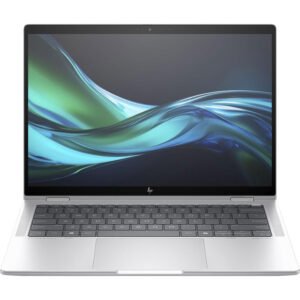 Business Laptops, HP Elitebook, HP Elitebook 1000 Series, Ultrabook and X360
HP EliteBook 1040 G11 x360 G11 Ultra 5-125H | 16GB RAM | 512GB SSD
Business Laptops, HP Elitebook, HP Elitebook 1000 Series, Ultrabook and X360HP EliteBook 1040 G11 x360 G11 Ultra 5-125H | 16GB RAM | 512GB SSD
</tr>rong>Screen size
<td class=”yoast-text-mark”>lass=”a-span9″ role=”presentation”>512 GB SSD Nvme&lt;/strong><st<strong>14.1 Inches Full HDss=”a-spacing-small po-ram_memory.installed_size” role=”listitem”>
Intel Ultra 5-125H</span>
ole=”listitem”><td class=”a-span3″ role=”presentation”><strong>Colour</td>
e=”presentation”>Brand and Model HP EliteBook 1040 x360 CPU model</strong> ass=”a-span3″ role=”presentation”><span class=”a-size-base a-text-bold”>Installed RAM memory size >role=”presentation”>>16GB DDR4 role=”presentation”>Graphics card description Intel Iris Graphics class=”a-span3″ role=”presentation”><span class=”a-size-base a-text-bold”>Hard disk size Silver SKU: HP70180
There are no reviews yet.