







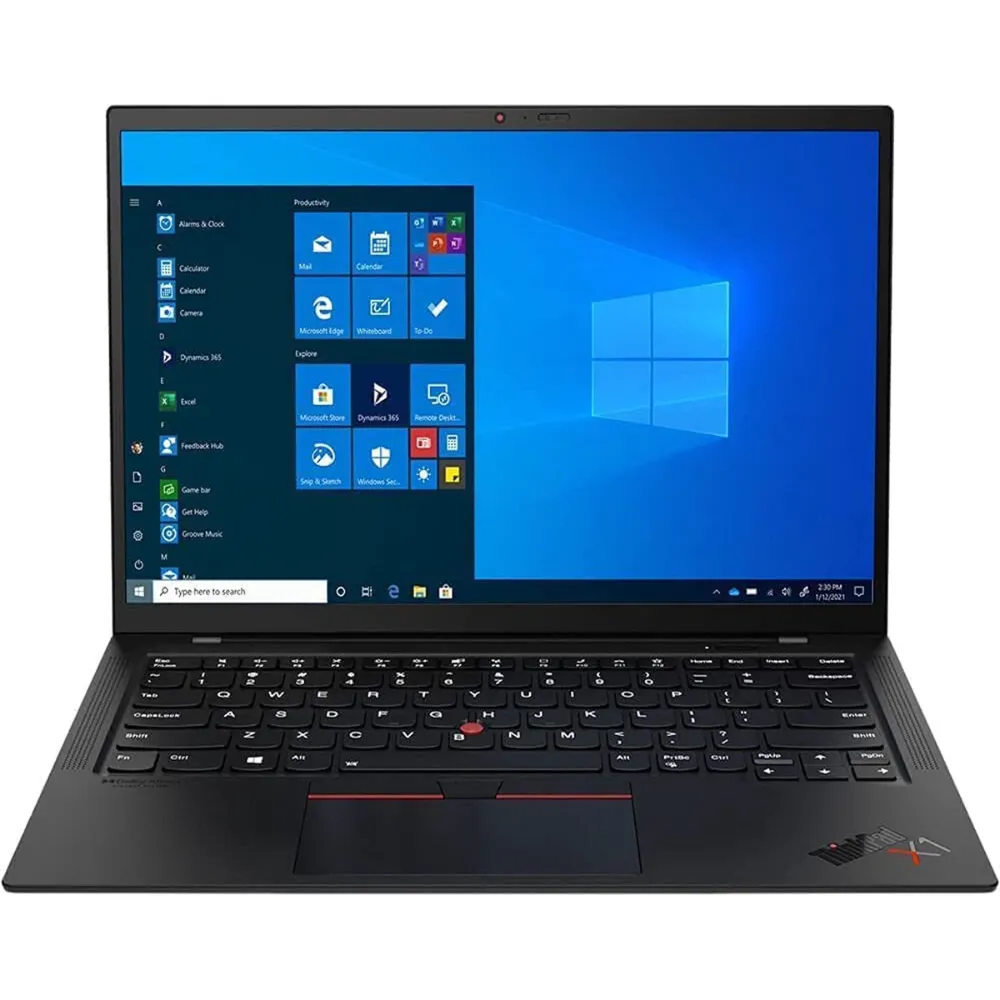
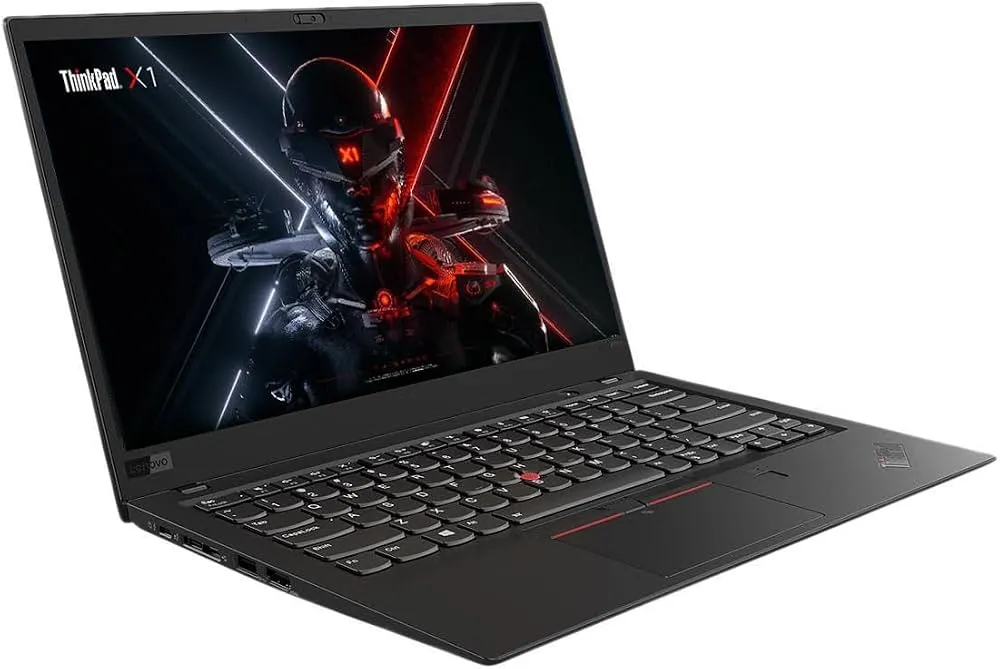


Lenovo ThinkPad X1 Carbon Gen 6 – Core i7, 16GB RAM, 256GB SSD

| Brand and Model | Lenovo ThinkPad X1 Carbon Gen 6 |
| CPU Model | 8th Gen Intel Core i7 |
| Installed RAM Memory Size | 16GB |
| Graphics Card Description | Integrated Intel UHD Graphics 620 |
| Hard Disk Size | 256GB SSD |
| Screen Size | 14 Inches |
| Colour | Black |
950 AED 1,200 AED
Overview
The Lenovo Thinkpad X1 Carbon Gen 6 laptop combines an 8th Generation Intel Core i7 processor, 16GB RAM, and 256GB SSD storage in a lightweight 14-inch business laptop. Lenovo developed this ThinkPad model for professionals who need reliable everyday computing without carrying a heavy device. Moreover, its compact construction, business-focused features, and comfortable keyboard make it a practical option for office work, travel, and mobile productivity. With its Core i7 platform, this configuration offers a capable foundation for multitasking, document management, web applications, and other common professional workloads.
Lenovo Thinkpad X1 Carbon Gen 6 Laptop Specifications
Review the main hardware details below to understand what this Core i7 configuration offers. Some specifications may vary according to the exact product code and installed components.
| Specification | Details |
|---|---|
| Brand | Lenovo |
| Model | ThinkPad X1 Carbon Gen 6 |
| Processor | Intel Core i7, 8th Generation |
| Processor Model | Depends on the exact configuration |
| RAM | 16GB LPDDR3 |
| Storage | 256GB SSD |
| Graphics | Integrated Intel UHD Graphics 620 |
| Display Size | 14 inches |
| Display Resolution | Depends on the installed panel |
| Battery | Integrated 57Wh battery |
| Weight | Approximately 1.13 kg, depending on configuration |
| Memory Upgrade | RAM soldered to the motherboard |
| Operating System | Depends on the seller’s configuration |
| Warranty | Depends on the seller |
Core i7 Processing for Business Productivity
The 8th Generation Intel Core i7 processor gives this configuration a strong starting point for everyday professional workloads. Lenovo offered the X1 Carbon Gen 6 with processors such as the Core i7-8550U and Core i7-8650U. However, the exact processor depends on the individual unit, so buyers should verify its full model number before comparing performance.
These low-power processors feature four cores and eight threads. Consequently, they can handle several common tasks, including office software, web browsing, email, online research, and document preparation. In addition, their multitasking capabilities help users switch between multiple applications during a busy workday.
Although the Core i7 configuration offers more processing headroom than many basic office laptops, it still belongs to an older mobile platform. Therefore, users who regularly run demanding engineering software, advanced video-editing tools, or heavy computational workloads should compare newer systems before making a decision.

16GB RAM and 256GB SSD for Everyday Work
Memory and storage play an important role in daily laptop performance. This configuration combines 16GB of LPDDR3 memory with a 256GB SSD, giving users a practical setup for typical business activities.
For example, users can keep several browser tabs open while working with spreadsheets, presentations, and communication tools. Furthermore, the SSD helps the system start applications and access files efficiently. As a result, everyday tasks feel more responsive than they would on a traditional mechanical hard drive.
One important detail concerns memory upgrades. Lenovo soldered the RAM directly onto the motherboard, so users cannot replace it with larger memory modules later. Therefore, the supplied 16GB capacity should meet the buyer’s needs from the beginning.
Intel UHD Graphics 620 and Visual Performance
The integrated Intel UHD Graphics 620 handles the visual requirements of everyday computing. Users can work with office applications, watch videos, browse websites, and manage standard multimedia content without a dedicated graphics card.
Moreover, this graphics solution helps the laptop maintain its compact and lightweight design. However, it does not target demanding gaming, advanced 3D rendering, or professional graphics production. Instead, it focuses on efficient everyday display and multimedia tasks.
For users who mainly work with documents, presentations, online platforms, and standard visual content, this integrated GPU can provide an appropriate level of performance. Nevertheless, specialized graphics workloads require a laptop with a more powerful dedicated GPU.
14-Inch Display for Work on the Move
The 14-inch screen gives the ThinkPad X1 Carbon Gen 6 a useful balance between workspace and portability. Its display size supports common productivity tasks while allowing the laptop to remain compact enough for daily transportation.
Lenovo offered several display options for this generation, including different resolutions and panel types. Consequently, the exact viewing experience depends on the installed screen. Buyers should check the resolution, brightness, and panel specifications before ordering, especially if they spend long hours reading documents or reviewing visual content.
In addition, the compact screen size works well for people who frequently use their laptop in meetings, classrooms, airports, and shared workspaces. Overall, this display configuration supports a flexible mobile working routine.
Lightweight Construction and ThinkPad Design
Portability remains one of the defining features of the X1 Carbon family. Lenovo uses a carbon-fiber-reinforced display cover and a magnesium-based bottom structure in the Gen 6 design. This construction helps keep the laptop light while giving it a professional appearance.
With an approximate starting weight of 1.13 kg, the device suits people who carry their computers throughout the day. Furthermore, its slim profile makes it easier to place inside a laptop bag or backpack.
The ThinkPad keyboard also contributes to the working experience. Its familiar layout supports regular typing, while the TrackPoint gives users another way to control the pointer. Additionally, selected configurations feature a fingerprint reader and ThinkShutter camera cover. However, buyers should confirm the presence of these options on the exact unit.
Connectivity for Office Equipment
The Lenovo ThinkPad X1 Carbon Gen 6 provides several connection options for common office accessories. Depending on the configuration, users can find USB-A ports, USB-C connections with Thunderbolt 3 support, HDMI, and a 3.5mm audio jack.
These connections make it easier to work with external displays, storage devices, audio accessories, and other compatible equipment. Moreover, Thunderbolt 3 support on compatible ports provides additional flexibility for supported peripherals and docking solutions.
Before purchasing, check the physical condition of every port. This step matters particularly when buying a pre-owned laptop because frequent use can affect connectors over time.
Who Should Buy the Lenovo Thinkpad X1 Carbon Gen 6 Laptop?
The Lenovo Thinkpad X1 Carbon Gen 6 laptop can meet the needs of professionals, business users, students, and frequent travelers who want a portable computer for everyday productivity. Its Core i7 processor and 16GB RAM provide a useful combination for multitasking, office applications, online meetings, and research.
Furthermore, the lightweight chassis makes it a convenient choice for people who work in different locations. The 256GB SSD also provides storage for essential applications and documents. However, users who need extensive local storage may prefer a larger SSD configuration.
You can explore more models in our Lenovo ThinkPad collection. You can also compare this model with other options in our business laptop category.
Important Checks Before Purchasing
Because the ThinkPad X1 Carbon Gen 6 belongs to an earlier generation, buyers should pay attention to the condition of the individual laptop. First, verify the exact Core i7 processor model and confirm the advertised 16GB RAM and 256GB SSD.
Next, inspect the screen for dead pixels, uneven brightness, and visible damage. Also, test the keyboard, TrackPoint, touchpad, webcam, speakers, wireless connection, and available ports. Meanwhile, check the battery’s health because an older battery may offer less runtime than it did when new.
Finally, confirm the operating system, charger, warranty, and overall condition with the seller. These checks help you understand exactly what the product includes and avoid confusion between different configurations.
Conclusion
The Lenovo Thinkpad X1 Carbon Gen 6 laptop brings together an 8th Generation Intel Core i7 processor, 16GB RAM, 256GB SSD storage, and a portable 14-inch design. This combination makes it a suitable option for everyday business tasks, office applications, study, and mobile productivity. Moreover, its ThinkPad keyboard, lightweight construction, and useful connectivity options add practical value. However, buyers should verify the exact processor, display, battery condition, and device specifications before ordering. If portability and everyday productivity matter more than modern high-end graphics performance, this ThinkPad deserves consideration.
Frequently Asked Questions
1. Which processor does the Lenovo ThinkPad X1 Carbon Gen 6 use?
This configuration features an 8th Generation Intel Core i7 processor. Lenovo offered models such as the Core i7-8550U and Core i7-8650U, so buyers should check the exact processor installed in the laptop.
2. How much RAM does this laptop have?
This configuration includes 16GB LPDDR3 memory. Lenovo soldered the RAM onto the motherboard, which means users cannot upgrade it through standard memory slots.
3. Does the ThinkPad X1 Carbon Gen 6 have SSD storage?
Yes. This version includes a 256GB SSD. It provides storage for the operating system, applications, documents, and other everyday files.
4. Which graphics card does this laptop use?
The laptop uses integrated Intel UHD Graphics 620. This GPU handles standard office tasks, video playback, and everyday visual applications, but it does not target demanding gaming or professional 3D workloads.
5. Is the Lenovo ThinkPad X1 Carbon Gen 6 suitable for business travel?
Yes. Its lightweight construction, compact 14-inch display, and business-oriented features make it convenient for commuting and business travel. However, check the battery condition and overall device health before purchasing.
| Brand | |
|---|---|
| Model | ThinkPad X1 Carbon Gen 6 |
| RAM | |
| Storage | |
| Graphics | |
| Screen Size | |
| Weight | 1.13 kg |
| Battery | |
| Camera | Integrated Camera |
| Condition | Used-Excellent (Fully Tested) |
| Keyboard | US-English |
| Operating System | Window 10 Pro |
| Processor | |
| Warranty | 3 Months |
| Color |
Based on 0 reviews
Only logged in customers who have purchased this product may leave a review.
Related products
-
Business Laptops, HP Elitebook, HP Elitebook 800 Series, Office and Student
HP EliteBook 840 G11 14 Inch Laptop – Intel Core Ultra 7 155U | 16GB RAM | 256GB SSD | Intel Graphics | Windows 11 Pro
-14% Business Laptops, HP Elitebook, HP Elitebook 800 Series, Office and Student
HP EliteBook 840 G11 14 Inch Laptop – Intel Core Ultra 7 155U | 16GB RAM | 256GB SSD | Intel Graphics | Windows 11 Pro
Business Laptops, HP Elitebook, HP Elitebook 800 Series, Office and StudentHP EliteBook 840 G11 14 Inch Laptop – Intel Core Ultra 7 155U | 16GB RAM | 256GB SSD | Intel Graphics | Windows 11 Pro
SKU: n/a -
Business Laptops, HP Elitebook
HP EliteBook 865 G9 Laptop – Ryzen 7 6800U, 16GB DDR5, 256GB SSD, 16 Inch
-13% Business Laptops, HP Elitebook
HP EliteBook 865 G9 Laptop – Ryzen 7 6800U, 16GB DDR5, 256GB SSD, 16 Inch
Business Laptops, HP ElitebookHP EliteBook 865 G9 Laptop – Ryzen 7 6800U, 16GB DDR5, 256GB SSD, 16 Inch
Brand and Model HP EliteBook 865 G9 CPU Model AMD Ryzen 7 PRO 6850U Installed RAM Memory Size 16GB DDR5-4800 Graphics Card Description AMD Radeon 680M – 2GB Shared System Memory (No Dedicated VRAM) Hard Disk Size 256GB PCIe NVMe SSD Screen Size 16 Inches (WUXGA 1920 × 1200) Colour Silver SKU: n/a -
Gaming Laptops, Lenovo Legion
Lenovo Legion Gaming Laptop Ryzen 7 5800H 16GB 1TB SSD 6GB Graphics
-20% Gaming Laptops, Lenovo Legion
Lenovo Legion Gaming Laptop Ryzen 7 5800H 16GB 1TB SSD 6GB Graphics
Gaming Laptops, Lenovo LegionLenovo Legion Gaming Laptop Ryzen 7 5800H 16GB 1TB SSD 6GB Graphics
>Graphics card8GB Nvidia</tr><td class=”a-span9″ role=”presentation”>14.1 Inches Full HD
<td class=”a-span9″ role=”presentation”>Lenovo Legion 15.6 Gaming Laptop
</tr>span class=”a-size-base po-break-word”>Silver
=”a-spacing-small po-brand” role=”listitem”>le=”presentation”>&amp;amp;lt;span class=”a-size-base a-text-bold”>Brand and Model
“>ss=”a-span3” role=”presentation”><strong>Installed RAM memory sizerole=”presentation”><strong><span class=”a-size-base po-break-word”>16GB DDR4</strong>Hard disk size512GB SSD Nvme</span></td>Screen sizes=”a-span3″ role=”presentation”>ass=”a-size-base a-text-bold”>Colour
ole=”list” width=”484″>
ass=”a-spacing-small po-model_name” role=”listitem”>ss=”a-span3″ role=”presentation”><strong>CPU model</td>ass=”a-span9″ role=”presentation”>ss=”a-size-base po-break-word”>AMD Ryzen 7</strong>
< SKU: legionpc1 -
Business Laptops, Dell Latitude, Dell Latitude 5000 series, Office and Student
Dell Latitude 5420 14″ Laptop Intel Core i7-11610U 16GB RAM 256GB SSD
-10% Business Laptops, Dell Latitude, Dell Latitude 5000 series, Office and Student
Dell Latitude 5420 14″ Laptop Intel Core i7-11610U 16GB RAM 256GB SSD
Business Laptops, Dell Latitude, Dell Latitude 5000 series, Office and StudentDell Latitude 5420 14″ Laptop Intel Core i7-11610U 16GB RAM 256GB SSD
SKU: n/a
There are no reviews yet.