







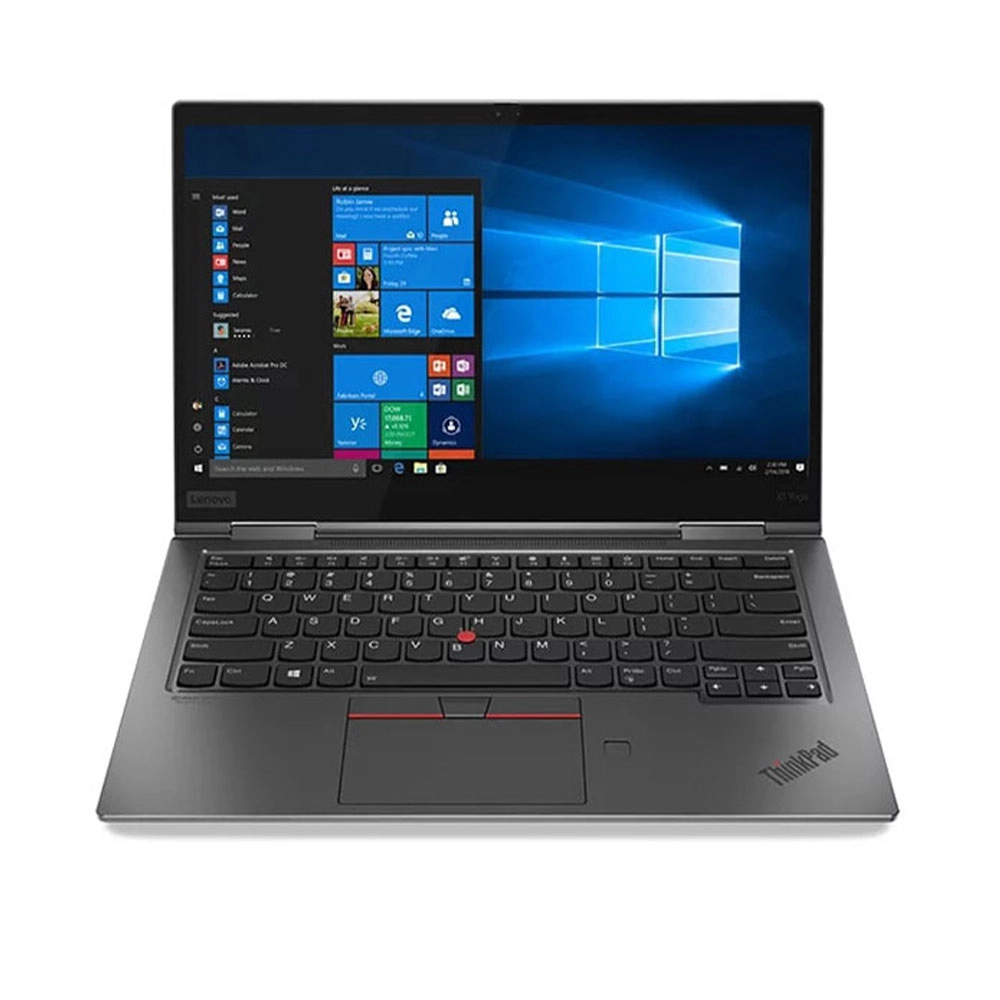


Lenovo Thinkpad X1 Yoga Gen 4 Laptop – Ci7-8th, 16GB RAM, 256 SSD Storage

| Brand and Model | Lenovo ThinkPad X1 Yoga Gen 4 |
|---|---|
| CPU model | Intel Core i7 8th Gen |
| Installed RAM memory size | 16GB LPDDR3-2133 |
| Graphics card description | Intel UHD Graphics 620 |
| Hard disk size | 256GB SSD NVMe |
| Screen size | 14 Inches |
| Colour | Iron Grey |
900 AED 1,100 AED
Lenovo ThinkPad X1 Yoga Gen 4 Laptop – Core i7 8th Gen, 16GB RAM, 256GB SSD Storage
The Lenovo ThinkPad X1 Yoga Gen 4 laptop brings together an eighth-generation Intel Core i7 processor, 16GB of LPDDR3 memory and a 256GB PCIe NVMe SSD in a 14-inch convertible business notebook. Its aluminium-and-magnesium construction gives the system a distinctive professional appearance, while the integrated ThinkPad Pen Pro and touchscreen expand the ways users can interact with the computer. Unlike a standard clamshell notebook, this model can rotate into several positions to support presentations, reading and direct screen input. It combines the familiar ThinkPad keyboard and security features with a design intended for flexible working environments.
Technical Specifications
| Component | Specification |
|---|---|
| Brand | Lenovo |
| Model | ThinkPad X1 Yoga Gen 4 |
| Processor | Intel Core i7 8th Generation |
| Matching CPU Configuration | Intel Core i7-8665U |
| Cores / Threads | 4 cores / 8 threads |
| Maximum Turbo Frequency | Up to 4.8GHz |
| Cache | 8MB |
| Memory | 16GB LPDDR3-2133 |
| Memory Upgrade | Soldered, not upgradeable |
| Storage | 256GB M.2 PCIe 3.0 NVMe SSD |
| Graphics | Integrated Intel UHD Graphics 620 |
| Display Size | 14 inches |
| Display | Touchscreen IPS; resolution varies by configuration |
| Hinge | 360-degree convertible hinge |
| Pen | Integrated rechargeable ThinkPad Pen Pro |
| Battery | Integrated 51Wh |
| Wireless | Intel Wi-Fi 5 (802.11ac) |
| Bluetooth | Bluetooth 5.1 |
| Camera | HD 720p with ThinkShutter; optional IR camera |
| Audio | Four speakers with Dolby Atmos |
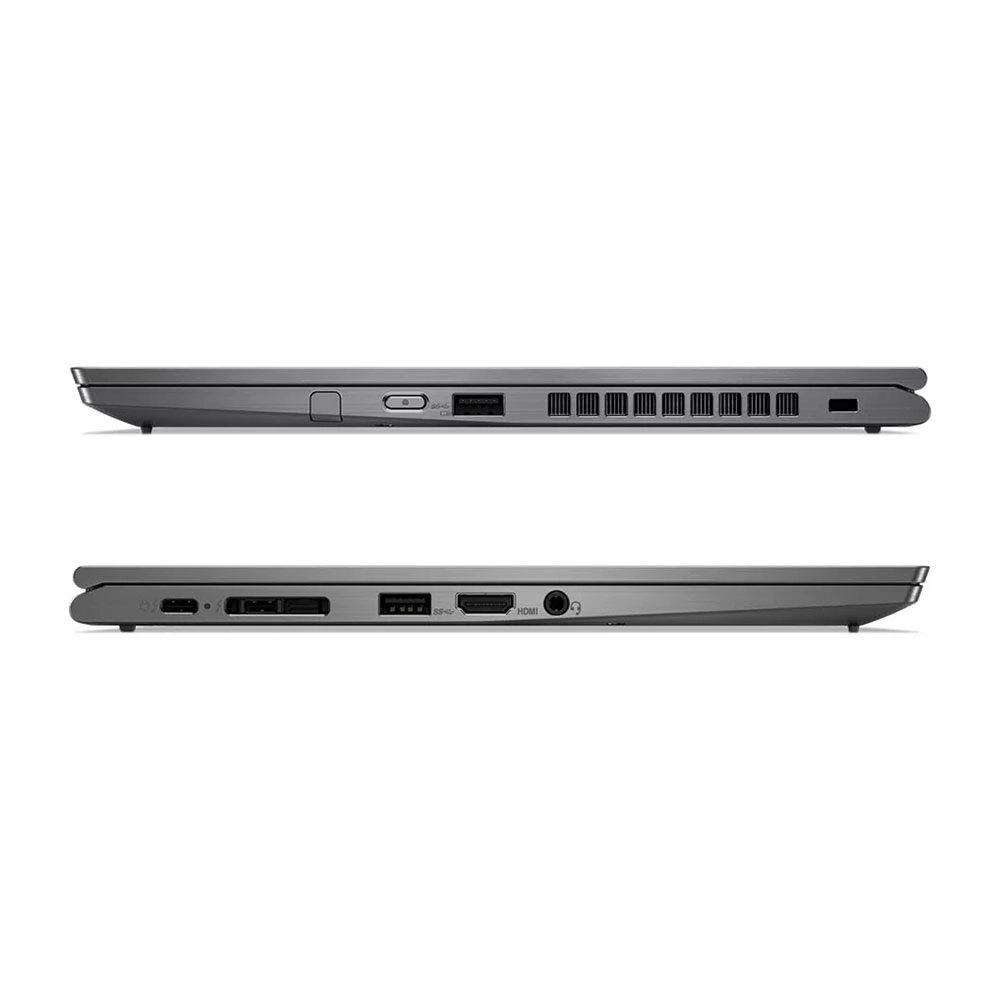
| Ports | 2× Thunderbolt 3, 2× USB-A, HDMI 1.4b, audio combo |
| Security | TPM 2.0, fingerprint reader, ThinkShutter |
| Weight | Approximately 1.36kg for non-Privacy Guard configurations |
| Operating System | Windows 10 Pro on the documented configuration |
Processor Architecture and Core i7 Capabilities
The selected eighth-generation processor for this configuration is the Intel Core i7-8665U. It belongs to Intel’s Whiskey Lake U-series and uses four cores with eight threads. Its base frequency is 1.9GHz, while Turbo Boost allows it to reach up to 4.8GHz under suitable thermal and power conditions.
This processor focuses on efficient performance in compact notebooks. It handles common business applications such as spreadsheets, document editing, email, browser-based platforms and video conferencing. Its four-core design also helps the system manage several active applications without relying on a dual-core architecture.
The X1 Yoga Gen 4 platform also appeared with other processor options, including the Core i7-8565U and selected 10th-generation CPUs. However, the i7-8665U is a documented eighth-generation configuration that matches the processor family specified here.
Memory Capacity and Upgrade Restrictions
The 16GB memory configuration uses LPDDR3-2133 technology. It provides working space for the operating system and applications, supporting tasks such as maintaining multiple browser tabs, working with office documents and switching between communication software.
One important design decision affects future upgrades: Lenovo solders the memory directly to the system board. The laptop does not provide removable RAM slots, which means the installed 16GB cannot be expanded later.
For everyday professional use, 16GB can support a broad range of standard productivity tasks. However, users who regularly operate memory-intensive software or large virtual machines should consider the fixed capacity when planning their workloads.
NVMe Storage and Data Access
The 256GB SSD uses an M.2 2280 PCIe 3.0 x4 NVMe interface in the matching Lenovo configuration. This storage technology provides faster data access than a conventional mechanical hard drive and helps reduce delays when starting the operating system or opening applications.
The drive stores the operating system, installed programs and frequently used documents. Its capacity is appropriate for a focused collection of business applications and files, although extensive media libraries and large project archives may require external or network storage.
Lenovo also specifies Opal 2.0 support for the documented SSD configuration. This storage-security standard can work with compatible management and encryption solutions.
Integrated Graphics for Everyday Visual Work
The laptop uses Intel UHD Graphics 620 integrated into the processor platform. Rather than relying on a separate graphics card, this solution shares system memory and handles the display output and standard visual processing.
It supports typical business activities, including desktop applications, presentations, video playback and external monitor connections. The system can also use its Thunderbolt 3 and HDMI connections to work with compatible displays.
There is an important distinction between integrated and dedicated graphics. UHD Graphics 620 is designed for everyday visual tasks, not intensive 3D rendering or demanding modern games. Graphics-heavy creative applications may therefore run with more limited performance than on a workstation equipped with a dedicated GPU.
Touchscreen Display and Visual Options
The 14-inch display is designed around touch interaction. Lenovo offered several IPS panel options for the X1 Yoga Gen 4, including Full HD at 1920 × 1080, WQHD at 2560 × 1440 and UHD at 3840 × 2160.
The documented i7-8665U configuration with 256GB storage includes a Full HD IPS touchscreen with 400-nit brightness. Other configurations provide different resolutions and display characteristics. For example, the UHD option supports Dolby Vision and HDR 400, while the WQHD panel offers a higher pixel count than the Full HD version.
All listed display options support ten-point multi-touch input. This allows users to interact directly with compatible applications, scroll through documents and use gestures without relying exclusively on the touchpad.
The display also supports the convertible design. When the screen rotates behind the keyboard, the touchscreen becomes the primary input surface in tablet mode.
Integrated ThinkPad Pen Pro
The ThinkPad X1 Yoga Gen 4 includes an integrated storage location for its rechargeable ThinkPad Pen Pro. Keeping the pen inside the chassis makes it readily accessible and reduces the need to carry a separate stylus.
The pen supports handwriting, drawing, document annotation and navigation in compatible software. It can be particularly useful when reviewing contracts, marking up presentations or writing notes during meetings.
This feature works alongside the touchscreen rather than replacing it. Users can switch between finger gestures, pen input, the TrackPoint and the traditional touchpad according to the task.
Aluminium and Magnesium Chassis
Lenovo uses an aluminium top cover and a magnesium bottom cover for this generation. The combination creates a solid business-oriented enclosure while keeping the overall system relatively light for a 14-inch convertible.
The Iron Grey finish gives the notebook a restrained professional appearance. Its dimensions are approximately 323 × 218mm, with thickness varying slightly according to the display configuration. Non-Privacy Guard models start at around 1.36kg, while Privacy Guard versions are heavier.
The 360-degree hinge is central to the physical design. It allows the display to move through a full rotation while maintaining the connection between the screen and keyboard assembly.
Four Convertible Working Modes
The Yoga hinge supports four main operating positions, each suited to a different interaction style.
- Laptop mode: The standard position for typing, spreadsheets and office applications.
- Tablet mode: The screen folds behind the keyboard for touch and pen-based interaction.
- Tent mode: The system forms an inverted V shape for presentations and shared viewing.
- Stand mode: The keyboard sits behind the display, leaving the screen accessible for viewing and touch input.
These modes allow the same computer to adapt to different workspaces. For example, a user can prepare a presentation in laptop mode and then reposition the display for a small group without connecting another device.
Battery and Power Management
The documented configuration uses an integrated 51Wh battery. Lenovo pairs the platform with a 65W USB-C power adapter and supports Rapid Charge technology.
Battery runtime depends on the display resolution, brightness, wireless activity, software load and battery condition. A Full HD low-power panel may consume less energy than a UHD display, while intensive applications can increase power demand.
The 65W USB-C adapter also connects through the Thunderbolt 3-compatible USB-C ports. This makes the charging connection part of the same port system used for data transfer and display output.
Thunderbolt 3 and External Connections
The X1 Yoga Gen 4 provides a range of physical connections for business accessories and desktop equipment. Two USB-C ports support Thunderbolt 3, data transfer, Power Delivery and DisplayPort output. They can connect compatible docks, external storage and high-resolution monitors.
Two USB-A 3.1 Gen 1 ports support conventional peripherals such as flash drives, keyboards and mice. One of these ports provides Always On functionality for compatible charging use.
The remaining connections include HDMI 1.4b, an Ethernet extension connector and a 3.5mm headphone and microphone combo jack. Selected mobile broadband configurations also include a Nano-SIM slot.
For wireless networking, Lenovo lists Intel Wireless-AC 9560 with dual-band 802.11ac Wi-Fi and Bluetooth 5.1. This provides wireless access for compatible networks, headphones, mice and other accessories.
Audio, Camera and Security
The laptop’s audio system uses four speakers arranged as two woofers and two tweeters, with Dolby Atmos support. Lenovo also includes four 360-degree far-field microphones, which help capture voices during calls and online meetings.
The standard camera configuration uses an HD 720p webcam with ThinkShutter, a physical privacy cover that lets users block the camera when it is not in use. Selected versions include an infrared camera for Windows Hello facial recognition.
Security features include a discrete TPM 2.0 chip and a touch-style fingerprint reader with match-on-chip technology. These components provide hardware-backed security and additional authentication methods for supported operating systems and applications.
Keyboard and Pointing Controls
The six-row ThinkPad keyboard includes spill-resistant construction, multimedia function keys and LED backlighting. Its layout supports conventional typing, while the TrackPoint offers cursor control without requiring users to move their hands away from the keyboard.
A glass-surface multi-touch touchpad provides another navigation option. Together with the touchscreen and integrated pen, these controls give users several ways to interact with the operating system.
This variety is especially relevant to the convertible format. The keyboard remains useful in laptop mode, while touch and pen input become more prominent when the display rotates into tablet or stand positions.
Advantages and Limitations
Key advantages
- Eighth-generation Core i7 processing with four cores and eight threads.
- 16GB LPDDR3 memory for everyday multitasking.
- 256GB PCIe NVMe SSD in the matching documented configuration.
- Four convertible modes through the 360-degree hinge.
- Integrated rechargeable ThinkPad Pen Pro.
- Four-speaker Dolby Atmos audio system.
- Two Thunderbolt 3 ports and a useful range of business connections.
- TPM 2.0, fingerprint authentication and ThinkShutter camera privacy.
Important limitations
- The 16GB memory is soldered and cannot be upgraded.
- Intel UHD Graphics 620 is intended for standard graphics workloads rather than demanding 3D applications.
- The 256GB SSD may limit local storage for large files.
- Display resolution and camera options vary across configurations.
- The platform uses an older processor and connectivity generation compared with current ThinkPad systems.
Final Overview
The Lenovo ThinkPad X1 Yoga Gen 4 combines an eighth-generation Core i7 processor, 16GB of memory and a 256GB NVMe SSD in a 14-inch convertible design. Its aluminium-and-magnesium construction, integrated pen, touchscreen and four operating modes provide flexibility across different working situations. Thunderbolt 3 connectivity, a backlit ThinkPad keyboard, Dolby Atmos audio and hardware security features complete a business-focused notebook designed for everyday productivity and mobile work.
| Brand | |
|---|---|
| Model | Lenovo ThinkPad X1 Yoga Gen 4 |
| Processor | |
| RAM | |
| Storage | |
| Graphics | |
| Screen Size | |
| Camera | Integrated Camera |
| Color | |
| Keyboard | Backlit Keyboard, US-English |
| Operating System | Window 10 Pro |
| Condition | Used-Excellent (Fully Tested) |
| Battery | |
| Weight | 1.36 kg |
| Warranty | 3 Months |
Based on 0 reviews
Only logged in customers who have purchased this product may leave a review.
Related products
-
Surface Pro, Tablet and Detachable
Microsoft Surface Pro-7+ Core i7-11th | 16GB 256GB
Surface Pro, Tablet and DetachableMicrosoft Surface Pro-7+ Core i7-11th | 16GB 256GB
ss=”a-spacing-small po-ram_memory.installed_size” role=”listitem”>
ss=”yoast-text-mark”>
Brand and Model Microsoft Surface Pro 7+ CPU model <span class=”a-size-base po-break-word”>Intel Core i7-11th Installed RAM memory size =”presentation”>16GB DDR4 Graphics card description Intel UHD Hard disk size s=”a-span9″ role=”presentation”>lass=”yoast-text-mark”>class=”a-size-base po-break-word”>256GB SSD Nvme Screen size 12.3 Inches Full HD Colour Platinum SKU: Su70170 -
Surface Book, Tablet and Detachable
Microsoft Surface Book 3 Core i7-10th | 32GB 512GB 4GB Graphics
-11% Surface Book, Tablet and Detachable
Microsoft Surface Book 3 Core i7-10th | 32GB 512GB 4GB Graphics
Surface Book, Tablet and DetachableMicrosoft Surface Book 3 Core i7-10th | 32GB 512GB 4GB Graphics
Brand and Model Microsoft Surface Book 3 CPU model Intel Core i7-10th Installed RAM memory size 16GB DDR4 Graphics card description Nvidia 4GB Hard disk size 512GB SSD Nvme Screen size 12.3 Inches Full HD Colour Silver SKU: Su70146 -
Surface Pro, Tablet and Detachable
Microsoft Surface Pro 7+ Core i5-11th | 8GB 256GB
Surface Pro, Tablet and DetachableMicrosoft Surface Pro 7+ Core i5-11th | 8GB 256GB
<td class=”a-span9″ role=”presentation”>256GB SSD Nvme
ss=”a-normal a-spacing-micro” role=”list” width=”484″>ss=”a-spacing-small po-hard_disk.size” role=”listitem”>Hard disk size
” role=”listitem”><span class=”a-size-base a-text-bold”>Screen size“a-size-base po-break-word”>12.3 Inches Full HD
ole=”listitem”>
<td class=”a-span3″ role=”presentation”><strong><span class=”yoast-text-mark”>ss=”a-size-base a-text-bold”>Colour</strong>s=”a-size-base po-break-word”>Platinum</strong>
s=”a-span3″>ole=”presentation”>CPU model<span class=”a-size-base po-break-word”>Intel Core i5-11th</td>
<td class=””<strong”>Microsoft Surface Pro 7+&amp;amp;amp;amp;amp;amp;amp;amp;amp;amp;amp;amp;amp;amp;amp;amp;amp;amp;amp;amp;amp;amp;amp;amp;amp;amp;amp;amp;amp;amp;lt;/span></span>role=”listitem”></p>
<p>ss=”a-spacing-small po-brand”>”a-spacing-small po-display.size”></p>
</tbody></p>
<p>></p>
<tr class=”yoast-text-mark”>role=””>=””>=””>=”presentation”><strong>ss=”a-size-base a-text-bold”>Brand and Model </tbody>
<td class=”yoast-text-mark”>s=”a-span3″ role=”presentation”><strong><span class=”yoast-text-mark”>ss=”a-size-base a-text-bold”>Installed RAM memory size&lt;/span></span>”presentation”&amp;gt;&
lt;strong&<p>gt;</p>
<p>ass=”</yoastmark”>”a-span3″ role=”presentation”><strong>>Graphics card descriptionrole=”presentation”>><strong>Intel UHD</strong>
SKU: Su70172 -
Surface Pro, Tablet and Detachable
Microsoft Surface Pro 7 + Core i5-11th 8GB 256GB SSD
Surface Pro, Tablet and DetachableMicrosoft Surface Pro 7 + Core i5-11th 8GB 256GB SSD
Brand and Model Microsoft Surface Pro 7+ CPU model Intel Core i5-11370H Installed RAM memory size 32GB DDR4 Graphics card description 4GB Nvidia RTX 3050 Hard disk size 512GB SSD Nvme Screen size 14.4 Inches Full HD Color Silver 
What is Tested Working?
This Renewed product is tested and certified to … more
How to deliver ?All delivery and payment options… more 
Warranty , Term and Condition?
In case you got problem and want to return … more
Order it easy ? Oder this item from whats-app Now.. more SKU: n/a
There are no reviews yet.